Log In

Free gifts available with your purchase

Reverb In A Class Of Its Own
Introducing Comet – a reverb of unparalleled lushness and versatility. Envelop yourself in breathtaking textures of sheer beauty while creating living, breathing space in real time with Comet’s unique preset morphing capabilities. Experience trails of beauty that are pristine, dramatic, and one-of-a-kind.
Dynamic, Fully Automatable Spaces
Features
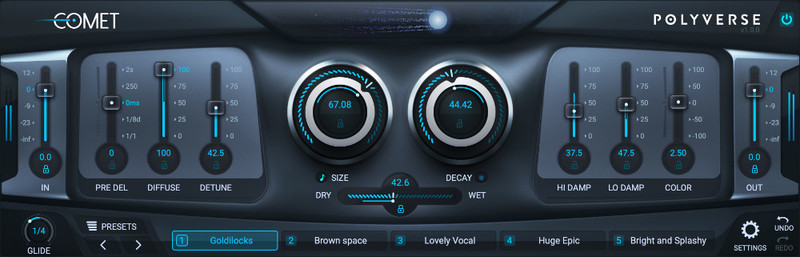
- An unbelievably smooth and beautiful reverb
- Five interchangeable preset morphing slots
- Glide control to morph between parameters
- Pre Delay & Glide available in milliseconds and rhythmic subdivisions
- Lockable parameters for consistency between presets
- Uniquely rich and musical detune algorithm
- Saturation module from input gain for extra density
- MIDI and CV control for every parameter
Trails Of Beauty
Comet is designed to create beautiful trails of sound. It does not aspire to model the physics of a room. Instead, it captures the essence of a beautiful reverb. Once you hear it, you’ll fall in love.
Enhance your vocals, melodic instruments and drums alike, and add a special quality to your musical textures and sound effects.
Revolutionary Preset Morphing
- Comet has 5 preset slots created to take advantage of its advanced morphing capabilities.
- Using variable gliding controls, you can smoothly transition or “morph” between up to 5 different settings/presets.

Reverb: Reimagined
While researching and developing various new prototypes, Comet was stumbled upon by the Polyverse development team. After an initial comparison with other popular and classic reverbs, it was decided that Comet’s algorithm was so unique and beautiful that we needed to share it with the world. Not only that, its versatile sound in all iterations inspired a degree of flexibility unheard of in other reverbs.
System Requirements
Mac
- OS X 10.9 or later (macOS 11 Big Sur and M1 Apple Silicon compatible) (64-bit only)
- Intel Core 2 Duo or higher, 4GB RAM minimum
- AAX, VST, VST3, AU
PC
- Windows 7 SP1 or later (64-bit only)
- Intel Core 2 Duo / AMD Athlon 64x2 or higher, 4GB RAM minimum
- AAX, VST, VST3

Clint Lagerberg
Composer | Keith Urban, Blake Shelton.
"Comet is showing up on every song I write/demo."

Ask.Audio
Ask.Audio features the latest in music production and performance new, tutorials, reviews, and interviews with industry experts.
"It’s a great sounding and well-designed reverb processor... the overall sound of the plugin is rich and dense and it’s perfect for many kinds of electronic music. Check it out."

Michael Malih
Writer & Producer | Madonna, Leona Lewis.
"Comet is my new favourite reverb."