


 Log In

Free gifts available with your purchase
Dream Big
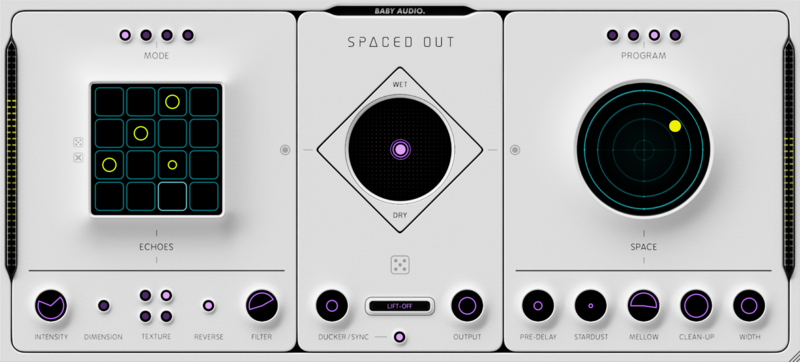
Spaced Out is a lush wet-FX generator, built for sending your sounds and vocals into weightless, heavenly orbit. It combines a crystalline reverb engine with a wealth of modulation options and a 16-step delay sequencer. In total, more than 50 individual effects come together in a singular creative experience with endless outcomes and zero sub-menus.
Spaced Out hosts an automatic ‘Generate’ function, which will create new textures at the click of a button and give you fresh ideas for where to take your tracks. We’ll see you on the other side!
Features
Spaced Out offers a pristine sounding one-stop solution for your wet-fx needs on drums, instruments and vocals. Use it subtly to add depth and movement — or go explore the outer bounds of wet-FX processing.
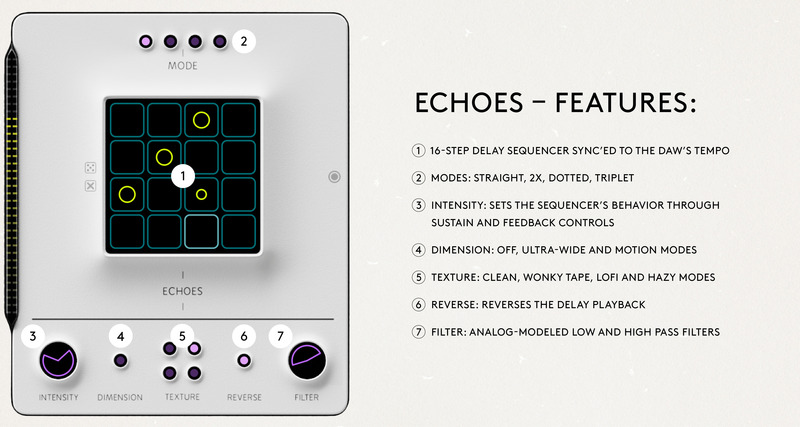
Echoes
- 16-step delay sequencer sync’ed to the DAW’s tempo
- Modes: Straight, 2x, Dotted, Triplet
- Intensity: Sets the sequencer’s behaviour through sustain and feedback controls
- Dimension: Off, Ultra-Wide and Motion modes
- Texture: Clean, Wonky Tape, Lofi and Hazy modes
- Reverse: Reverses the delay playback
- Filter: Analog-modeled low and high pass filters
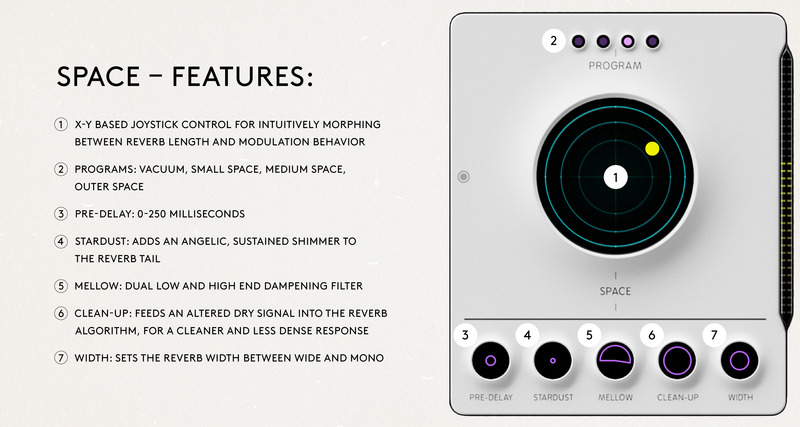
Space
- X-Y based joystick control for intuitively morphing between reverb length and modulation behaviour
- Programs: Vacuum, Small Space, Medium Space, Outer Space
- Pre-Delay: 0-250 milliseconds
- Stardust: Adds an angelic, sustained shimmer to the reverb tail
- Mellow: Dual low and high end dampening filter
- Clean-Up: Feeds an altered dry signal into the reverb algorithm, for a cleaner and less dense response
- Width: Sets the reverb width between wide and mono
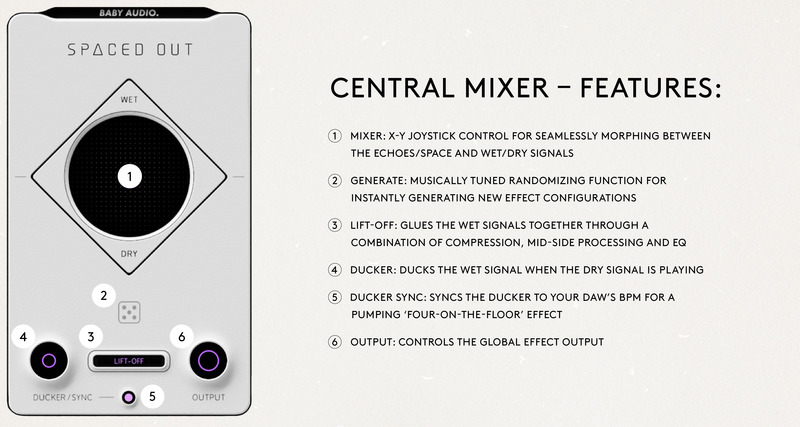
Central Mixer
- Mixer: X-Y joystick control for seamlessly morphing between the Echoes/Space and Wet/Dry signals
- Generate: musically tuned randomizing function for instantly generating new effect configurations
- Lift-Off: Glues the wet signals together through a combination of compression, mid-side processing and EQ
- Ducker: Ducks the wet signal when the dry signal is playing
- Ducker Sync: Syncs the ducker to your DAW’s BPM for a pumping ‘four-on-the-floor’ effect
- Output: Controls the global effect output
A Space Echo for the 21st Century?
It is no secret that BABY Audio are obsessed with the quirks, sounds and simplicity of vintage analogue gear. With every software product Baby Audio make, they hope to offer a little bit of that same hands-on experience and instant gratification. Never by emulating the past — but by tapping into its spirit to invent something new.
With Spaced Out, Baby Audio asked themselves this: How would they design a “space echo” effect today, almost 50 years after the original, with the abundance of computer power and algorithmic complexity at their disposal?
They set out to create an effect as fun, flavoured and futuristic for the 21st century as the Space Echo was for its own time. It’s been an epic journey and Baby Audio are proud to have returned with their most complex plugin to date.
Presets
Spaced Out comes loaded with 125 presets created by BABY Audio and some friends of the house - including:
- Filip Nikolic (Turbotito, Poolside, Azealia Banks)
- Tushar Apte (Nicki Minaj, Noah Cyrus, BTS)
- Richie Beretta (Beyoncé, Diplo, Jillionaire)
- John Nathaniel (One Republic, Switchfoot, Kygo)
- Anthony Saffery (Portugal. The Man, Dirty Vegas, Cornershop)
Display Options
- Choose between two colour schemes (light/dark)
- Plugin window fully resizable
New in Version 1.0.2
- Average CPU performance improved by 20-25%.
- Improved CPU performance when bypassing modules.
- Wet-lock feature introduced, allowing users to browse presets or randomize the effect without affecting the over-all wet/dry balance.
System Requirements
Mac
- Mac OS X 10.7 or later (64-bit only)
- Intel or M1 Apple Silicon Processor (Native compatibility)
- Formats: AU, VST, VST3 & AAX
- Compatible DAWS: Ableton Live, Pro Tools, Logic Pro, FL Studio, Cubase, Nuendo, Reaper, Reason and any other major DAW software on the market
Windows
- Windows 7 or later (32 / 64-bit)
- Formats: VST, VST3 & AAX
- Compatible DAWS: Ableton Live, Pro Tools, FL Studio, Cubase, Nuendo, Reaper, Reason and any other major DAW software on the market
Please Note: An internet connection is required to authorise this software.
Awards


Sam Sherbin
Mix engineer for Rachel Platten, Micky Shiloh, Halima
"Spaced out is an awesome and creatively designed plugin. From deep lush spaces to trippy vibes, the all in one approach is killer!"
MusicTech
The world’s leading media brand at the intersection of music and technology.
"This slick, modern reworking of a classic recipe has its quirks but sounds fabulous with everything from a touch of slapback to huge, other-worldly spaces."
Team Salut
UK Artists & Afrobeat Hitmakers
"This is a workflow changer! One plugin to do 3 or 4 FX tasks. Amazing!"
Reviews Summary
While it aims to provide a helpful overview, it may not capture every perspective or detail. We encourage you to read individual reviews to make an informed decision.
Overall sentiment for the plugin is predominantly positive, with users praising its lush reverb and delay combinations, user-friendly XY control, and unique sound design capabilities. However, a critical review noted that similar effects could be replicated using stock DAW modules.


