Log In

Free gifts available with your purchase
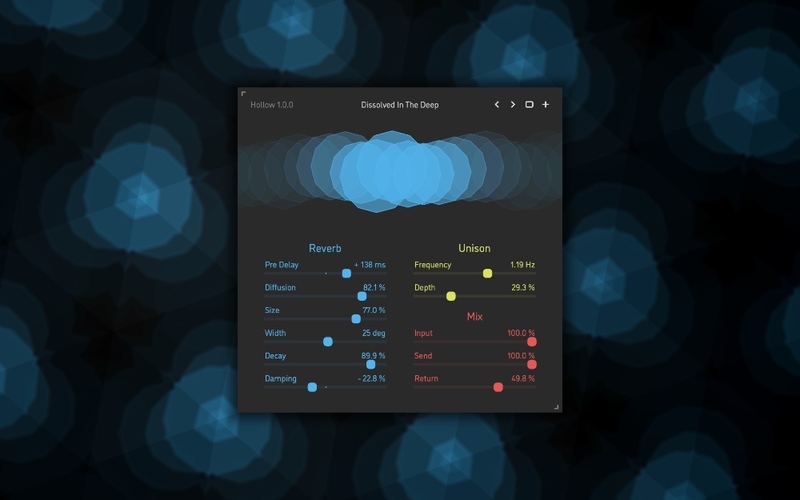
Hollow is a vast space reverb effect plugin. At its core is a massive delay network comprised of 24 delay lines, 32 filters, and a feedback matrix with as many as 256 connections. With all settings maxed out, this engine is capable of producing tail times that exceed 15 minutes, while still having a very natural exponential decay. Hollow includes a variable diffusion stage and a unique bi-directional pre-delay: in addition to normal operation, it can also make the reverb tail precede the dry input signal, opening interesting new creative possibilities.
Additionally, the plugin has trademark unison modulation via four phase-shifted sine oscillators – for adding deep, chorus-like vibrance and richness. The complex yet highly musical algorithms in Hollow also feature finely-tuned low-pass or high-pass damping filters and employ a very special formula for adjusting the reverb engine’s stereo width – giving it a truly vast, almost three-dimensional sound.
Features
Sound Engine
- Reverb engine based on a feedback delay network with a 16x16 matrix
- Unique two-way pre-delay stage
- Variable diffusion stage
- Stereo width adjustable from mono to full expansive stereo
- Unison-style modulation via four mutually phase-shifted oscillators
- Variable low-pass or high-pass damping filters
- Lag filters on all continuous parameters for smooth, click-free adjustment
- Supports mono › mono, mono › stereo, and stereo › stereo channel configurations
Graphic Interface
- Colour-coded graphic elements
- Consistent name, mapping, value, and unit implemented for all parameters in both graphic user interface and host control/automation
- Built-in preset management functions
- Supports window size scaling up to 200%
System Requirements
Mac
- macOS 10.9 or later (64-bit only)
- Intel or M1 Apple processor
- AU, AAX, VST3
Windows
- Windows 8.1 or later (64-bit only)
- AAX, VST3