/ Reverb / Kleverb
Klevgrand

Kleverb

4.8 (51 Reviews)
$59.99
Klevgrand Kleverb
Klevgrand Kleverb
Klevgrand Kleverb - GUI
Klevgrand Kleverb - Overview Video gallery thumbnail
Klevgrand Kleverb - Examples Video gallery thumbnail
Buy Now
Product information

Algorithmic Reverb

A smart reverb, designed to fit in any mix

Kleverb is a high-quality algorithmic reverb effect. An intuitive UI combined with a carefully calibrated network of filters and delays makes this a powerful effect useful in any context; all from acoustic Jazz to EDM.

Usage

With three different room size setups (small, medium, large), selectable filter on both early and late reflections, modulation, damping, diffusion, and much more, almost any kind of room can be simulated.

There is also a ducker included that uses the dry signal as a side-chain. Very useful to keep vocals or other solo instruments distinct even when they're soaking wet. The 64 factory presets covers most of the Kleverb features.

Anatomy
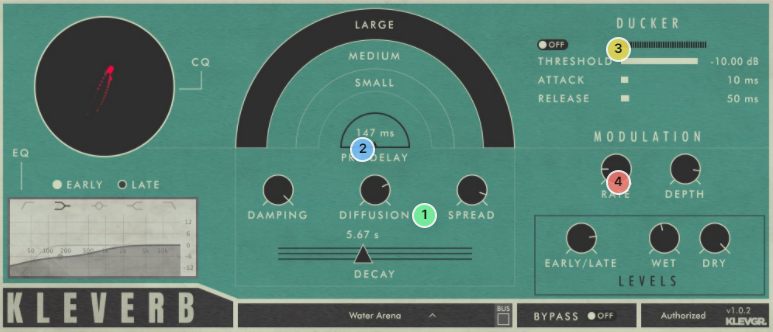
1. Decay? OK! - Up to 25 seconds should give you enough time to figure out what your next pad chord should be.

2. Damp, diffuse, spread. - Shape your space with intuitive and clever controls for both small and big changes.

3. Too much guck? Duck! - Often used, seldom built in the reverb itself. A trick to clarify a reverb-drenched lead vocal or instrument. It lowers the reverb while the dry signal is active, and raises it in the pauses. Everybody gets happy!

4. Modulation salvation - Modulate the reverb to give it a little more life.

Features

  • Room size selection
  • Filters with selectable type on both early and late reflections
  • Wet signal modulation
  • Damping filter
  • Diffusion and Stereo Spread parameters
  • Decay time between 0 and 25 seconds
  • Pre delay parameter
  • Ducker (compressor), with dry signal as sidechain
  • Early / Late signal mix parameter
  • Wet and Dry signal level parameters

System Requirements

  • macOS 10.10 or later (optimized for the M1-processor)
  • Windows 7 SP1 or later
  • AU, VST-2, VST-3, AAX

Installation Instructions

Please Note: Pana is used as the example:

Mac

License Redemption

1. Navigate to https://klevgrand.com/redeem > Paste your 16 digit redemption code found in your Plugin Boutique User Account > Click 'Submit!'.

2. Your redemption code has been accepted > Scroll down to Step 2.

3. Click either 'Sign in' if you already have a Klevgrand account, or 'Create new account' if you do not > Fill in your personal details > Click 'I'm ready'.

4. Your account has now been created.

5. Navigate to your email inbox and locate the activation email that you should have received from Klevgrand > Click 'Let me in!' to activate your account.

6. Create a password for your account > Click 'Enter Klevgrand'.

7. Your software and serial number is now available within your Klevgrand account > Click the Apple logo to download the installer file.

Installation

1. Launch the pana_x_x_x_macOS.dmg installer file.

2. Double click the KLEVGR. logo to launch the installer.

3. Click 'Continue'.

4. Click 'Continue'.

5. Click 'Agree'.

6. Click 'Install'.

7. Enter your system password > Click 'Install Software'.

8. Click 'Close'.

9. Navigate back to your Klevgrand My Account page > Click on the serial number to copy it to your clipboard.

10. Launch your DAW > Create a new audio track > Insert Pana onto the channel > Paste your serial number into the box.

Your software is now activated and ready to use within your DAW

Windows

License Redemption

1. Navigate to https://klevgrand.com/redeem > Paste your 16 digit redemption code found in your Plugin Boutique User Account > Click 'Submit!'.

2. Your redemption code has been accepted > Scroll down to Step 2.

3. Click either 'Sign in' if you already have a Klevgrand account, or 'Create new account' if you do not > Fill in your personal details > Click 'I'm ready'.

4. Your account has now been created.

5. Navigate to your email inbox and locate the activation email that you should have received from Klevgrand > Click 'Let me in!' to activate your account.

6. Create a password for your account > Click 'Enter Klevgrand'.

7. Your software and serial number is now available within your Klevgrand account > Click the Windows logo to download the installer file.

Installation

1. Unpack the pana_x_x_x_win.zip installer file > Launch the pana_x_x_x_win.exe file.

2. Click 'I accept the agreement' > Click 'Next'.

3. Click 'Next'.

4. Click 'Next'.

5. Click 'Next'.

6. Click 'Install'.

7. Click 'Finish'.

8. Navigate back to your Klevgrand My Account page > Click on the serial number to copy it to your clipboard.

9. Launch your DAW > Create a new audio track > Insert Pana onto the channel > Paste your serial number into the box.

Your software is now activated and ready to use within your DAW

Plugin Boutique Rewards

Discover the most rewarding loyalty programme among all plugin retailers.

  • Free Loopmasters Samplepacks
  • Discounts on products and courses
  • Extra Virtual Cash claimed immediately at checkout
Find out more

Follow us:

X (Twitter) Facebook YouTube Instagram
Logo Logo

Plugin Boutique Limited, Part of the Beatport Group LLC.

Copyright © 2011-2025 Plugin Boutique. All rights reserved
























