/ Amp Simulator / UAD Dream '65 Reverb Amp
Universal Audio

UAD Dream '65 Reverb Amp

4.6 (9 Reviews)
$29.00 $149.00

80% off until Dec 31

Dream '65 - Boutique
Dream '65 Reverb Amp by UAD - No Talking! gallery thumbnail
Introducing UAD Dream ‘65 Reverb Amplifier gallery thumbnail
Dream '65 - EV12
Dream '65 - GB25
Dream '65 - JBF120
Dream '65 - Oxford
Dream '65 - S-Verb
Dream '65 - With Preset Browser
Buy Now
Product information

UAD Dream '65 Reverb Amplifier

Get the classic American tube amp — now in a plug-in

The native UAD Dream '65 Reverb Amplifier plug-in gives you the essential American tube amp sounds used by artists and producers for more than 60 years, from Muddy Waters to The Beatles to Elvis Costello*.

Based on the award-winning UAFX pedal, the Dream '65 plug-in perfectly captures the timeless sound and feel of a "golden unit" 1965 reverb amp, with its bold cleans, sweet tube breakup, and divine spring reverb and vibrato. Plus you'll get built-in boosts, famous amp mods, and a collection of perfectly mic'd speaker cabs. 


Experience Legit Tube Amp Tones in your DAW

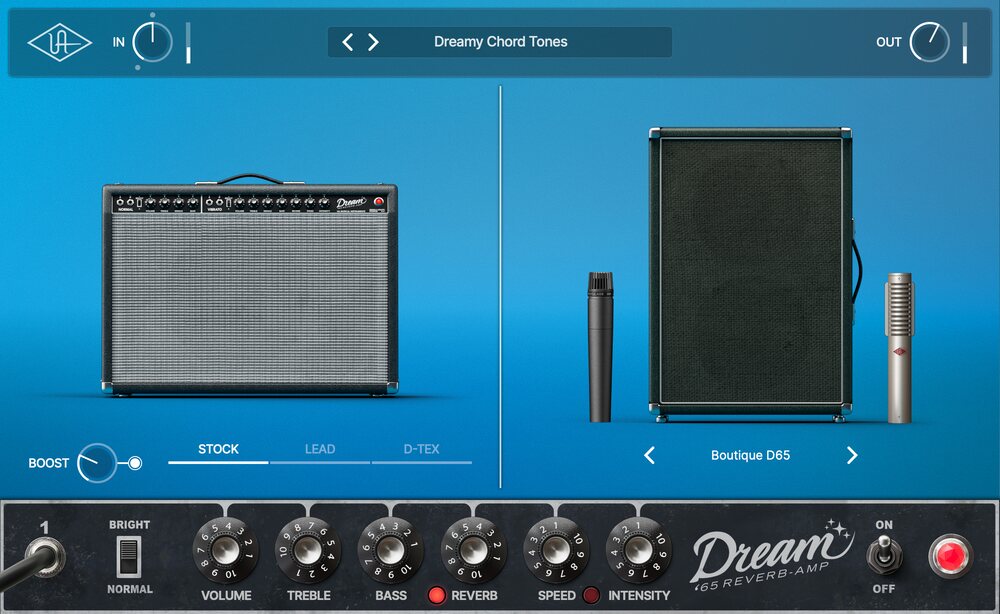
The UAD Dream '65 plug-in perfectly captures a "golden unit" 1965 reverb combo amp, famously used on stages and in studios across six decades of hits — from pop, rock, and country to funk, soul and more. Based on the award-winning UAFX pedal, the plug-in gives you all the essential controls for getting incredible amp tone right inside your DAW. 

Play Through Famous Spring Reverb & Vibrato 

Tube-driven spring reverb and vibrato are essential to the guitar tones you've heard on nearly every classic record. From soul to surf, funk to punk, blues to bebop — UAD Dream ‘65 is the only plug-in that faithfully delivers the two most important guitar amp effects you need to craft immersive, inspiring guitar parts. 

Get the Sound of a Modded Studio Amp

Take your vintage tone a step further with custom mods and legendary drive sounds made famous by artists like Stevie Ray Vaughan and Steve Lukather. With two iconic mods and a clean boost built in, UAD Dream '65 offers even more variations of a classic amp – just like the pros used back in the day.

Explore Classic Mic & Speaker Pairings

UAD Dream ‘65 gives you six classic speaker cabinet setups, with perfectly placed studio mics and dynamic room sounds.

Dream '65 Speaker Cabinets:

  • GB25: Vintage Celestion Greenback mic'd with a M160 ribbon
  • Oxford: Original Oxford 12K5-6 speaker mic’d with a 57
  • EV12: 1x12 12", 200 watt Electro-Voice EVM12L mic'd  with a 414 condenser mic
  • Boutique D65: 2x12 boutique Celestion G12-65s mic'd with a 57 and a 121 ribbon
  • S-Verb: 4x10 original CTS speakers mic'd with a 414 condenser mic
  • JBF120: 2X12 original JBL D-120F speakers mic'd with a 57 and a 121 ribbon mic

Find Your Sound Fast with Expert Presets

Dial in classic tones fast with an expertly-curated collection of presets across musical genres. You can use these presets to start recording quickly, or dial in the perfect sound for your playing style. 

Features

  • Get the most authentic emulation of a mid‑'60s American tube amp in your DAW — no Apollo required
  • Immerse yourself in vintage tube‑powered spring reverb and vibrato effects    
  • Professionally capture world-class studio amp sound, complete with classic mic/speaker pairings and boosts
  • Take your tone a step further with custom mods and drive sounds made famous by artists like Stevie Ray Vaughan and Steve Lukather
System Requirements
  • macOS 10.15 Catalina, 11 Big Sur, 12 Monterey, 13 Ventura, 14 Sonoma
  • Windows 10 or Windows 11 (64-bit only Editions)
  • Intel, AMD, or Apple silicon processor
  • Internet connection to download software and authorize UADx plug-ins
  • Free iLok account with iLok Cloud or iLok USB (2nd generation or higher)
  • A physical iLok dongle is NOT required to activate this product

You can activate this software on an online system (using iLok Cloud) or an offline system (using an iLok USB):

  1. Online: an active internet connection and a FREE iLok account are required to authorise UAD Plug-ins using iLok Cloud

  2. Offline: you will need a physical iLok USB (2nd generation or higher) to authorise this software

Important note: UAD plugins do not work in Apple's Garageband DAW

*Use of artist names does not constitute official endorsement of UAD Dream ‘65 Reverb Amplifier.  **Product names used herein are trademarks of their respective owners, which are in no way affiliated with Universal Audio Inc. These name(s) are used solely to identify products studied in the creation of the sound models found in UAD Dream ‘65 Reverb Amplifier.

Installation Instructions

Registration

1. Click the Download button in your Plugin Boutique account or go to https://www.uaudio.com/my/account/redeem/.

2. Enter your email and the serial code found in your Plugin Boutique User Account > Click 'Get my Plug-in'.

3. Enter the details required to create your Universal Audio account > Click 'Create Account'.

4. Download UA Connect by clicking either 'macOS' or 'Windows' depending on the system you are using.

Windows Installation

1. Once the download is complete, extract and open the ZIP folder you just downloaded > Open the PC folder > Double-click the UA Connect.exe installer file.

2. Read the terms of agreement > Click 'I Agree'.

3. The installation of PACE License Support will now begin > Click 'Next >'.

4. Read the license agreement > Click 'Yes'.

5. Click 'Install'.

6. Click 'Finish'.

7.  Locate and open UA Connect > Enter the email address and password of your Universal Audio account.

8. Click 'GET STARTED'.

9. Select the option that is relevant to you - either 'I Already Have an iLok Account' or 'Create an iLok Account For Me'.

10. Enter your iLok account User ID then click 'LINK ACCOUNT'

.

11. Enter the password for you iLok account and click 'Authorize'.

12. Locate the plugin you wish to install > Click 'DOWNLOAD'.

13. Once the plugin has been installed, open your DAW and then the newly installed plugin.

Your software is now activated and ready to use in your DAW!

Mac Installation

1. Once the download is complete, double-click the UA Connect.dmg installer file.

2. Drag UA Connect into your Applications folder.

3. Locate and open UA Connect > Enter the email address and password of your Universal Audio account.

4. Click 'GET STARTED'.

5. Select the option that is relevant to you - either 'I Already Have an iLok Account' or 'Create an iLok Account For Me'.

6. Enter your iLok account User ID then click 'LINK ACCOUNT'

.

7. Enter the password for you iLok account and click 'Authorize'.

8. Locate the plugin you wish to install > Click 'DOWNLOAD'.

9. Once the plugin has been installed, open your DAW and then the newly installed plugin.

Your software is now activated and ready to use in your DAW!

Plugin Boutique Rewards

Discover the most rewarding loyalty programme among all plugin retailers.

  • Free Loopmasters Samplepacks
  • Discounts on products and courses
  • Extra Virtual Cash claimed immediately at checkout
Find out more

Follow us:

X (Twitter) Facebook YouTube Instagram
Logo Logo

Plugin Boutique Limited, Part of the Beatport Group LLC.

Copyright © 2011-2025 Plugin Boutique. All rights reserved