/ Amp Simulator / GTR3
Waves

GTR3

4.0 (2 Reviews)
$27.99 $129.00

78% off until Dec 07

Waves GTR3
Waves GTR3
Waves GTR3
Waves GTR3 gallery thumbnail
Buy Now
Product information

GTR3

True-to-Life Tone, Vast Versatility

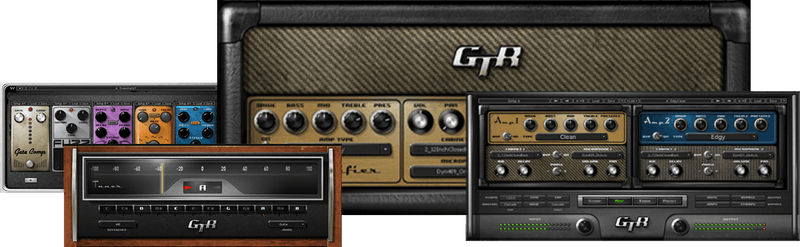
Amp sims are all about tone and feel—which is why GTR3 is the go-to amp sim for so many guitarists and bass players. GTR3 doesn’t just model everyone’s favorite vintage amps, but also has cutting-edge, modern amps—including custom models from Paul Reed Smith and Neil Citron.

25 pedal effects, based on Waves’ high-end studio processors, fill out your virtual pedalboard. Meticulously modeled with dazzling detail, GTR3 embodies Waves’ tradition of sonic excellence.

Features

  • Choose among 30 guitar and 7 bass amps
  • Mic 16 guitar cabs and 6 bass cabs virtually, with 12 miking options
  • Stack 2 amps in series or parallel, in-phase or out-of-phase
  • 25 stompboxes, derived from Waves’ high-end studio algorithms
  • ToolRack module optimized for standalone use in live performance
  • Tap tempo, tempo sync, and many more extras

System Requirements

Mac

  • macOS Monterey 12, Ventura 13, Sonoma 14, Sequoia 15
  • VST / AU / AAX

PC

  • Windows 10+
  • VST / AAX
Installation Instructions

1. Head to https://www.waves.com/create-account

2. Enter your email and choose a password to create an account (if you already have a Waves account, choose Log in, enter your details and head to Step 5) > click 'Submit'

3. Open your email inbox > click the activation link in the email from Waves

4. Click 'Log in here' > Log in to your Waves account

5. Click 'Register New Products'

6. Enter the Serial Number found in your Plugin Boutique user account > click 'Submit'

7. Click download in your Plugin Boutique user account or head to https://www.waves.com/downloads/central > download the Waves Central app for your operating system

8. Install Waves Central > Open Waves Central

9. Click 'Log in' > enter your log in details

10. Click the 'Install Products' tab

11. Tick the blue dot on all products you wish to install or click the top dot to install all products > click 'Install & Activate'

12. Click 'OK'

13. Open your DAW > open the Waves plugin

Your Waves plugins are installed and ready to use, enjoy!

Plugin Boutique Rewards

Discover the most rewarding loyalty programme among all plugin retailers.

  • Free Loopmasters Samplepacks
  • Discounts on products and courses
  • Extra Virtual Cash claimed immediately at checkout
Find out more

Follow us:

X (Twitter) Facebook YouTube Instagram
Logo Logo

Plugin Boutique Limited, Part of the Beatport Group LLC.

Copyright © 2011-2025 Plugin Boutique. All rights reserved