


 Log In

Free gifts available with your purchase
Voltage Amps
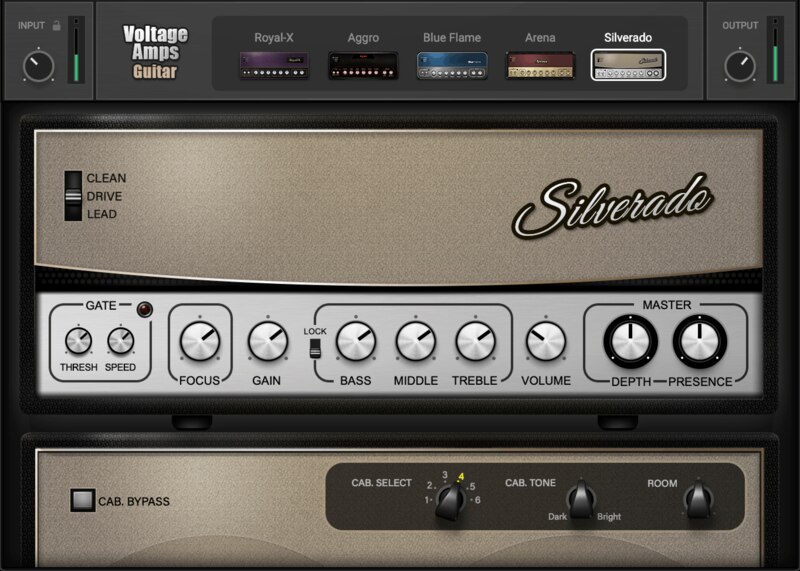
Perfect Guitar and Bass Tones—Right Out of the Box
Endless tweaking can kill inspiration—so with Voltage, we’ve made sure you get inspiring guitar and bass tones, immediately. Voltage amps are designed to deliver satisfying tone in any setting, and we’ve even added a Focus control to match the amps’ tone to your individual guitar and pickups.
Each of the 5 guitar amps delivers an iconic sound, based on classic American and British amps—clean to crunchy, jangly to high-gain aggressive. The bass amps run the gamut from smooth vintage to full-spectrum modern.
For instant tone gratification, just load an amp, lightly tweak cab and tone–and you’re done. For easy comparisons, all control settings persist as you switch amps. Create your own sounds, or choose from over 400 presets by top musicians and producers—including rock icons Butch Vig (Nirvana, Foo Fighters) and Dave Mustaine (Megadeth), the producers for Taylor Swift, Doja Cat, and more—and indulge in your favorite new amp collection.
Features
- 7 guitar and bass amps, optimized for perfect tone
- Kickstart your creativity with 400+ presets by top artists
- Amps cover full sonic spectrum: clean to crunchy, jangly to high-gain aggressive
- Match amp performance to your own guitar and pickups, with the Focus control
- Choose from a variety of cabs and cab tones, plus tailor-made IRs
- Use Cab bypass to feed physical cabs. Or, add a separate IR loader
- Stereo room emulation adds authentic ambiance
- Go beyond guitars: Add character to vocals, synths, drum loops
System Requirements
Mac
- macOS Monterey 12, Ventura 13, Sonoma 14, Sequoia 15
- VST / AU / AAX
PC
- Windows 10+
- VST / AAX














