


 Log In

Free gifts available with your purchase
Surfing. Flying. Shredding.
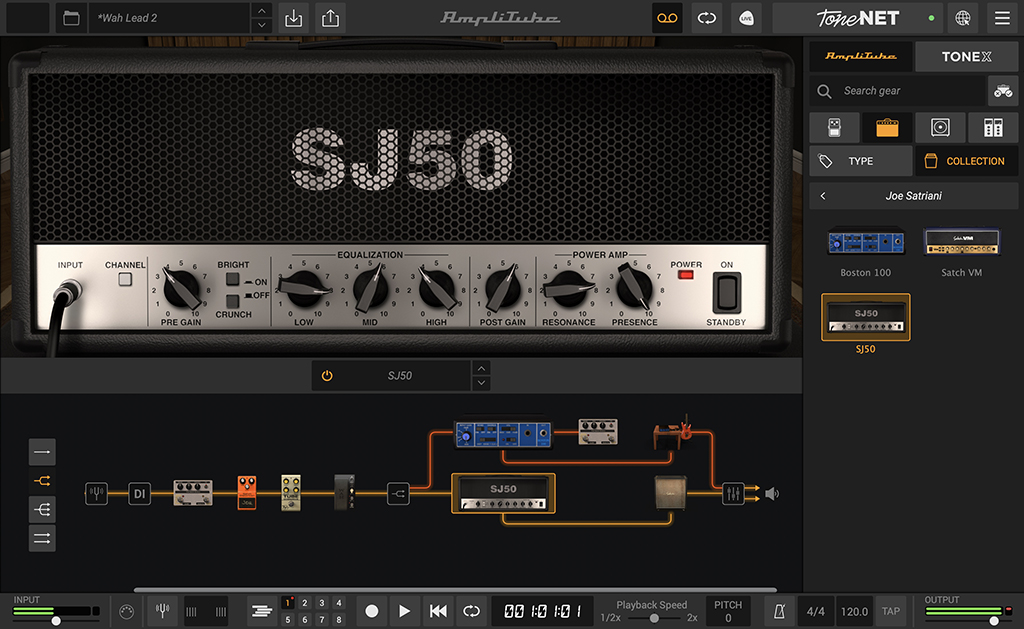
AmpliTube Joe Satriani represents over 30 years of soaring melodies, amazing soundscapes and soulful technique created by the guitar master. Joe Satriani has inspired countless musicians and pushed the limits of rock guitar. From his very first solo EP to his work with supergroup Chickenfoot, Joe somehow keeps one foot in the blues and one in the stars. Now an arsenal of Joe's tones can be yours.
Unstoppable momentum
AmpliTube Joe Satriani replicates 3 amps, 3 cabinets, and 5 stompbox effects, all carefully modeled and loaded with presets, all under the supervision of the man himself. Whether you're looking for his most iconic sounds or for inspiration on your own musical journey, AmpliTube Joe Satriani gives you unstoppable momentum.
Gear available in AmpliTube Joe Satriani
AmpliTube Joe Satriani features 12 models including 3 amps, 3 cabinets and 5 stomps. With models based on Joe’s signature Marshall® JVM410HJS, a completely remodeled Peavey® 5150, a Scholz® Rockman™, plus a range of classic pedals BOSS® and more, it’s a massive gear collection that’s simply not of this earth.
3 Amplifiers
- Satch VM
- SJ50
- Boston 100
3 Cabinets
- Satch Green
- Satch 60
- Boston Cab Sim
5 Stompboxes
- Satch Wah
- Satch Distortion
- Satch Overdrive
- Tube Overdrive
- Satch Octave
1 Microphone
- Dynamic 421
Shredding with the Alien
IK worked meticulously with Joe to capture his go-to gear and favorite settings to get the secrets behind some of his most iconic sounds. From Joe’s signature Marshall® amp to his personal stompboxes, this collection includes iconic gear from the ‘70s, ‘80s, ‘90s and beyond.
Trust Joe to collect the gear he needs to get great tone, and IK to make it available to the rest of us. Give this unique collection a try today and see where it takes you.
Features
- Gear collection for AmpliTube Custom Shop
- 12 models split between amps, cabs and effects
- Breakthrough DIM™ technology for unparalleled realism
- Sound-certified and approved by Joe Satriani
- No previous version of AmpliTube required
- Works seamlessly with the new Custom Shop updates
System Requirements
Mac®
- Minimal: Apple M1 or Intel® Core i5 Processor, 8 GB of RAM, macOS® 10.15 or newer (macOS 11 or newer required for Apple Silicon Processors). 3 GB of hard drive space.
- Requires an OpenGL 2 compatible graphics adapter.
- Supported Plug-in formats (64-bit): Audio Units, VST 3, AAX.
Windows®
- Minimal: Intel® Core i5 Processor or equivalent, 8 GB of RAM, Windows 10 (64 bit) or newer. 3 GB of hard drive space.
- Requires an ASIO compatible sound card.
- Requires an OpenGL 2 compatible graphics adapter.
- Supported Plug-in formats (64-bit): VST 3, AAX.
Important note: Internet connection is required to authorise the application and access ToneNET.


