


 Log In

Free gifts available with your purchase
Celestion Speaker Shape
Goodbye IR Loaders. Hello, Control.
- A highly versatile speaker cabinet designer for guitar, bass, and more.
- Replaces IR loaders for guitar and bass sounds.
- Created in collaboration with and officially licensed by Celestion.
- Two versions included: Celestion Speaker Shaper native plugin and Celestion Speaker Shaper for Amp Room.
Speaker manufacturer Celestion is on the eve of its 100th anniversary. You don’t just luck into that kind of longevity. The company, which began in 1924 with the first cone loudspeaker patent, was instrumental in the sound of the British Invasion. It has since become a famed pro audio brand in its own right as the manufacturer of world-renowned guitar and bass speakers.
Now, Celestion's high-quality speakers for guitar and bass are available in an easy-to-use, insanely creative plug-in: Celestion Speaker Shaper. Celestion Speaker Shaper replaces the need for Impulse Response loaders by enabling you to set up two cabinets in parallel and independently adjust specs for, well, just about everything. There is a multitude of permutations to discover. Tweak your favourite speakers or bring your dream rig to life. Either way, Celestion Speaker Shaper will blow you away.
The Art of Rock & Roll Science
Softube has a long history modelling professional gear. Softube's collaboration with premium pro audio brands like Marshall, Tube-Tech, Chandler Limited ®, and Empirical Labs spans almost two decades. When it comes to creating software that sounds precisely like the hardware equivalent, Softube's reputation is rock solid.
This legacy is the foundation of Celestion Speaker Shaper. When creating it, Softube took the exacting approach they have become known for: expert modelling, precise testing, and careful fine-tuning. Because to create software that is equal to the original gear and innovates upon it, everything must be perfect. Nothing less.

Native Speaker
Phenomenal speaker sounds, optimized workflow, and more flexibility and control than you ever thought possible. In partnership with Celestion, Softube brings an officially licensed plugin that eliminates the need for IR loaders for guitar and bass sounds. Scale eleven of Celestion’s most famous speakers from 8″ to 24″. Calibrate three channels per speaker and eight microphone options per channel. Then tweak parameters like speaker break-up, ohms, magnet type and strength, open versus closed cabinets, room sounds, 4-band EQ, and more. Celestion Speaker Shaper can make both natural and fantastical sound transformations a reality.
English Speaker
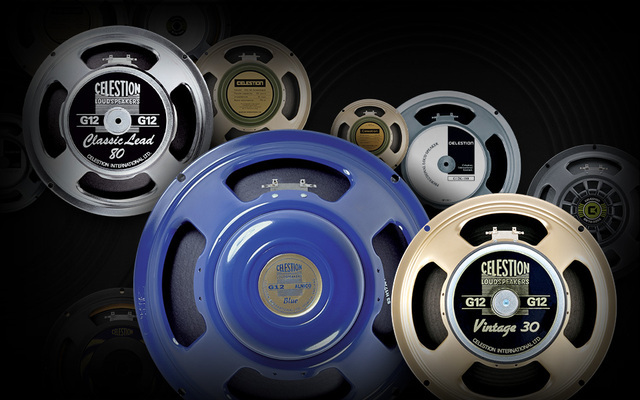
Ever wanted to play an 8x24″ Celestion Vintage 30 cabinet? Now, you can. Speaker Shaper offers authentic, high-quality Celestion sound with eleven of the British company’s most popular guitar and bass speakers: Vintage 30, G12T-75, G12K-100, G12M Greenback, G12M-65 Creamback, G12M Heritage, Classic Lead 80, Celestion Blue, PULSE12, BL10-100X, and BN10-200K. Beyond scaling and ageing them to your specs, you can change the speaker magnet material and determine how it will behave. Experiment with Ferrite M and H or AlNiCo and Neodymium to shape your speaker sound in ways only Speaker Shaper can.
Motivational Speaker
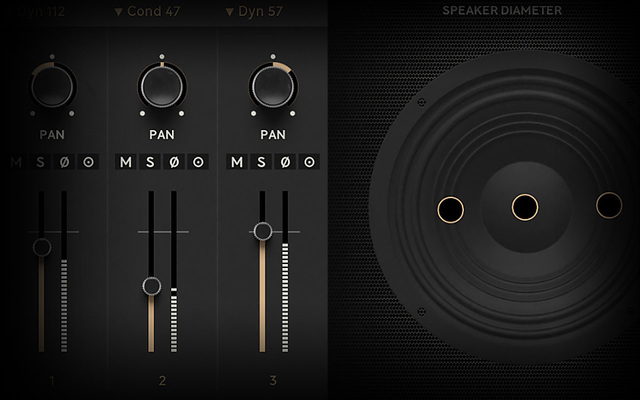
With Celestion Speaker Shaper, you get eight classic microphones to finetune. Dyn 57, Dyn 7B, Dyn 421, Dyn 112, Cond 87, Cond C414, Cond 47, and Rib 121—to be exact. Place up to three mics in front of each speaker to capture sound precisely the way you want. And when you get it exactly right, check out the onboard effects. Speaker Shaper enables you to add realistic speaker distortion, sculpt your sound with EQ, or get mix-ready with room sounds. You can create precise setups of mic’d Celestion cabinets or push the sonic envelope with inspired experimentation.
Speaker of the House
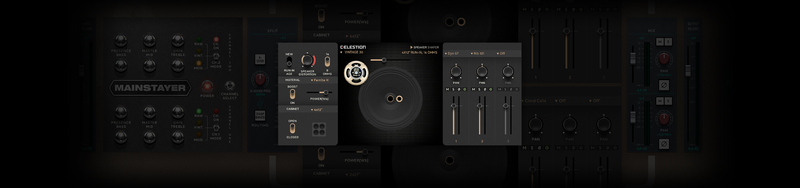
Celestion Speaker Shaper offers a groundbreaking approach to sound shaping. And, unlike IR loaders or other speaker plug-ins, it can be used both as a native plugin and as a module in Amp Room, Softube's pro audio guitar and bass platform. In Amp Room, you can couple it with other plugins and modules, such as Softube's Marshall range, or join multiple iterations of the Speaker Shaper module itself. The sound-sculpting options are bountiful, but it's a breeze to use with all the parameters displayed coherently and no submenus—what you see is what you get. And not just for guitar and bass. Creative use of Speaker Shaper on synths, vocals, and drums can lead to some unexpected and truly wonderful sonic places.
What's Included?
Celestion Speaker Shaper Native Plugin
Sculpt speaker sounds for guitar, bass, vocals, synths, and more with genuine. Celestion sound quality and an optimized workflow. Only Celestion Speaker. Shaper native plug-in lets you go this deep easily with a clear layout and intuitive interface.
Celestion Speaker Shaper for Amp Room
Celestion Speaker Shaper for Amp Room, the pro audio guitar and bass platform, is flat-out fun. Double it, triple it, combine it with other amps, cabs effects, and pedals. Speaker Shaper lets you easily create studio-quality, record-ready guitar and bass tones.
Features
- A speaker cabinet designer for guitars, bass, synths, and more.
- Created in collaboration with and officially licensed by Celestion.
- Includes 11 well-known Celestion speaker models for guitar and bass.
- Set a myriad of parameters to your exact specifications.
- Adjust existing setups or create never-before-heard rigs.
- Sculpt speaker sound in an entirely new and modern way.
- Two versions included: Celestion Speaker Shaper native plugin and Celestion Speaker Shaper for Amp Room.
System Requirements
- macOS Big Sur 11, Monterey 12, Ventura 13
- Windows 10 (64-bit), Windows 11
- Softube account
- iLok account
- Computer with AU, VST, VST3, and/or AAX-compatible DAW host software
- Internet access (for downloading installers and managing licenses)
Supported CPU Families
- Apple macOS computers with Intel Core i3/i5/i7 or Apple silicon (M1 or newer) CPU. Apple silicon is supported natively.
- Windows computers with quad-core Intel Core i3/i5/i7 or AMD quad-core processors with SSE 4.2 support.
- Other Intel processors (Celeron, Pentium, and Xeon) are compatible if they support SSE 4.2 instructions.
Supported Host Software (DAW)
Any 64-bit VST, VST3, AU, or AAX (Pro Tools 11.0.2 or higher) compatible host application should work. However, due to plug-in host differences between DAWs—and our rigorous standards—Softube only officially test their plug-ins and instruments in the most recent versions of Pro Tools, Logic Pro, Cubase, Ableton Live, Studio One, and Reaper. Softube plug-ins are not tested regularly in non-listed systems. They will likely work if the system requirements are met. However, the manufacturer cannot guarantee a solution for issues in unsupported systems.
Softube strongly recommend using VST3, as some of their plug-ins have features that are not present in the older VST format. Supported sample rates: 44.1, 48, 88.2, 96, 176.4, and 192 kHz, in both mono and stereo. The most recent maintenance release of your DAW application is recommended. AAX DSP is not currently in active development. TDM/VENUE/RTAS are no longer supported. See Legacy Installers.
Important Note: Make sure that you always use the latest iLok License Manager. It is not included in the Softube installer but can be downloaded from www.ilok.com
Brandon Bell
Grammy Award-Winning Record / Mix Engineer & Producer
"Holy Moly! This thing is incredible! The tonal variations seem endless but it’s very easy to quickly dial in a great tone. I’m a fan!"
Daniel Bergstrand
Swedish Record Producer
"Unbelievable! Celestion and Softube are a match made in hell! My guitar tones have never been better."


