


Buy PSP InfiniStrip, get a free gift with purchase:
Zero Latency. Full Impact.
PSP InfiniStrip is an infinitely configurable channel strip plug-in based on PSP's 20 years of experience in developing handcrafted plug-ins for tracking, mixing and mastering.
PSP InfiniStrip can be used for mixing, tracking, or live streaming/broadcasting anywhere you need a great sounding and easy to configure channel strip, without having to worry about latency!
PSP InfiniStrip is part of PSP's series of Zero Latency Processing plug-ins; making it ideal for situations such as live monitoring, live broadcast production, and use while tracking.
Features
- 25 independent processors divided into 8 types of modules (preamps, filters, compressors, equalisers, limiters, dynamic modules [expander, ducker and gate], control and special modules) to create your custom channel strip.
- 7 dedicated “slots” for you to add one module from each type of processing modules, and 2 flexible insert slots for any module type.
- Intelligent parameter matching - easily swap different compressors or EQs without touching a knob to find your preferred colour and flavour.
- 3 different view modes (full, resizeable, and mini view mode) designed for different workflows and screen sizes.
- External side-chain support for each module.
- Includes both Mono and Stereo plug-in versions for different track types.
- Zero latency processing.
- Over 230 presets designed by top sound engineers from around the world.
System Requirements
Windows
- Windows 7 – Windows 11
- 64-bit
- VST / VST3 / AAX
- The latest iLok License Manager application installed
macOS Intel or macOS Silicon
- macOS 10.12 – macOS 13 Ventura
- 64-bit
- AU / VST / VST3 / AAX
- Up to date iLok License Manager application installed
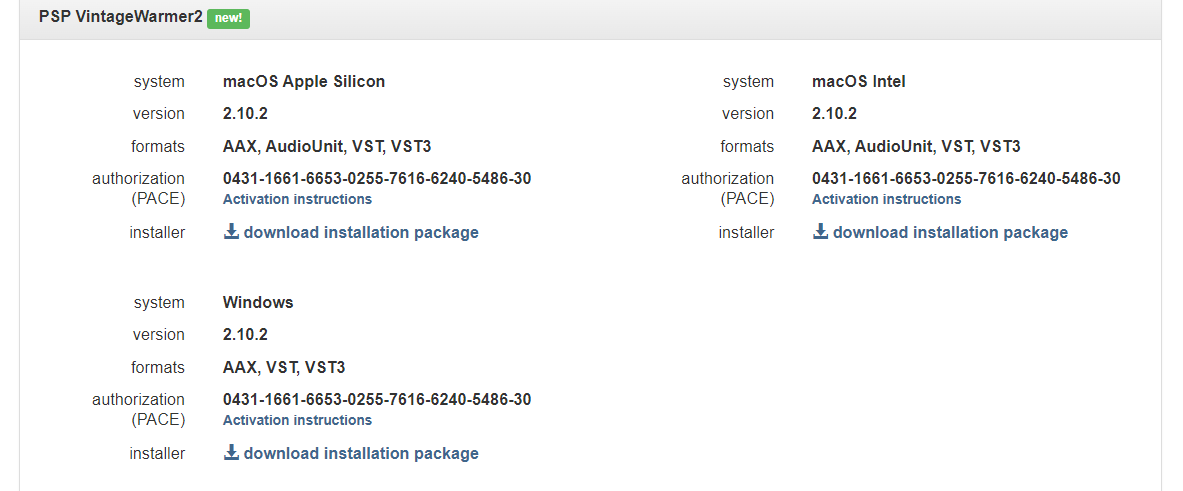
Please Note: PSP VintageWarmer2 is used as an example.
Activation
1. Visit the PSP Registration Centre and create/log into your PSPaudioware account.

2. Select the Manual Product Activation link and copy and paste/manually enter the serial number that is provided with your User Account. > click 'Activate!.'

3. Your PSP product will now show up in your PSP customer account. Your 30-digit iLok activation code will also be listed under authorization (PACE). Download the relevant installer.
iLok Registration
1. Go to the iLok website and create a new account if you are not currently registered and do not have the iLok Licence Manager installed on your computer.

2. Download and install the iLok License Manager.
3. Open your iLok license manager application > click 'Sign In'.

4. Enter your iLok registered User ID and password > click ‘Sign In'.

5. Once you are signed in, click the ‘Redeem’ icon which is located at the top-right corner of the iLok Licence Manager’s interface.

6. Copy and paste/manually enter the 30-digit code from your PSP Audioware account into the available Activation Code boxes, and then click ‘Next'.

7. Select your activation destination > Click 'Activate'.

8. Click 'Ok'.

Installation
Mac
1. Open the recently downloaded .dmg file to begin the installation.
2. Click 'Continue'.

3. Click 'Continue'.

4. Click 'Continue'.

5. Click 'Agree'.

6. Click 'Continue'.

7. Click 'Install'.

8. Click 'Close'.

9. Open your DAW > Open your newly installed software.
Your software is now activated and ready to use.

PC
1. Open the recently downloaded .exe file to begin the installation.
2. Click 'Next >'.

3. Select 'I Accept the Agreement' > Click 'Next'.

4. Click 'Next >'.

5. Click 'Next'.

6. Click 'Next'.

7. Click 'Next' to begin the installation.

8. Click 'Finish'.

9. Open your DAW > Open your newly installed software.
Your software is now activated and ready to use.



