


 Log In

Free gifts available with your purchase
Maserati ACG
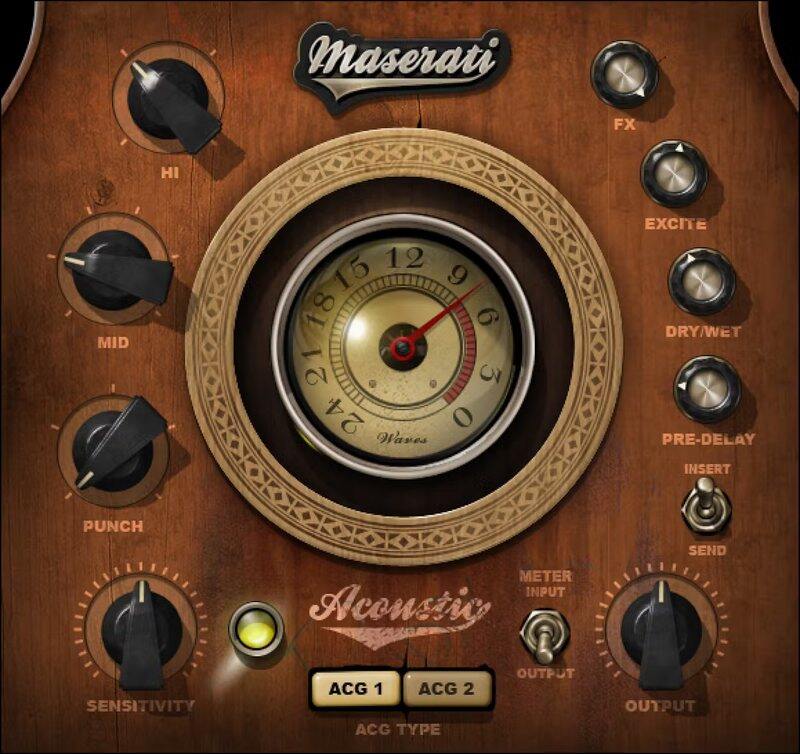
Standout Acoustic Guitar Sounds—Every Time
There’s nothing like a driving acoustic guitar to push a song’s rhythm, or solo picking for expressive leads. But in a dense mix, acoustic instruments can end up getting buried. This multi-effect chain plugin by master mixer Tony Maserati (Beyoncé, Jason Mraz, David Bowie) helps you solve that.
Prioritize level and tone for rhythm, or nuances for leads, with two modes. Then, shape the sound further with punch, mid and hi EQ, reverb, and exciter—for a guitar sound with focus and energy.
“These controls give you my chains for giving acoustic guitars an energy boost: ACG 1 helps you to maximize levels and sculpt your top and bottom. ACG 2 has more built-in compression for bringing out the subtleties in a live performance. Both have appropriate room settings available to be dialed in at varying levels.”—Tony Maserati
Features
- Designed with Grammy®-winning mix engineer Tony Maserati
- Choose from customizable chains: ACG1 and ACG2
- PUNCH helps guitar cut through crowded mixes
- EXCITE adds shimmer and emphasizes strums
- Reverb with pre-delay adds ambiance
- Mid and hi frequency controls optimized for acoustic guitar
- 42 ready-to-go presets in multiple styles
- Separate modes for use as an insert or send effect
System Requirements
Mac
- macOS Monterey 12, Ventura 13, Sonoma 14, Sequoia 15
- VST / AU / AAX
PC
- Windows 10+
- VST / AAX














