/ Channel Strip / CLA Unplugged
Waves

CLA Unplugged

$29.99 $99.00

69% off until Dec 07

Waves CLA Unplugged
Waves CLA Unplugged
Waves CLA Unplugged
Waves CLA Unplugged gallery thumbnail
Buy Now
Product information

CLA Unplugged

The Quick Fix for Your Acoustic Tracks from a Master of Mixing

Acoustic instruments play in an acoustic space, so enveloping them with a realistic ambiance is crucial to the mixing process. Chris Lord-Alge (Foo Fighters, Muse, Green Day, Bruce Springsteen) knows that glorious acoustic sounds require exquisite effect chains.

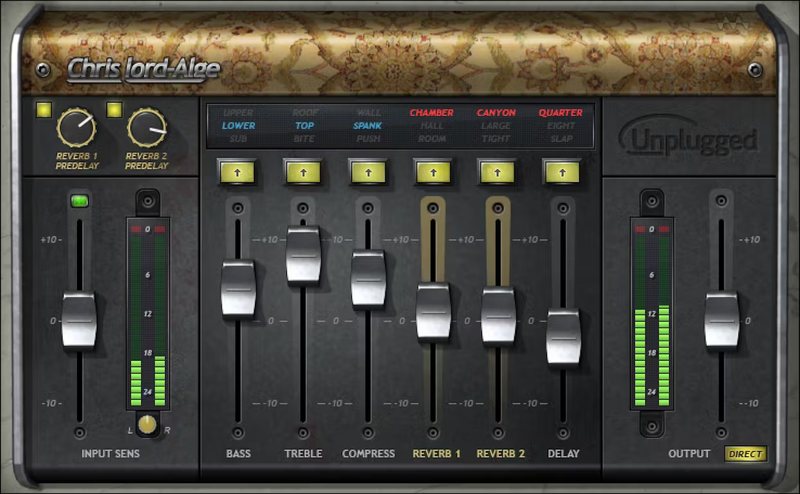
CLA Unplugged’s two lush reverbs (each with pre-delay), delay, bass/treble EQ, and compression give all acoustic instruments a luxurious polish—from realistic textures, to rich and dreamy.

“CLA Unplugged is a dream box of reverb effects plus great hi-res EQ and compression. I wanted a plugin you could put on acoustic guitars, piano, strings, nylon string solos… This plugin is designed to give you great reverb/delay possibilities for acoustic instruments plus the smoothest EQ curve around”—Chris Lord-Alge

Features

  • Created with mix legend Chris Lord-Alge
  • 6 effects, each with 3 different modes and effect amount fader
  • Ideal for piano, acoustic guitar, strings, woodwinds, and voice
  • Classy, complex ambiance from 2 reverbs with different characters
  • Bass and treble EQ curves are optimized for acoustic instruments
  • Expand the sense of space with separate pre-delay for each reverb
  • Combine rhythmic echo effects—sync delay times to host tempo
  • Push dynamics for power and punch, with precise compression

System Requirements

Mac

  • macOS Monterey 12, Ventura 13, Sonoma 14, Sequoia 15
  • VST / AU / AAX

PC

  • Windows 10+
  • VST / AAX
Installation Instructions

1. Head to https://www.waves.com/create-account

2. Enter your email and choose a password to create an account (if you already have a Waves account, choose Log in, enter your details and head to Step 5) > click 'Submit'

3. Open your email inbox > click the activation link in the email from Waves

4. Click 'Log in here' > Log in to your Waves account

5. Click 'Register New Products'

6. Enter the Serial Number found in your Plugin Boutique user account > click 'Submit'

7. Click download in your Plugin Boutique user account or head to https://www.waves.com/downloads/central > download the Waves Central app for your operating system

8. Install Waves Central > Open Waves Central

9. Click 'Log in' > enter your log in details

10. Click the 'Install Products' tab

11. Tick the blue dot on all products you wish to install or click the top dot to install all products > click 'Install & Activate'

12. Click 'OK'

13. Open your DAW > open the Waves plugin

Your Waves plugins are installed and ready to use, enjoy!

Plugin Boutique Rewards

Discover the most rewarding loyalty programme among all plugin retailers.

  • Free Loopmasters Samplepacks
  • Discounts on products and courses
  • Extra Virtual Cash claimed immediately at checkout
Find out more

Follow us:

X (Twitter) Facebook YouTube Instagram
Logo Logo

Plugin Boutique Limited, Part of the Beatport Group LLC.

Copyright © 2011-2025 Plugin Boutique. All rights reserved