Log In

Free gifts available with your purchase
Rhythmic Auto Panner
Rhythmic Auto-Panning with Cool Classic Features, New Tricks, and Analog Colour
Panning. You wouldn’t be alone if you thought of it as nothing more than the simple act of moving sounds from left to right and back again. But it can be so much more. PanMan opens up a Pandora’s Box of panoramic possibilities. Recreate the sounds of classic hardware panning boxes. Trigger panning with the dynamics of a track. Create complex rhythmic patterns and dizzying sweeps. With the full range of Soundtoys modulation tricks at your disposal, PanMan turns the simple act of panning into something incredibly creative and powerful.
Classic Auto Panning
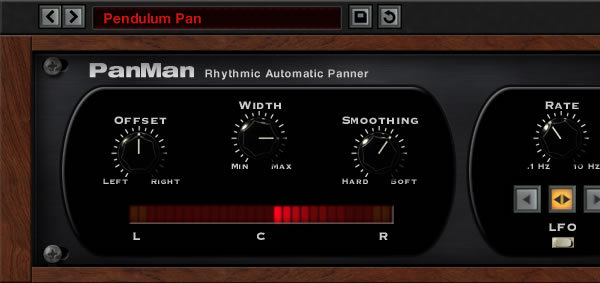
PanMan incorporates features inspired by classic auto-panners. There are classic auto-panners? Yep! And Soundtoys tracked down these obscure boxes, like the Spanner and PanScan, to study what makes them tick. One thing Soundtoys just had to run with comes from the PanScan: the trigger divider. This quirky feature lets you set the number of trigger events it takes to move to a new pan position. For example, you can set it to scan from the left to right in three triggers. Trigger the panning by clicking with your mouse, automate the trigger with your host, or even set a threshold to have it respond to incoming audio. You can even filter the audio going to the trigger so it responds to just low, or high, frequency events. And of course, Soundtoys didn’t stop there: they've added 7 different analog modes that add saturation and a real analog vibe when you push PanMan hard.
Modern and Musical Tools
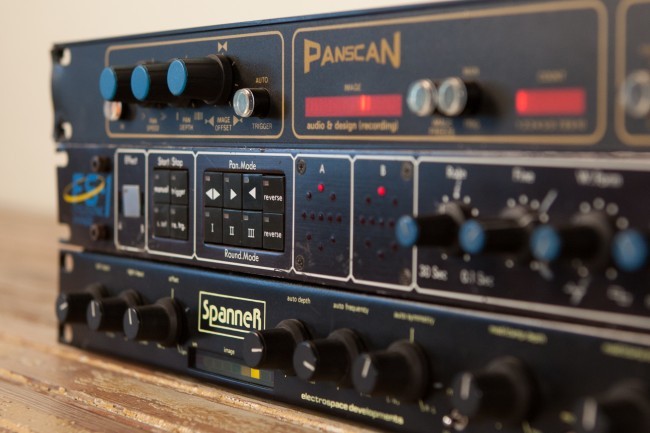
Like Soundtoys' other modulation effects, PanMan also offers advanced rhythmic tools that let you create your own signature pan effects. Two different rhythm modes give you tons of possibilities: Step mode lets you choose a new position on each beat and sync it to your host, while the Shape mode lets you choose from a library of custom panning shapes or even draw your own. Open the Tweak panel and you’ll find a bevvy of creative options - you’ll be amazed at how versatile PanMan can be.
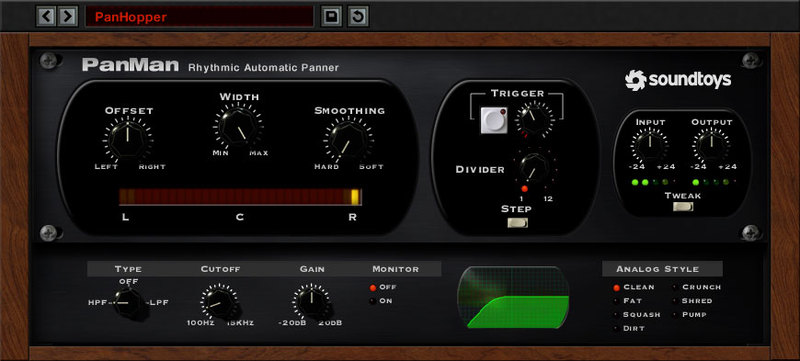
For panning effects that follow the feel of the music, you can even set the threshold control and trigger PanMan using the dynamics of your track. Move the width, speed and offset controls based on the rhythm of the audio. Create sounds that sweep whenever the snare drum hits. Change the speed of the panning based on the loudness of a vocal. With PanMan, you’ll come up with creative new pan-based effects you didn’t think were possible.

Features
- Create custom auto-panning effects, locked perfectly to your song’s tempo
- Choose from 6 different panning modes including LFO, step and random
- Recreates the clever “trigger divider” feature from the vintage PanScan hardware
- Design your own rhythmic patterns and panning waveshapes
- Set the threshold to let your music’s dynamics control speed, offset and width
- Add vintage tone with 7 different analog emulation algorithms
System Requirements
Mac
- macOS 10.12 Sierra and later (Intel / Apple Silicon supported) (64-bit only)
- VST2, VST3, AU, AAX Native, AAX AudioSuite
Windows
- Windows 7 and later (64-bit only)
- VST2, VST3, AAX Native, AAX AudioSuite
Supported Sample Rates:
- Minimum - 44.1 kHz
- Maximum - 192 kHz
Important Notes:
- A FREE account at ilok.com is required (a physical USB iLok is not required)
- This software is 64-bit only and is not compatible with 32-bit systems.
Officially Supported Host Applications:
All version 5 Soundtoys products come in 64-bit VST2, VST3, AU and AAX Native plugin formats.
Supported DAWs:
- Pro Tools: 12 or higher (Mac & PC: AAX Native and AudioSuite)
- Logic Pro X: 10.7 or higher (Mac: AudioUnits)
- Ableton Live: 10.0 or higher (Mac: AudioUnits, VST2 & VST3; Windows: VST2 & VST3)
- Studio One: 4.5 or higher (Mac: AudioUnits, VST2 & VST3; Windows: VST2 & VST3)
- Cubase: 9.5 or higher (Mac & PC: VST3)
- Nuendo: 8 or higher (Mac & PC: VST3)
- Reaper: 6 or higher (Mac: AudioUnits, VST2 & VST3; Windows: VST2 & VST3)
- Bitwig: 4 or higher (Mac & PC: VST2 & VST3)