Log In
.jpeg)
Free gifts available with your purchase

Broaden Your Horizons
Achieve the stunning stereo your mix deserves. StereoSavage provides an innovative stereo toolbox, combining tried and tested studio techniques with emulations of modern and classic tools that will bring your mix to life.
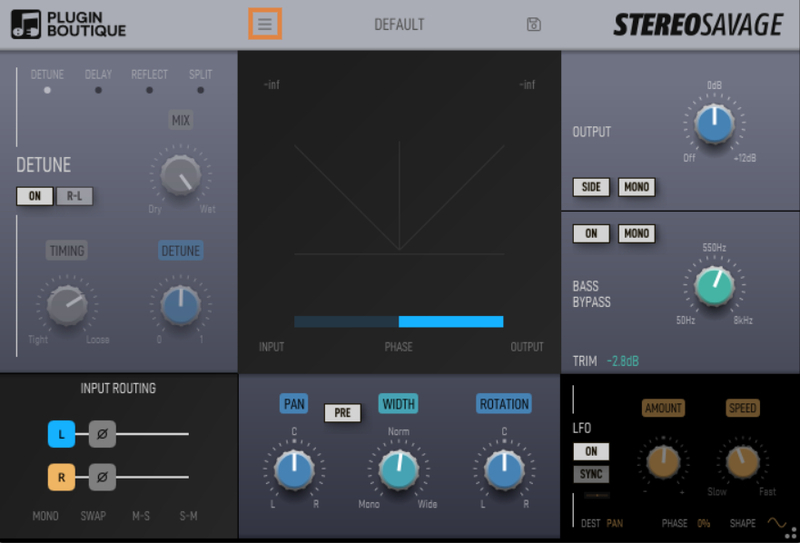
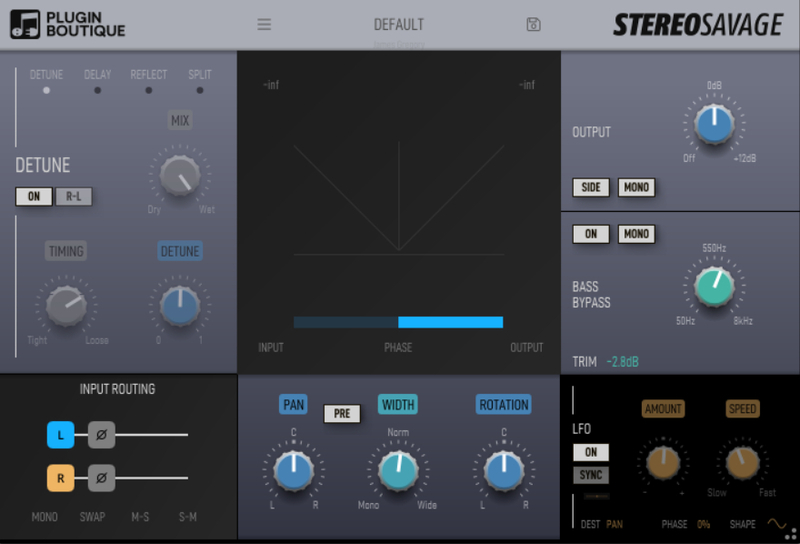
Generate stereo from mono with the 'Detune', 'Delay', 'Reflect' and 'Split' programs. Place sounds precisely in the stereo field with the 'Width', 'Pan' and 'Rotation' adjustment tools. Create movement and chorus-like effects with the 'LFO' function, and retain a solid low end with the adjustable 'Bass Bypass' tool.
StereoSavage includes all of these features in a single plugin for the first time, offering the flexibility to enhance your track with dramatic effects, or add the perfect subtle finishing touches.
Audio Demos
Most of the examples start with an untreated example showing the original sounds before StereoSavage was applied. The only difference between the untreated sounds and the treated sounds is the addition of the StereoSavage plugin.
Benefits:
- Create stereo from mono sources for richer soundscapes.
- Control the placement and width of stereo sources. Separate instruments within the stereo field.
- Use the rotation effect for an incredibly natural sounding pan.
- Get lush wide vocals in seconds.
- Quick simple controls for achieving a ‘big sound’.
- Add motion and excitement with modulation.
- Retain great mono compatibility with the bass bypass feature.
- Reduce the number of vocal takes required for rich, tight, backing vocals.
Effects
Generate Stereo from Mono:
- Detune: Get that classic wide vocal sound: huge leads or rich backing choirs. It’s also brilliant on synths, guitars and has hundreds of other uses.
- Delay: Use a simple delay on a channel to pan or widen a sound, this is great for percussive parts. It also has a huge benefit for club mixes where you want to pan some percussion without making either channel quieter!
- Reflect: Add some aggressive early reflections to make sounds stereo and engaging without adding any unwanted movement.
- Split: Splits the sound up into multiple frequency bands and pans those bands left and right. Compared with the other three modes it is exceptionally natural sounding.
Stereo Adjustment
Stereo Adjustment Features:
- Width: Make it wider, make it wider than wide…or bring it in so other sounds draw focus.
- Pre: Move the panning before widening for super-wide auto-panning.
- Rotation: Super-natural panning.
Add modulation to key controls for movement and excitement. Use the sync to ensure all modulation happens in time with your track. Check out the audio demos to hear this in action.
Bass Bypass
Essential for maintaining a solid low end signal by allowing the bass to be passed through the plugin unprocessed. The gain knob can be used to compensate for differences in level that may arise as a result of the stereo processing.
Metering
Metering Features:
- Goniometer: Ultra precise goniometer for visual display of the stereo placement of your sound.
- Phase Correlation: Keep a close eye on this to prevent any potential phasing issues.
- Input / Output: Use the input and output peaks to help keep things balanced.
New in Version 2
Input Routing
StereoSavage 2 has a much clearer and more capable input routing section.
You can specify whether your input signal is to be taken from the left, right or both channels, and it can cope with MS inputs, as well as allowing you to invert the phase of either channel if necessary. These are things that may be common requirements if you are recording with stereo microphone setups, but have creative uses for people working in-the-box with soft synths as well.
The Centre Panel
The centre panel includes all the metering.
There's a modern goniometer implementation. The out-of-phase signals are below the 45-degree line.
There's also a phase correlation meter. That's the horizontal bar at the bottom. If the phase correlation meter is on the right you have a mono-compatible signal, if it goes all the way to the left you might find some of your mix disappears in mono. You can check it by pushing the MONO button in the output section.
There are also input and output level meters as the processing can sometimes affect the volume level and you'll want to balance the output so you can do sensible A/B comparison.
At the bottom of the centre panel you have three controls:
- Pan
- Width
- Rotation
Pan and width you'll already likely be familiar with from your DAW.
Rotation is interesting and essentially pans the centre signal, leaving the sides in place. If you use rotate on a drum loop with some reverb on it, you'll hear this effect clearly with the drum kit moving left and right but the reverb staying put. It really is magical and very natural sounding, unlike a simple pan.
There's also A 'pre' button. This moves the panning before the width control allowing for more dramatic pan sweeps with some out-of-phase enhancement from the width. You can make the sound appear to pan outside of your speakers.
There's also the bass bypass which applies a crossover to the input signal allowing you to apply stereo processing to only your higher frequencies and leaving your bass untouched. Or you can use the brand new mono bass feature to sum your bass line into a single mono signal.
System Requirements
Mac
- macOS 10.15 and later (Intel / Apple Silicon supported) (64-bit only)
- AU, VST, AAX (requires Pro Tools 10.3.6 and later)
Windows
- Windows 10 and later (64-bit only)
- VST, AAX (requires Pro Tools 10.3.6 and later)
Important note: When accessing this software via a Rent to Own plan or the Beatport Studio membership, it's installed and run through the Beatport Access portal. An internet connection is required every 30 days to validate your license.
Awards


Rob Kidd - Hammer & Spark Audio
Hammer & Spark Audio Production offer a range of sound post-production services that include dialogue editing and mixing, sound design and Foley recording.
"StereoSavage adds width in a smooth, natural sounding way and also offers the opportunity to get creative with stereo effects".
Ask.Audio Magazine
News, reviews & tutorials for the modern musician, producer & DJ.
"StereoSavage is 'it' when it comes to stereo width creation, subtraction, management and control. A true all-in-one stereo width plug-in".
Kris O’Neil
Black Hole Recordings, UltraViolet Music, Spinnin' Records.
"I'm using this one to widen mono lead-vocals - it does a fantastic job".