


 Log In

Free gifts available with your purchase
Precise Downmixing & Surround Rebalancing
Complement your workflow
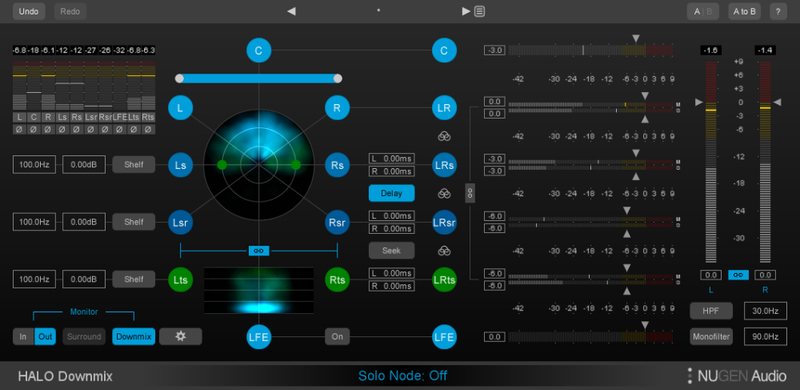
Halo Downmix completes your surround toolset enabling precise surround balancing, mix monitoring and sophisticated stereo fold-down. The glue that brings your workflow together, allowing you to deliver in surround and stereo with ease and without compromise.
Produce better downmixes and enhance the downmix compatibility of your surround mixes. 5.1, 7.1, advanced and compact interfaces perfectly designed for the task in hand, maximising screen real estate. Multiple monitoring modes, quick mute and solo controls promote rapid assessment and critical listening tests. Halo Downmix is the ideal complement to any surround workflow.
Accelerate & enhance
Precise surround control, versatile downmix balancing and mix monitoring for accelerating and enhancing your surround productivity.
- Surround to stereo downmix
- Regulate LF content
- Maintain dialog clarity
- Control excess ambient energy
- Remove rear-delay artefacts
- Fine-tune surround to surround
- In-place surround and stereo monitoring
Expert surround-to-stereo
Simply using standard downmix coefficients can often lead to unsatisfactory results, particularly if legacy upmix practices were used for the original surround mix. Halo Downmix can quickly mitigate these issues and produce a more coherent stereo mix, for example by controlling excessive diffuse sound from added artificial reverberation, or removing delay artefacts introduced in the rear channels.
Fine-tune existing surround material
Adjust existing 5.1 or 7.1 mixes in surround-to-surround mode. Levels of individual channels, and balance of direct vs. diffuse sound can be adjusted to fine tune or re-balance existing surround audio where access to the original mix is not possible.
3D Immersive Extension
The new 3D Immersive Extension option for Halo Downmix adds capability for downmixing 7.1.2 Dolby Atmos bed tracks to 7.1, 5.1 and stereo.
Parallel workflows
Halo Downmix can also be used in conjunction with the included Receive plug-in to enable a parallel surround/stereo workflow. This allows for rapid A/B listening checks between the full surround mix and stereo downmix.
Flexible, intuitive interface
Halo Downmix provides a highly creative solution for precise downmixing of 7.1 or 5.1 mixes to stereo. Intuitive, visual controls for relative levels, timing, and direct/ambient sound balance allow unprecedented fine-tuning, delivering accurate downmixes no longer limited by typical in-the-box processes.
Halo Downmix’s highly customisable interface includes both 7.1 & 5.1 modes, and advanced & compact modes, with quick-select ‘in-place’ monitoring of stereo and surround signals, as well as quick linked solo and mute functions at every stage, and clear visualisation of surround energy distribution.
Typical applications
- Standard and custom surround-to-stereo downmixing
- Surround re-balancing and fine-tuning
- Simultaneous surround/stereo workflow
- Immediate and versatile surround/downmix monitoring
- Downmix rescue
- Surround restoration
- Stereo production within a surround workflow
- Controlling excess ambient energy
- Regulating low frequencies
- Maintaining dialog clarity
- Removing rear-delay artefacts
System Requirements
Available formats
We support AAX (64-bit only), VST, VST3, AU and AudioSuite in both 64-bit and 32-bit versions. Halo Downmix requires a surround-compatible plug-in host (5.1/7.1) such as Pro Tools HD.
Minimum system requirements
- Mac OSX 10.7.x / 512 MB RAM
- Windows (64 bit) Vista or above / 512 MB RAM
Zach McNees
Engineer/mixer for TV & Film.
"Halo Downmix is by far the best sounding downmix plugin I've ever heard."
Tom Marks
Re-recording mixer for TV and Cinema.
"I've been a fan of NUGEN Audio products for a while. They're extremely stable with GUIs that are intuitive."
Mike Wyeld
Royal College of Art.
"One of the smartest moves we've ever made was to adopt NUGEN Audio software tools for our audio design curriculum."





















