


 Log In

Instant Audio Imaging
Newly updated for 2019 with immersive, fluid visuals, full resizability, and a smooth new Stereoize mode, this free plug-in offers a wider world of possibilities for imaging in your mix.
A Taste of Ozone Magic
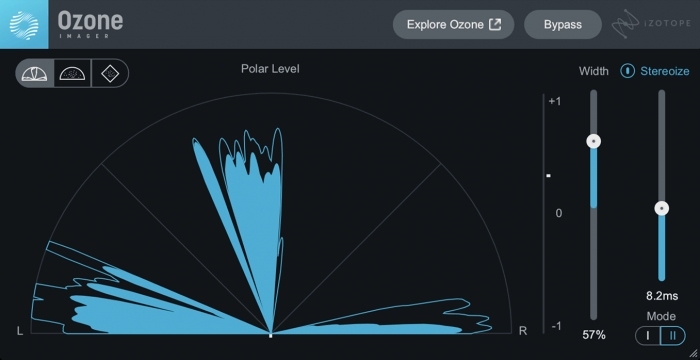
Control the width of any track, perfect for making super-wide sounds or creating narrow, mono-like sources. Make your pianos, synths, and cymbals fill up your stereo image, or tighten up your low end by narrowing bass and kick drums!
Why Ozone Imager?
Control the Width
Easily widen or narrow your sounds to fit them in any mix. It’s the easiest way to spread out a narrow-sounding synth or nestle your bass guitar in the centre.
Stereoize It!

Stereoize can turn mono into stereo, with no need for reverb or doubling. Use the new Stereoize II mode for subtle enhancement, or Stereoize I for a colourful phasing effect.
Visualize Your Sides
Three different vectorscope meters help check your stereo width and see if your left and right channels are lining up properly. Resize your plug-in window to get an even better view of the action!
Listen to Ozone Imager Examples
Before Ozone Imager
After Ozone Imager
System Requirements
Operating Systems
- Mac: OS X 10.11.6 (El Capitan) - macOS 10.15 Catalina (64-bit only)
- Windows: Windows 7 - Windows 10 (64-bit only)
Plugin Formats
- AU (Mac only), AAX, VST2, VST3 (All formats 64-bit only)
Supported Hosts
- Logic Pro X
- Ableton Live 9 - 11
- Pro Tools 12.8 - 2019
- FL Studio 20
- Cubase 9 - 10
- Nuendo 10
- Wavelab 9
- Sound Forge Pro 13
- Sound Forge Mac 3
- Studio One 4
- REAPER 5
- Reason 10
- Audition CC 2019
- Premiere Pro CC 2019
- MASCHINE 2
- Komplete Kontrol
- Bitwig Studio 3
- Final Cut Pro X
Reviews Summary
While it aims to provide a helpful overview, it may not capture every perspective or detail. We encourage you to read individual reviews to make an informed decision.
Users highly recommend this free stereo imaging plugin, praising its ease of use, sound quality, and mix clarity. It is frequently highlighted for its versatility in both widening stereo elements and narrowing specific tracks, such as low-end frequencies, doubled guitars, and wide synths to mono.


