/ Stereo Width / Pana
Klevgrand

Pana

4.6 (73 Reviews)
$19.99 $39.99

50% off until Dec 11

Klevgrand Pana
Klevgrand Pana
Klevgrand Pana - GUI
Klevgrand Pana - Overview Video gallery thumbnail
Klevgrand Pana - Guitar Panning Example Video gallery thumbnail
Buy Now
Product information

Natural Panner

A pan knob for the human ear

Pana is a sophisticated stereo tool designed to let you do more elegant, natural audio positioning than what regular balance panning might accomplish.

Panning an audio signal can be done in several ways, where the most common is to alter the volume on one channel. This is a CPU-efficient way (and many times the best) to achieve a sense of positioned audio. Almost every DAW and mixing console has this feature built-in.

Another way is to add a short delay to one of the channels – the Haas method. This renders a richer sound, but can also make a sound come off as somewhat unnatural.

A more elegant way is to apply a low pass filter to one of the channels. This maintains the audio energy on both channels, but at the same time makes it sound positioned. This works very well on transient rich sounds like drums or other percussive instruments.

Pana uses both the delaying and filtering methods in combination, to achieve a more natural positioning. This makes Pana a very versatile tool for most types of sounds – and having these features in one plug-in makes for a great mixing experience. To top it all off, there’s also a crossover filter that makes it possible to leave the low-end frequencies completely untouched, letting the bass remain fully centered, to prevent the mix from tipping over on one side.

Anatomy
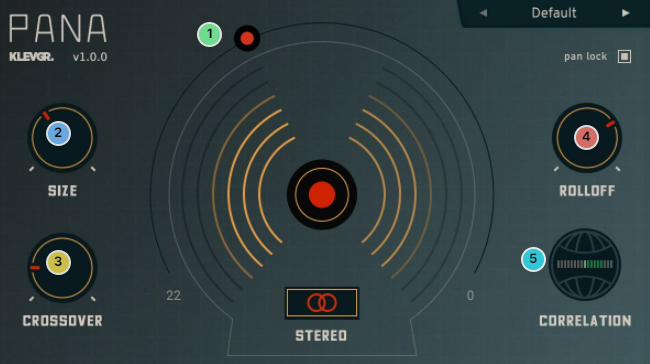
1. Pan the mic - The pan knob in Pana is actually more of a macro controller, controlling multiple parameters for filter and micro delay.

2. Set your head size - Binaural hearing (how humans perceive sound) is highly dependent on time difference between the ears, rather than sound level difference (as set by a normal pan knob). This time difference is bigger if you have a large head. To feel smarter, turn this knob to the right.

3. Keep your bottom in the middle - To prevent the mix from "tipping over", you can keep the low frequencies in the middle.

4. Steepen the curve - Apart from time difference, binaural hearing also relies on the filtering of high frequencies on the opposite side of the sound source. This knob controls that.

5. Not just a phase - For checking the mono compatibility, if your audio signals are in or out of phase.

Features

  • Adjustable micro-delay, tuned after human head size (variable size)
  • Adjustable low-pass filter on opposite channel
  • Bass crossover filter, keeps high-energy low frequencies in the center (to prevent the mix from tipping)
  • Quick button for checking mono compatibility
  • Correlation meter for checking the phase
  • Pan lock – for locking the pan knob when browsing presets
  • A collection of ready-made presets

System Requirements

  • macOS 10.10 or later (optimized for the M1-processor)
  • Windows 7 SP1 or later
  • AU, VST-2, VST-3, AAX

Installation Instructions

Mac

License Redemption

1. Navigate to https://klevgrand.com/redeem > Paste your 16 digit redemption code found in your Plugin Boutique User Account > Click 'Submit!'.

2. Your redemption code has been accepted > Scroll down to Step 2.

3. Click either 'Sign in' if you already have a Klevgrand account, or 'Create new account' if you do not > Fill in your personal details > Click 'I'm ready'.

4. Your account has now been created.

5. Navigate to your email inbox and locate the activation email that you should have received from Klevgrand > Click 'Let me in!' to activate your account.

6. Create a password for your account > Click 'Enter Klevgrand'.

7. Your software and serial number is now available within your Klevgrand account > Click the Apple logo to download the installer file.

Installation

1. Launch the pana_x_x_x_macOS.dmg installer file.

2. Double click the KLEVGR. logo to launch the installer.

3. Click 'Continue'.

4. Click 'Continue'.

5. Click 'Agree'.

6. Click 'Install'.

7. Enter your system password > Click 'Install Software'.

8. Click 'Close'.

9. Navigate back to your Klevgrand My Account page > Click on the serial number to copy it to your clipboard.

10. Launch your DAW > Create a new audio track > Insert Pana onto the channel > Paste your serial number into the box.

Your software is now activated and ready to use within your DAW

Windows

License Redemption

1. Navigate to https://klevgrand.com/redeem > Paste your 16 digit redemption code found in your Plugin Boutique User Account > Click 'Submit!'.

2. Your redemption code has been accepted > Scroll down to Step 2.

3. Click either 'Sign in' if you already have a Klevgrand account, or 'Create new account' if you do not > Fill in your personal details > Click 'I'm ready'.

4. Your account has now been created.

5. Navigate to your email inbox and locate the activation email that you should have received from Klevgrand > Click 'Let me in!' to activate your account.

6. Create a password for your account > Click 'Enter Klevgrand'.

7. Your software and serial number is now available within your Klevgrand account > Click the Windows logo to download the installer file.

Installation

1. Unpack the pana_x_x_x_win.zip installer file > Launch the pana_x_x_x_win.exe file.

2. Click 'I accept the agreement' > Click 'Next'.

3. Click 'Next'.

4. Click 'Next'.

5. Click 'Next'.

6. Click 'Install'.

7. Click 'Finish'.

8. Navigate back to your Klevgrand My Account page > Click on the serial number to copy it to your clipboard.

9. Launch your DAW > Create a new audio track > Insert Pana onto the channel > Paste your serial number into the box.

Your software is now activated and ready to use within your DAW

Plugin Boutique Rewards

Discover the most rewarding loyalty programme among all plugin retailers.

  • Free Loopmasters Samplepacks
  • Discounts on products and courses
  • Extra Virtual Cash claimed immediately at checkout
Find out more

Follow us:

X (Twitter) Facebook YouTube Instagram
Logo Logo

Plugin Boutique Limited, Part of the Beatport Group LLC.

Copyright © 2011-2025 Plugin Boutique. All rights reserved