Log In

Free gifts available with your purchase
What It Does
Nasty Channel is a channel strip that lets you easily add grit, saturation, and distortion to your tracks. Dial in a noise layer to add crunch, grit, or shimmer to your bass, drum, and synth tracks. It serves as both a helpful mixing utility and a powerful creative effect. Add some disturbing girth or subtle thizz to individual tracks, buses, or the master channel. You can get as nasty as you want with this thing.

Barclay Crenshaw
Backstory
I wanted an easy distortion solution with good sounding thizz that I could add to make it pop in the mix. Most producers don't realize the bass is more about the nasty top and the overdrive than the actual sub bass. There are other plugins that kind of offer these features but not in this simple dirty ass format with good presets. This is the simplest, nastiest circuit available. I recorded all the top end sounds myself through disgusting analog pedals and filters. I found this insane guy who got fired from IBM in 1987 for hacking the mainframe to do all the coding. As long as I keep making fresh chocolate chip cookies he keeps working here.
Features
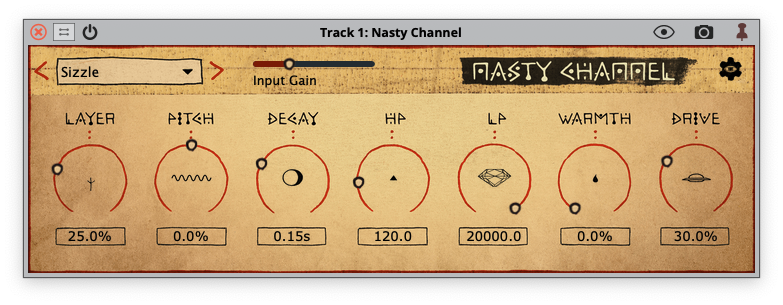
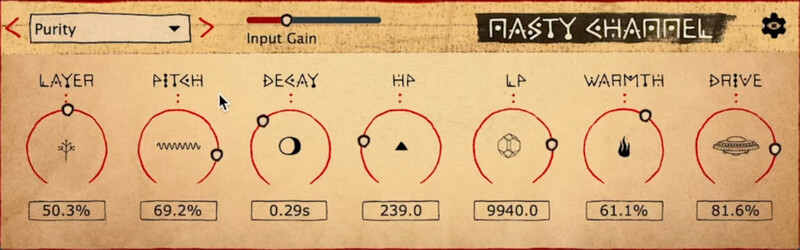
- Layer: Choose between 17 unique noise or oscillator layers to follow your input signal.
- Pitch: Adjust the pitch of the layer signal.
- Decay: Control the decay time of the layer signal. Crank it up for washed out soundscapes.
- HP: Cut out some low end from the layer signal with the highpass filter to keep your subs squeaky clean.
- LP: Use the lowpass filter to tame high end harshness and shape the tone of your sound.
- Warmth: Make your sounds extra toasty with this specialized low/mid warmth processor.
- Drive: Increase drive from subtle saturation to out of control heavy distortion.
- 17 layer sounds and seven streamlined controls for tweaking your sound.
System Requirements
- Minimum OS requirements: macOS 12 or Windows 10.
- Must be used within a DAW that supports VST3 or AU audio effects.

Mark Matsuki
DJ / Producer / Remixer
"Using on every track now. Super intuitive design, instant fizz and easy to control. Everything you need right there on UI. nicely done. Looking forward to future updates with more fizz algorithms maybe>? 5/5"
.jpg?t=1792196459)
Barclay Crenshaw
Producer & DJ (Dirtybird)
"This started in 2015 when EPROM showed me how to add the stock Ableton erosion plugin on top of an 808 to make it have a thizzy top. I thought what if I made an entire machine that added all kinds of crackly tops + distortion to glue it together and make it filthy."
.jpg?t=1792196459)
Walker & Royce
DJs / Producers (Dirtybird Records, HIGHER GROUND, Nurvous Records)
"I threw this in on a recent project and instantly got great results. The audio input detection makes it so much more than a distortion box. You can make a riser out of anything!! Super sick." - Sam Walker