Log In
.jpg)
Free gifts available with your purchase
The Sweet Spot in the Distortion Domain
Devastor 2 is the second generation of D16’s first FX Plugin from the SilverLine Collection series. Devastor is a deceptively simple yet remarkable Multiband Distortion Unit. It is an enhanced version of the distortion unit you can find in Phoscyon, but with full control over multiband processing. This elevates its sonic mangling capabilities to an entirely new level!
Structure
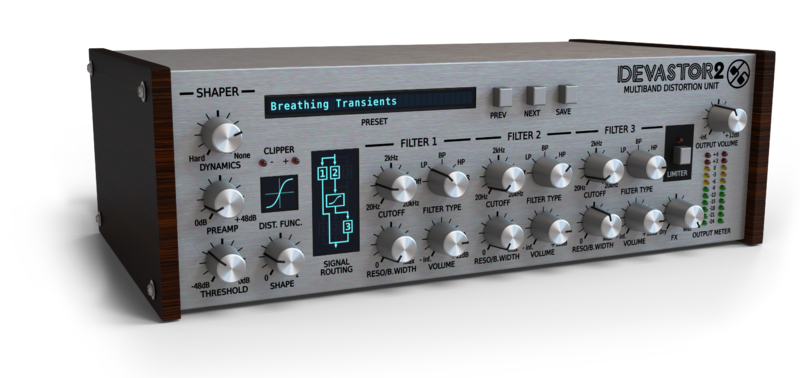
The plug-in consists of four essential blocks:
- Dynamics-flattener module (one-knob controlled input signal compressor)
- Diode-clipper distortion
- Three multi-mode filter sections
- Optionally activated signal limiter
The plug-in offers nine different connection topologies between its filters and diode-clipper. Filters can process the signal before or after it gets fed into the diode-clipper, but some of the configurations even allow the filters to work alongside the clipper, which greatly increases the possible sonic palette.
Devastor’s filters are not simply the peaking EQ type that is commonly used in classic multiband distortion units: rather, they are like those found in analogue synthesizers (low pass, high pass, bandpass and band reject) with adjustable resonance and cutoff parameters. As a result, Devastor has a completely unique sound. Just check out the factory content and hear for yourself!
Versatile and advanced
Devastor can be used to distort and enhance a wide range of sounds, from full-on acid synth sounds to guitar fuzz or an analogue amp with speaker combo. It can even be used with drums to make them sound dirtier and more dynamic! Devastor isn't just good at creating distorted, monster sounds: it can also be used subtly to improve the timbre and character of gentler sounds. For example, reducing the preamp gain, increasing the threshold, and selecting a soft knee for the dynamics will bring out more warmth and detail in a sound without introducing distortion.
When designing Devastor, we applied special antialiasing techniques to the output signal to make sure it was devoid of aliasing (one of the reasons why digital distortion units can sound so cold and un-musical). As a result, Devastor has a warm, musical, and very high-quality sound.
We would like to invite you to listen to the audio examples to whet your appetite and to check out the demo version for yourself if you need any more convincing. Devastor uses algorithms of such high quality that you'd be forgiven in a blind test for wondering if the sound has somehow been sent from the computer to an external analogue distortion unit and back into the computer again!
Features
- Probably the best diode-clipper emulation on the market today
- Analogue-modelled filters of extremely high quality (refined filter models)
- Dynamics flattener (with improved peak detection and more natural envelopes)
- Optional output limiter
- Tag-based preset browser
- Two alternative GUI sizes
- MIDI-learn functionality throughout
- 9 different topologies of connections for filters and the diode-clipper
- 64bit internal processing
- Ultra-low aliasing output
System Requirements
Windows
- Windows 7 - 10 (32 or 64-bit)
- CPU - Single-core 1.5 GHz SSE (Multi-core 2.0 GHz SSE recommended)
- RAM - 8 GB (16 GB Recommended)
- Plugin Formats - VST2, VST3, AAX
Mac
- macOS 10.13 - macOS 12 Monterey (64-bit only)
- CPU - Intel 1.8 GHz / Apple M1 (Intel 2.4 GHz / Apple M1 recommended)
- RAM - 8 GB (16 GB Recommended)
- Plugin Formats - VST2, VST3, AU, AAX
Please Note: This is not a standalone program - a host application (DAW) is required to use it.
Awards


Perc
DJ/producer Perc (AKA Alistair "Ali" Wells) be leading a revival? The Guardian recently identified him as belonging to a fresh wave of "bleak but danceable" British industrial music.
"Within minutes of installing the Devastor it had transformed a remix I was working on."
Chris Lake
Is a Scottish house DJ/producer , Lake first became recognized for his bootleg remixes of The Prodigy's "Climbatize", Leftfield's "Phat Planet", and Eurythmics "Sweet Dreams".
"Devastor has now become the first distortion plugin I turn to for doing crazy things to pads and rhythms. I love it. Great work guys."
Showtek
Is a Dutch electronic dance music act consisting of two brothers, Sjoerd Janssen and Wouter Janssen .The duo regularly manages to reach the top of multiple music charts and work with artists such as Tiësto, Chris Brown and David Guetta .
"One of our favorite Plug Ins , for many years already is Devastor, and now also Devastor two."
It’s been quite a while since “Phoscyon” came out and a small coder team named d16 got loads of attention by music producers. While first being critical about just another TB-303 clone it became clear those guys know what they are doing – so no surprise there the plugin’s successors, being emulat...
Read More