


 Log In

Free gifts available with your purchase

Take your music to the outer limits
Please Note: This is an upgrade for existing owners of Saturn 1. The Full version of Saturn 2 is also available.
A crush on music
Distortion and saturation play a very important role in music production. From subtle, clean and warm tube or tape saturation to the wildest multiband guitar amp effects: FabFilter Saturn 2 delivers.
Saturn 2 introduces a host of new features such as a redesigned interface with modulation visualization, new subtle saturation and linear phase processing for mastering, many new distortion styles, and more.
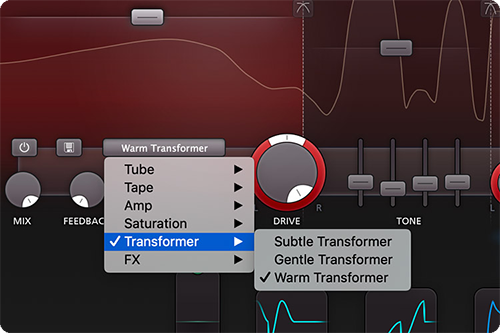
Warmth, Harmonics, Colour and Dynamics
FabFilter Saturn 2 offers a range of different high-quality distortion models, inspired by the vintage sound of tubes, tape, transformers and guitar amps. In addition, you get five creative FX distortion styles to mangle your sounds in weird and unexpected ways.
With its multiband design and per-band feedback, dynamics, drive, tone and modulation options, Saturn 2 will bring a unique flavour to your music.
Bring Your Sounds to Life
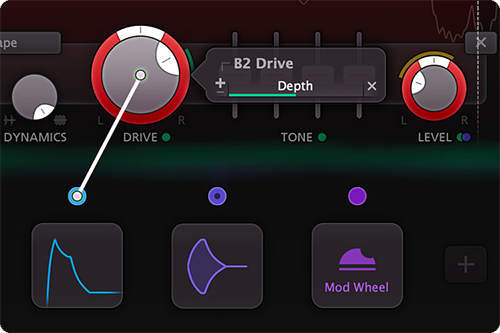
Add life and depth to your music using the extensive modulation section. By applying subtle modulation to crossover frequencies, dynamics, band levels or tone controls, great warmth and definition can be achieved.
With all the XLFOs, EGs, XY controllers/sliders, envelope followers and MIDI sources you will ever need, you get practically unlimited modulation possibilities. Creating new modulation connections could not be easier: just drag and drop. And Saturn 2 visualizes all modulation in real-time to show exactly what's going on.
FabFilter Goodies
Finally, FabFilter Saturn 2 contains all the usual FabFilter goodies: perfectly tuned knobs, MIDI Learn, Smart Parameter Interpolation for smooth parameter transitions, interface resizing and full-screen mode, support for Avid control surfaces, GPU-powered graphics acceleration, extensive help with interactive help hints, SSE optimization, and much more.
Features
- 28 different distortion styles, from subtle tube saturation to heavy guitar amps and bit crushing
- Multiband processing (up to 6 bands), with optional linear phase processing
- Adjustable slope for the crossovers, offering 6, 12, 24 and 48 dB/oct options
- Per-band drive, mix, feedback, dynamics, tone and level controls
- Live modulation visualization for targets and sources
- Optional HQ modes: Good (8x oversampling) and Superb (32x oversampling)
- Fully redesigned, easy-to-use interface, including a new design of modulation sources and floating slot panel
- Interactive multiband display
- Endless modulation options, with all the 16-step XLFOs, XY controllers/sliders, envelope generators, envelope followers, and MIDI sources you will ever need
- Curve control in EGs and transient detection in EFs
- Easy drag-and-drop modulation with 50-slot modulation matrix
- Supports common Pro Tools hardware control surfaces
- Mid/side processing
- Various interface sizes and Full Screen mode
- GPU-powered graphics acceleration
- Unique per-component presets
- Interactive MIDI Learn
- Carefully designed and curated Factory Presets, plus support of V1 presets
- Per-band solo and mute options
- Smart Parameter Interpolation
- Extensive help file with interactive help hints
- Undo, redo and A/B switch features
System Requirements
Mac
- macOS 10.12 or higher (Intel or M1 Apple Silicon processor) (64-bit only)
- VST2, VST3, AU, AAX Native
Windows
- Windows 11, 10, 8, 7, or Vista (32 or 64-bit)
- VST2, VST3, AAX Native
Formats
All FabFilter plug-ins are available in VST, VST3, Audio Units, AAX Native and AudioSuite formats.
Awards


Damien Lewis
Grammy-nominated producer, mixer and engineer
"FabFilter Saturn is my new favorite plug-in. I love distortion and I'll put it on everything from vocals to 808's."


