Buy Degrader, get a free gift with purchase:
Resampler & Bitcrusher
Destroy any mix in bits and pieces
Degrader is a combined resampler and bit crusher plugin. It can be used to simulate the sound of vintage digital gear, as a lofi-effect or distortion unit.
Since all parameters are fully automatable it’s a handy plugin for creating unique and interesting drops, sweeps and other transitions.
Anatomy
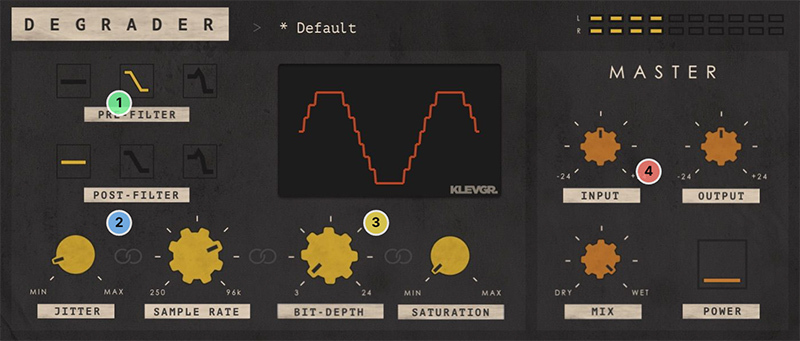
1. Filter bubble - Choose low pass filter character before and after resampling (off, low-q, high-q). Frequency is fixed to half the sample rate value.
2. Resampler - Control the amount of jitter, plus any sample rate between 250 Hz and 96kHz.
3. Crush them bits - Go as low as 3 bits of low resolution, and if that isn't enough - saturate until unrecognizable.
4. Master them bits - Use Input/Output to trim the gain levels, set the blend with the unprocessed signal, and A/B-test the effect with the Power button.
Features
- Resamples between 250 Hz and 96 kHz
- Low pass filter with different characteristics both pre and post resampling
- Bit depth can continuously be altered between 3 and 24 bits
- Additional distortion algorithm
- Parameter linking (control several parameters with one knob)
- Input and output gain control
- Dry / Wet mix
- Several factory presets simulating different vintage gear
System Requirements
- macOS 10.10 or later (optimized for the M1-processor)
- Windows 7 SP1 or later
- AU, VST-2, VST-3, AAX

Please Note: Pana is used as the example:
Mac
License Redemption
1. Navigate to https://klevgrand.com/redeem > Paste your 16 digit redemption code found in your Plugin Boutique User Account > Click 'Submit!'.
2. Your redemption code has been accepted > Scroll down to Step 2.
3. Click either 'Sign in' if you already have a Klevgrand account, or 'Create new account' if you do not > Fill in your personal details > Click 'I'm ready'.
4. Your account has now been created.
5. Navigate to your email inbox and locate the activation email that you should have received from Klevgrand > Click 'Let me in!' to activate your account.
6. Create a password for your account > Click 'Enter Klevgrand'.
7. Your software and serial number is now available within your Klevgrand account > Click the Apple logo to download the installer file.
Installation
1. Launch the pana_x_x_x_macOS.dmg installer file.
2. Double click the KLEVGR. logo to launch the installer.
3. Click 'Continue'.
4. Click 'Continue'.
5. Click 'Agree'.
6. Click 'Install'.
7. Enter your system password > Click 'Install Software'.
8. Click 'Close'.
9. Navigate back to your Klevgrand My Account page > Click on the serial number to copy it to your clipboard.
10. Launch your DAW > Create a new audio track > Insert Pana onto the channel > Paste your serial number into the box.
Your software is now activated and ready to use within your DAW
Windows
License Redemption
1. Navigate to https://klevgrand.com/redeem > Paste your 16 digit redemption code found in your Plugin Boutique User Account > Click 'Submit!'.
2. Your redemption code has been accepted > Scroll down to Step 2.
3. Click either 'Sign in' if you already have a Klevgrand account, or 'Create new account' if you do not > Fill in your personal details > Click 'I'm ready'.
4. Your account has now been created.
5. Navigate to your email inbox and locate the activation email that you should have received from Klevgrand > Click 'Let me in!' to activate your account.
6. Create a password for your account > Click 'Enter Klevgrand'.
7. Your software and serial number is now available within your Klevgrand account > Click the Windows logo to download the installer file.
Installation
1. Unpack the pana_x_x_x_win.zip installer file > Launch the pana_x_x_x_win.exe file.
2. Click 'I accept the agreement' > Click 'Next'.
3. Click 'Next'.
4. Click 'Next'.
5. Click 'Next'.
6. Click 'Install'.
7. Click 'Finish'.
8. Navigate back to your Klevgrand My Account page > Click on the serial number to copy it to your clipboard.
9. Launch your DAW > Create a new audio track > Insert Pana onto the channel > Paste your serial number into the box.
Your software is now activated and ready to use within your DAW


























