


 Log In

Modern Degradation
Codec is for sound destruction.
Unlike other plugins that simulate degradation in “old school” ways like vinyl, tape or cassette, Codec degrades sound in the most common way we hear today, through internet compression algorithms!
Codec is essentially a container that holds an audio compressor (not that kind of compressor) so you can compress and then decompress your sound, in real time, in your DAW of choice.
Packet Drop
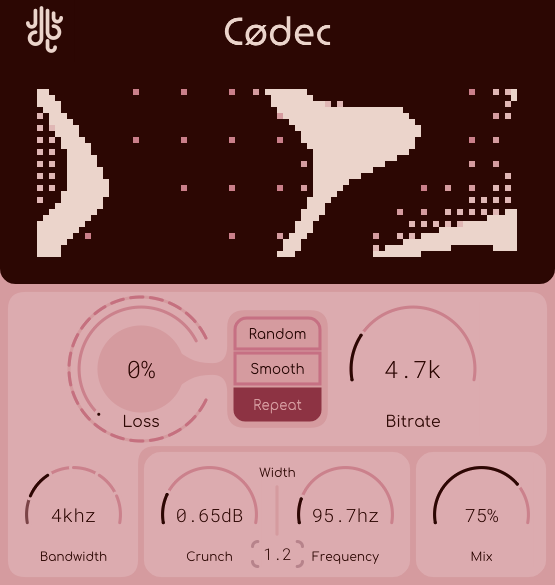
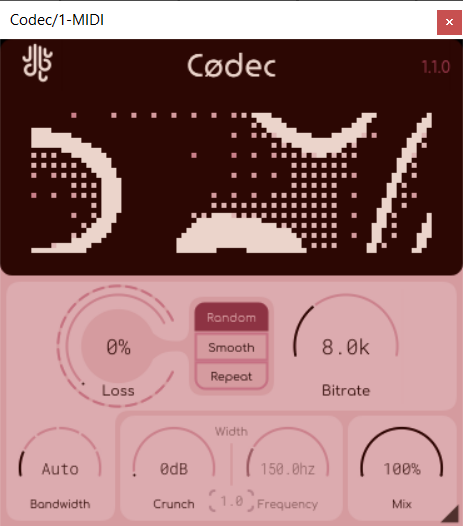
Codec can simulate a poor internet connection through the use of it's "Loss" system (as well as how 'lost packets' are handled). Packets can either be lost totally (and the internal algorithm will try to "reconstruct" your sound in real-time), or they can be held and repeated (for a super glitchy effect).
A "Bit" Of Crunch
You can take Codec to it's limits via the crunch section. Massive amounts of gain can be applied to the frequency section of your choosing, and then removed once compression & decompression have been completed, keeping your sound at the same volume but adding even more artifacts.
Mode Selection
The internal state of the algorithm can also be altered. If you click on the Lese logo in the title bar, you can switch between a "voice" mode, a "music" mode, and a "low-latency" mode. Each of these modes respond to incoming sounds a bit differently.
Features
- Bitrate adjustment for real-time packet size constraint
- Bandwidth selector feature, allowing for bandwidth adjustment beyond filtering out artifacts
- Coloration (crunch) option
- Packet loss simulation
- A funky visualizer
- Fully vectorized, resizable interface
System Requirements
- Windows: VST3
- OSX (Intel / ARM): VST3, AU
Reviews Summary
While it aims to provide a helpful overview, it may not capture every perspective or detail. We encourage you to read individual reviews to make an informed decision.
Users highly praise this experimental bitcrush and glitch plugin by Lese for going beyond standard bit-reduction. Reviewers love its ability to add unique crunch, stutter effects, and nostalgic 1990s-2000s VOIP codec compression to their audio. It is frequently highlighted as a fun, well-designed, and surprisingly useful tool for creative layering on melodies and percussive elements to achieve a glitchy, futuristic-vintage vibe.


