


 Log In
Free gifts available with your purchase
Note: Customers who purchased MORPH 2 on or after January 1st, 2024 are eligible for a free MORPH 3 upgrade via the Zynaptiq web site. For ZAP III users who purchased from November 1st, 2023, a free upgrade that includes MORPH 3 PRO will be available as well.
Real-Time Audio Morphing & Style Transfer
MORPH 3 is a real-time plug-in for audio morphing, the sonic equivalent of one object slowly changing its shape to become a different object - for example, one face becoming another.
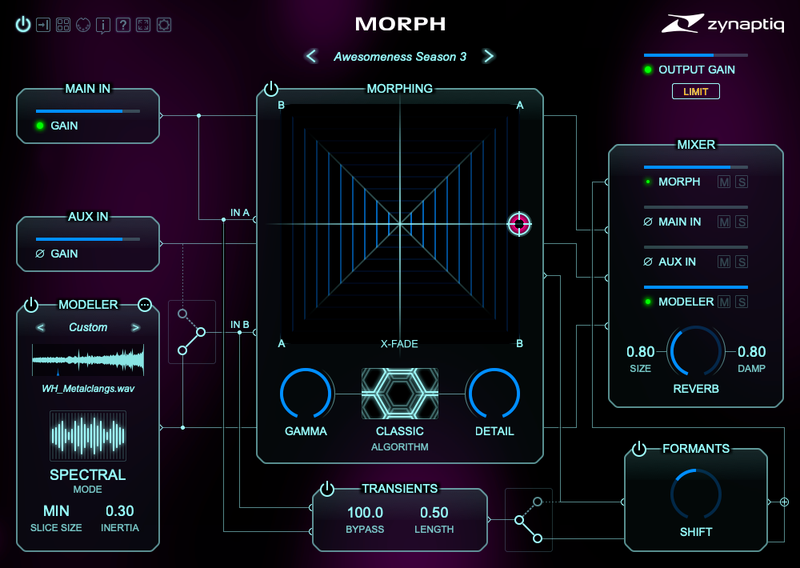
Super-charged with a selection of up to 11 different morphing algorithms, a style transfer and file playback module, transient bypass options, a stunningly clean formant shifter as well as a lush reverb that seems to extend sounds much like some highly revered vintage hardware boxes, MORPH 3 opens up a whole new universe of sounds to explore.
Create seamless morphing transitions, new hybrid sounds that combine aspects of existing ones, physically impossible instruments, the furthest-out creature and robot voices, talkbox-esque effects and other outrageously unique new sounds. Whether you're a sound designer for film or games looking for that signature sound, or a music producer or remix artist wanting to create new content from existing recordings...look no further, MORPH is for you!
Features
A massive upgrade to the classic MORPH 2, MORPH 3 and MORPH 3 PRO extend the classic's sonic bandwidth even further, adding new algorithms, a patent-pending real-time style transfer module, file playback, transient bypass functionality, a redesigned and scalable UI, and much, much more.
Heard on blockbuster feature films and shows, AAA+ games and state of the art music productions, MORPH takes two input sounds and creates a new, hybrid sound that features characteristics of both, and that can smoothly transition from one to the other. Creature voices, alien hardware, futuristic ambiences, unique new instruments - you name it, MORPH has you covered.
What's New in MORPH 3
- 4 New morphing algorithms: INTERWEAVE V3, IMPRINT SMOOTH, IMPRINT CRYSTAL, ENHARMONIC. The entire suite of V2 algorithms is included, too, of course, for a total of 9 algorithms.
- New MODELER module that provides particle/granular synthesis based style transfer functionality, as well as straight file playback.
- Improved FORMANT SHIFTER with +-24 semitones of range; the v2 formant shift algorithm can be activated for the v2 algorithms to get the exact same v2 sound, using a prefs setting.
- New TRANSIENT BYPASS module that can significantly improve the morphing results. The transients are taken at the A and B inputs to the morphing, and added back in, with their mix controlled by the morphing X/Y control. The transients can be boosted, and may also bypass the formant shifter for increased crispness.
- Optional internal double precision processing - internal processing can be switched to 64 bit for increased resolution.
- New soft-knee output limiter.
- Redesigned, scalable UI with interactive-signal-flow-diagram design, built using vector graphics for sharp visuals when zooming, with up to 200% UI scaling for 4k and larger displays.
- New Preset Manager application.
- Previous/Next Preset can now be controlled via MIDI for improved accessibility.
System Requirements
Windows
- Windows 10 or newer
- CPU with at least 2 Cores; Intel CPU recommended, i7 or better recommended.
- Steinberg VST 2.4, VST 3 or Avid AAX compatible 64-bit host software, processing audio as 32 bit float.
- iLok.com account for machine- or iLok 2/3 based activation (of full as well as demo versions)
- Internet Connection for Software Activation (though not necessarily on the computer used for audio)
Mac
- macOS 10.15.x or newer, 64 bit.
- Apple Silicon CPU, or Intel CPU with at least 2 Cores (i7 or better recommended).
- Apple AU (AudioUnits), Steinberg VST 2.4, VST 3 or Avid AAX Native compatible Host software, processing audio as 32 bit float.
- iLok.com account for machine- or iLok 2/3 based activation (of full as well as demo versions)
- Internet Connection for Software Activation (though not necessarily on the computer used for audio)


Reviews Summary
While it aims to provide a helpful overview, it may not capture every perspective or detail. We encourage you to read individual reviews to make an informed decision.
Users praise the plugin as an exceptional, high-quality spectral processor and creative tool for sound design, foley, and music production. Reviewers particularly highlight its advanced morphing algorithms, effective formant control for vocal mixing, and overall fun and intuitive performance.


