Log In

Free gifts available with your purchase
PSP Wobbler
THE DARK SIDE OF THE WOBBLE!
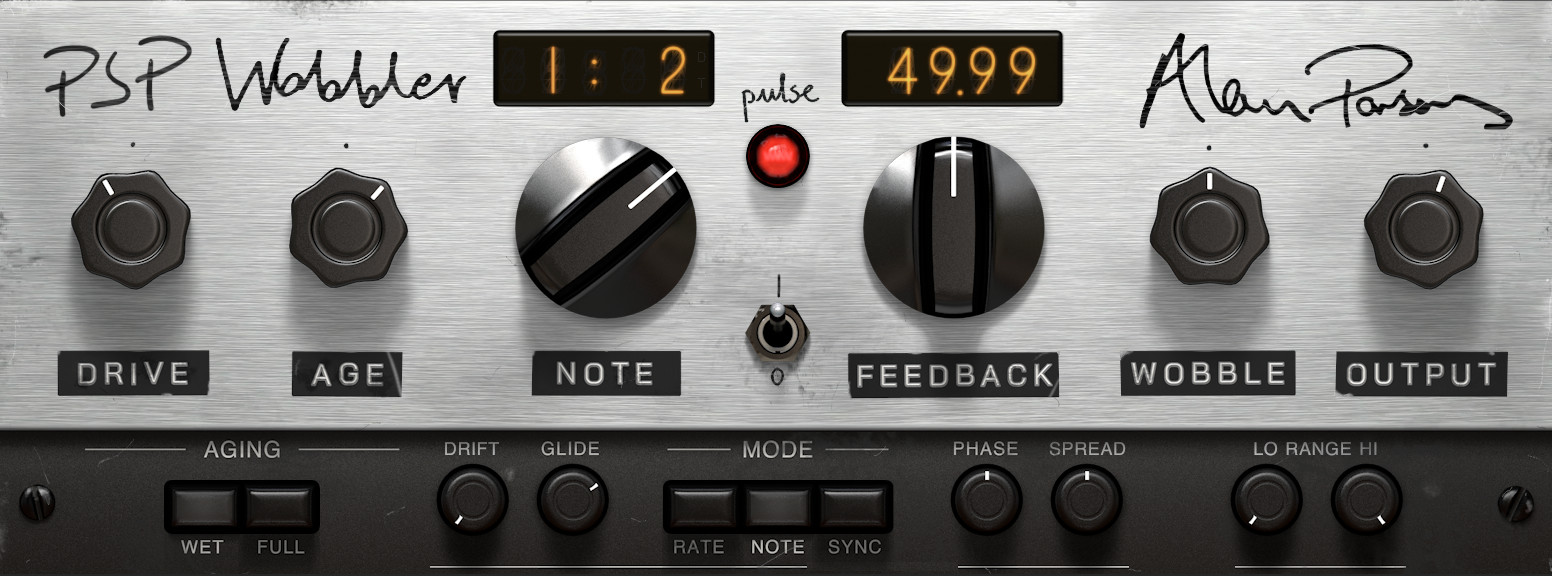
PSP Wobbler is a modulation effect plug-in, inspired by and developed in collaboration with the legendary recording engineer, producer, and musician Alan Parsons. PSP Wobbler faithfully recreates the sound of Alan’s secret weapon, the Frequency Translator - a handmade experimental device built by Keith Adkins, which created the unique modulation effect heard on “Time” from Pink Floyd’s The Dark Side of the Moon.
PSP Wobbler uses frequency shifting to create non-harmonic phase differences that form a unique “wobble” with elements of phasing, flanging, and even a rotating speaker feel. It takes this sound well beyond the original Frequency Translator’s capabilities, adding controllable Drive, Ageing, Drift, and Spread, as well as tempo sync, a pair of EQ filters to control the effect’s frequency range, and more. Get ready to explore a range of modulation sounds that are as groundbreaking as the original hardware was!
Features
- Frequency shift up to ±25 Hz, manually controlled or set as a clock division of your DAW tempo
- Frequency shift can be set to follow tempo changes or stay at a fixed amount through a song
- Wobble amount is controlled via wet/dry mix
- Drive and Age controls let you dial in saturation and character
- Ageing modes for adding Drive / Age to wet signal alone or to both wet and dry signals
- Separate controls for Feedback, thermal and voltage Drift, Phase, and stereo Spread
- Adjustable lower and upper limits for effect frequency range
System Requirements
PC
- Windows 7 - 11
- VST / VST3 / AAX compatible host application
- Up-to-date iLok License Manager application required
Mac
- OS 10.14 Mojave - 15 Sequoia (64-bit)
- AU / VST / VST3 / AAX compatible host application
- Up-to-date iLok License Manager application required

Alan Parsons
Grammy Award winning producer, musician, and audio engineer (Pink Floyd, The Beatles, Pilot, Al Stewart, The Alan Parsons Project ...)
"I have been proud to help PSP develop this amazing new plug-in which emulates some of the effects I used on The Dark Side Of The Moon."