


Buy PSP L'otary 2, get a free gift with purchase:
High-Quality Emulation of a Rotary Speaker
PSP L’otary2, is an ultra high-quality emulation of a rotary speaker. PSP based their algorithm upon two original and legendary models: the Leslie® 122 and Leslie® 147, and spent hundreds of hours perfecting their simulations.
In other words, this is not just another modulation effect! PSP L’otary2 is capable of reproducing the classic sounds of those famous rotary speakers as precisely as possible.
PSP L’otary2 is also capable of creative new sounds and tones not possible with the original. For example, you could set up both the rotating high frequency horn and the rotating low frequency drum independently from each other, and emulate speakers with a static drum or even a broken horn or drum engine.
PC
In order to run PSP L'otary2 in 30-day trial mode or activate it, you need an iLok user ID which you can create for free at www.ilok.com, and you need to install the free iLok License Manager application but you don't need any hardware dongle.
You can activate the license in 3 separate locations, each of which can be either a computer or an iLok dongle (2nd generation or above). You can move these licenses at any time using PACE's iLok License Manager software.
VST3:
- Windows 7 – Windows 11
- 64-bit VST3 compatible application
VST:
- Windows 7 – Windows 11
- 64-bit VST compatible application
AAX:
-
Windows 7 – Windows 11
-
Pro Tools
All DAWs:
- The latest iLok License Manager application installed
Mac OS X:
Audio Unit:
- macOS 10.14 – macOS 14 Sonoma
- 64-bit AudioUnit compatible host application
VST:
- macOS 10.14 – macOS 14 Sonoma
- 64-bit VST compatible host application
VST3:
- macOS 10.14 – macOS 14 Sonoma
- 64-bit VST3 compatible host application
AAX:
- macOS 10.14 – macOS 14 Sonoma
- Pro Tools
All DAWs:
- The latest iLok License Manager application installed
Awards

Hank Linderman
"It's not only the best rotary sim, it's one of the best rotary cabinet sounds I've ever used."
Steve Nathan
"Organ, Wurly, Clapton style guitar, Lennon style vocals, synths, pretty much anything you would want to hear through a real one, sounds great through L'otary."
Kenny Greenberg
"L'otary is the most authentic Leslie cabinet sound I've ever heard."
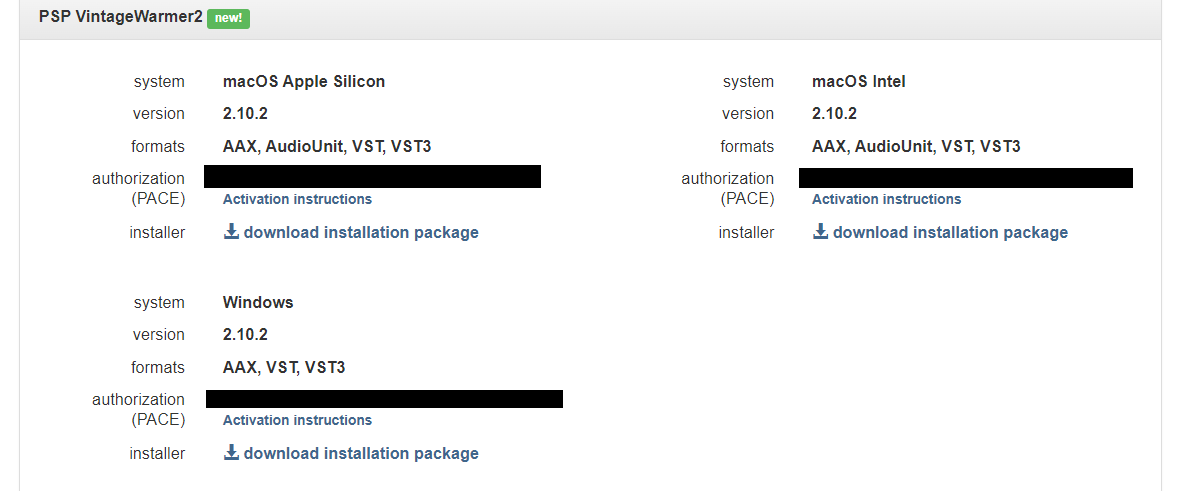
Please Note: PSP VintageWarmer2 is used as an example.
Activation
1. Visit the PSP Registration Centre and create/log into your PSPaudioware account.

2. Select the Manual Product Activation link and copy and paste/manually enter the serial number that is provided with your User Account. > click 'Activate!.'

3. Your PSP product will now show up in your PSP customer account. Your 30-digit iLok activation code will also be listed under authorization (PACE). Download the relevant installer.
iLok Registration
1. Go to the iLok website and create a new account if you are not currently registered and do not have the iLok Licence Manager installed on your computer.

2. Download and install the iLok License Manager.
3. Open your iLok license manager application > click 'Sign In'.

4. Enter your iLok registered User ID and password > click ‘Sign In'.

5. Once you are signed in, click the ‘Redeem’ icon which is located at the top-right corner of the iLok Licence Manager’s interface.

6. Copy and paste/manually enter the 30-digit code from your PSP Audioware account into the available Activation Code boxes, and then click ‘Next'.

7. Select your activation destination > Click 'Activate'.

8. Click 'Ok'.

Installation
Mac
1. Open the recently downloaded .dmg file to begin the installation.
2. Click 'Continue'.

3. Click 'Continue'.

4. Click 'Continue'.

5. Click 'Agree'.

6. Click 'Continue'.

7. Click 'Install'.

8. Click 'Close'.

9. Open your DAW > Open your newly installed software.
Your software is now activated and ready to use.

PC
1. Open the recently downloaded .exe file to begin the installation.
2. Click 'Next >'.

3. Select 'I Accept the Agreement' > Click 'Next'.

4. Click 'Next >'.

5. Click 'Next'.

6. Click 'Next'.

7. Click 'Next' to begin the installation.

8. Click 'Finish'.

9. Open your DAW > Open your newly installed software.
Your software is now activated and ready to use.



