Log In
Free gifts available with your purchase
Important Note: This is an educationally discounted version of TIME FACTORY II and is available for full-time students or faculty at an educational institution only. Please check your eligibility before purchase on the Educational Discount Help Centre Article.
Once purchased please send your order number and proof of educational status to support@pluginboutique.com.
The full version of TIME FACTORY II is also available.
Precision Batch Time Stretching And Pitch Shifting
Important Note: TIME FACTORY II is available as Mac OS X stand-alone application only.
TIME FACTORY II for Mac OS X is a professional application for high-quality audio time stretching and pitch shifting. It features the critically acclaimed MPEX, ZTX and ClearScale algorithms and allows changing duration and pitch of any audio file independently over a very wide range of stretch ratios – with unprecedented fidelity and timing precision. TIME FACTORY II supports phase-synced processing of mono, stereo and multichannel files up to 384kHz sample rate, all popular audio file types including broadcast formats with meta-data preservation, and features industrial-grade batch processing as well as formant shifting and correction. Whether you need to perform frame rate (FPS) conversion for film sound, change the tempo and/or pitch of music tracks for production or remixing a song, design new sounds or slow down music for transcription – TIME FACTORY II is your weapon of choice.
Straight Forward
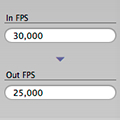
Getting sample accurately precise results with TIME FACTORY II is fast and easy. Drop some files onto the application, set stretching/shifting amount, hit process...done. You can enter stretching factor either as new target duration in hours/minutes/seconds, a percentage of change in length, source and target BPM or FPS, the equivalent pitch transposition amount, or use sample frames as unit for the new target length. Whatever your preferred unit of measurement is, TIME FACTORY II lets you use it in a straight-forward way.
Precision, As In "Precision"
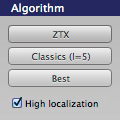
When stretching audio, it is vitally important that timing is precise. Particularly with very long files, such as a film reel, this can be challenging for other solutions, where you may end up with loosened lip sync or drum timing, even flanging in the transients. Not so with TIME FACTORY II, which uses extremely high precision mathematics to ensure timing accuracy to the highest degree possible without the obvious artifacts commonly associated with time stretching. Which is why TIME FACTORY II is recognized across the industry as one of the best possible solutions for stretching audio.
Freedom Of Choice
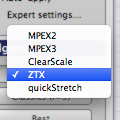
TIME FACTORY II doesn't come with one industry standard stretching algorithm, it comes with five. Each of these algorithms - MPEX 2, MPEX 3, ZTX, quickStretch, ClearScale - has its own particular strengths, parameters and applications. This gives you the option to pick and choose algorithms depending on preference, signal type and the intended result. You make the choice, TIME FACTORY II does the work.
Compatible To The Max
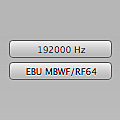
TIME FACTORY II supports phase synced processing of an arbitrary number of channels, making it an ideal solution for frame rate conversion of cinematic and broadcast material. It also supports any sample rate up to 384kHz (DXD), and any bit depth up to 32 bit, making it compatible to today's highest fidelity formats. Speaking of which...of course, TIME FACTORY II also supports all popular file formats, including AIFF, WAV, BWF with meta-data preservation, WAVE64, MBWF/RF64, CoreAudio and even the venerable SoundDesigner II. It also imports MP3 and AAC directly from iTunes if required. Whatever you throw at it, TIME FACTORY II can deal with it.
Fast, Faster, TIME FACTORY II
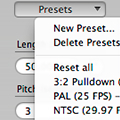
High-quality time stretching can take time. A lot of it. Which is why you may not want to waste any, waiting for the process to complete. Hence TIME FACTORY II is built around an industrial grade batch processing engine. Set up parameters, click "process", and go ahead and focus on the other tasks at hand while your Mac processes all of those files for you. And to speed up your workflow even more, TIME FACTORY II comes with factory presets for common tasks like PAL<->NTSC frame rate conversion, and allows you to save your own custom settings. It's not a time stretching application, it's a time stretching powerhouse. Have a look at what TIME FACTORY II can do for you using the free trial today!
Features
- Batch time stretching, pitch shifting and formant shifting application for Mac OS X.
- ZTX, quickStretch, MPEX 2, MPEX 3 and ClearScale algorithms.
- High precision even with extremely long audio tracks.
- Support for phase synced processing of mono, stereo, 5.1, 6.1, 7.1 and N.1 channel layouts.
- Support for sample rates up to 384kHz (DXD) and bit rates up to 32 bit.
- Option to "transpose" files, a.k.a. sample rate conversion.
- Support for AIFF, WAV, BWAV (with meta data preservation), CAF, WAVE64, MBWF/RF64 and SoundDesigner II files.
- Entry of stretching factor as BPM, seconds, sample frames or FPS
- Factory presets for common scenarios including 3:2 pull-down, PAL <-> NTSC frame rate conversion, double speed and half speed.
- Option to save user presets to speed up repeating tasks.
- Algorithm parameters to optimize processing for speech, complex material, monophonic or polyphonic music, and more.
- Perfect for frame rate (FPS) conversion.
System Requirements
- Mac OS X 10.6.8 or newer
- Intel CPU
- 2GB of RAM, though we strongly suggest more
Channel & File Formats Supported:
- Phase-synced processing of any channel count, including but not limited to mono, stereo, 5.1 and 7.1
- All popular audio file formats including AIFF, WAV, BWF, CAF, WAVE64, MBWF/RF64
- Meta-Data is preserved for BWF
- Bit rates up to 32bit
- Sample rate up to 384kHz
Important Note: TIME FACTORY II is available as Mac OS X stand-alone application only.