


 Log In

Free gifts available with your purchase
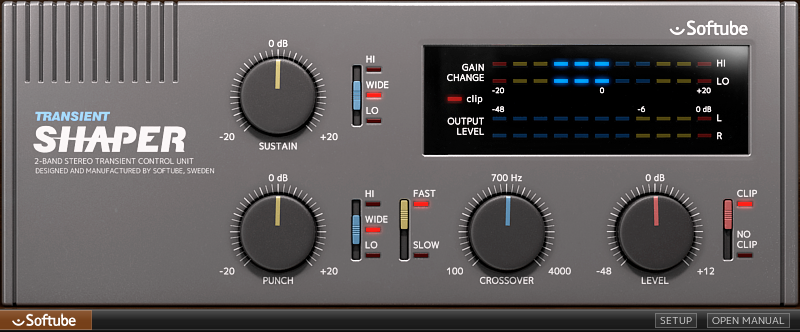
Being able to control the attack and decay of a sound is tremendously useful for anyone mixing music. But Softube's Transient Shaper goes beyond that due to the fact that it's a dual-band processor. This means that the user can set it to affect only the treble or bass portion of a sound—separately for the Sustain and Punch parameters—and leave the rest untouched. This opens up a new realm of possibilities.
Transient shaping has become a vital technique in music mixing. The ability to sharpen or soften the onset of a sound, as well as lengthen or shorten the decay, has proven very useful for giving each sound just the right size and position in the mix. Transient Shaper takes this concept one step further, by letting the user affect either the entire frequency range—as most similar tools—or only the treble frequencies or bass frequencies.
Use Cases
For example, on drum overheads, this means you can turn up the Sustain knob and set its frequency control to Wide. This will simultaneously stretch out the room sound and cymbals, as well as give you more sustain and boom to the toms. But let's say you don't want boomier toms. Then you set the Sustain knob's frequency control switch to Hi, in which case the Sustain processing only affects the high frequencies, i.e. the cymbals and room, but leaves the toms just the way they are. Set the switch to Lo, and hear how you now only get boom from the toms, but the room sound and cymbals stay unaffected.
More than Percussion
The dual-band operation makes Transient Shaper useful for much more than drum and percussion sounds. Give a vocal track clarity and presence by adding some high-frequency transients—add Punch with its frequency slider set to Hi. Or create a darker and more rounded sound that oozes with vintage vibe by instead turning down the Punch knob. Use it on piano, bass, guitar, electronic drums—Transient Shaper works on a wide range of sound types.
The crossover frequency is user selectable, as is the Punch behavior (Fast or Slow). We also added an output distortion section called Clip.
Features
- Dual-band transient processing tool
- Add or reduce punch and/or sustain from any sound
- Affect either the whole frequency spectrum, only the high frequencies or only the low frequencies
- User-selectable crossover frequency
- Clip section adds output distortion
System Requirements
- macOS Big Sur 11, Monterey 12, Ventura 13
- Windows 10 (64-bit), Windows 11
- Softube account
- iLok account
- Computer with AU, VST, VST3, and/or AAX-compatible DAW host software
- Internet access (for downloading installers and managing licenses)
Supported CPU Families
- Apple macOS computers with Intel Core i3/i5/i7 or Apple silicon (M1 or newer) CPU. Apple silicon is supported natively.
- Windows computers with quad-core Intel Core i3/i5/i7 or AMD quad-core processors with SSE 4.2 support.
- Other Intel processors (Celeron, Pentium, and Xeon) are compatible if they support SSE 4.2 instructions.
Supported Host Software (DAW)
Any 64-bit VST, VST3, AU, or AAX (Pro Tools 11.0.2 or higher) compatible host application should work. However, due to plug-in host differences between DAWs—and our rigorous standards—Softube only officially test their plug-ins and instruments in the most recent versions of Pro Tools, Logic Pro, Cubase, Ableton Live, Studio One, and Reaper. Softube plug-ins are not tested regularly in non-listed systems. They will likely work if the system requirements are met. However, the manufacturer cannot guarantee a solution for issues in unsupported systems.
Softube strongly recommend using VST3, as some of their plug-ins have features that are not present in the older VST format. Supported sample rates: 44.1, 48, 88.2, 96, 176.4, and 192 kHz, in both mono and stereo. The most recent maintenance release of your DAW application is recommended. AAX DSP is not currently in active development. TDM/VENUE/RTAS are no longer supported. See Legacy Installers.
Important Note: Make sure that you always use the latest iLok License Manager. It is not included in the Softube installer but can be downloaded from www.ilok.com
Computer Music
The world’s best selling magazine dedicated to making great music with your Mac or PC.
"Transient Shaper is a well-conceived plugin that offers plenty of control without being complicated and CPU hungry. The dual-band architecture makes it more than just a drum processing tool."
Arjan Rietvink
Chief mastering engineer (Armin van Buuren, Ferry Corsten, Julian Calor).
"The Transient Shaper is a great tool for adding dynamics to compact mixes. The sound is punchy without sounding harsh."
Koen Heldens
Koen has worked with the likes of Beyoncé, Lil Wayne, Missy Elliott and Timbaland.
"The unique ability to isolate and focus on a portion of the signal and alter its attack/sustain is just mere brilliant."
Reviews Summary
While it aims to provide a helpful overview, it may not capture every perspective or detail. We encourage you to read individual reviews to make an informed decision.
Overall, customers highly praise the Softube Transient Shaper as an intuitive, punchy, and versatile tool that excels at shaping drums, percussion, and guitars. Users appreciate its natural sound, attack and sustain controls, built-in soft clipping, and high value for the price, frequently making it their go-to transient plugin. Minor criticisms include a desire for more presets, visual waveform displays, full multiband capability, and occasional tweaking required to find the sweet spot compared to newer competitors.


