Log In

Free gifts available with your purchase
Tremolo and Auto-Gate
Analog Guitar Tremolo Effects and Beyond with Beat-Synced Rhythmic Chopping
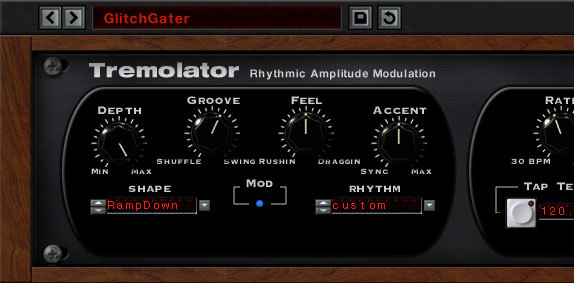
Need tremolo? Soundtoys has got you covered. Tremolator emulates the tremolo effect of classic hardware like the old Fender Vibrolux guitar amp and even the great tremolo sound of the Wurlitzer electric piano.
Soundtoys added dynamic control of speed and depth that lets the tremolo respond to the music, and then tossed in MIDI sync to lock your tremolo to tempo. Of course, Soundtoys also included a programmable Rhythm Editor that lets you write custom patterns and turn Tremolator into an outrageous rhythmic auto-gate. Vintage guitar effect and modern remix tool at your service.
Tremolo of Old
Soundtoys broke out the test equipment and analyzed the waveforms created by some of their favourite old hardware. Then Soundtoys used the custom LFO waveshape editor built into Tremolator to perfectly recreate them.
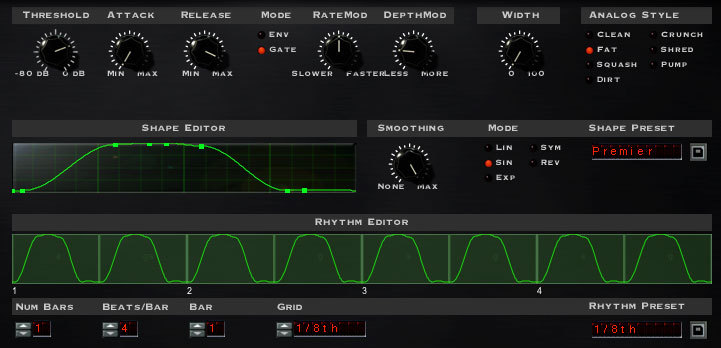
It’s very interesting to look at these shapes and see why each of these vintage pieces has a unique sound. Pass that through Soundtoys' Analog mode, which emulates going in and out of a piece of analog hardware, and you’ve got all the pieces of a great-sounding tremolo.
Chop Shop: Auto-Gate Mania
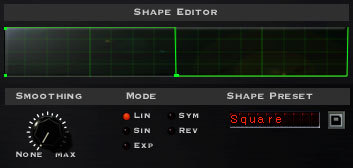
Switch the nice smooth tremolo waveforms over to a sharp squarewave and you turn this into a monster of an auto-gate. You can lock it to MIDI with the flip of a switch, then select 1/8th notes, 16th notes or whatever fits the rhythm you need.
If straight note pulses aren’t what you need, use the Rhythm Editor to write your own cool groove (You can even pull a groove from Soundtoys' library). More? Add some swing or shuffle, accents, and analog mode. You can even use the Waveshape Editor to tighten or loosen the gate time.
Get Dynamic
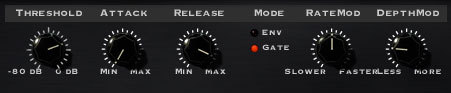
In the Tweak menu, you’ll find the Dynamics controls. These parameters let your playing control the speed and/or depth of the modulation.
You can create cool speedups or slowdowns based on how loud or soft you play. You can create smooth increases in depth as your chords fade out, or heavy tremolo that fades away. Plus there are already some great presets in Soundtoys Dynamics folder that you can “tweak” to fit your needs.
Features
- Unmatched auto-gate rhythmic control for a powerful remix tool.
- Lock to MIDI for tempo and beat-synced tremolo.
- Dynamic controls allow real-time musical and emotional expression.
System Requirements
Mac
- macOS 10.12 Sierra and later (Intel / Apple Silicon supported) (64-bit only)
- VST2, VST3, AU, AAX Native, AAX AudioSuite
Windows
- Windows 7 and later (64-bit only)
- VST2, VST3, AAX Native, AAX AudioSuite
Supported Sample Rates:
- Minimum - 44.1 kHz
- Maximum - 192 kHz
Important Notes:
- A FREE account at ilok.com is required (a physical USB iLok is not required)
- This software is 64-bit only and is not compatible with 32-bit systems.
Officially Supported Host Applications:
All version 5 Soundtoys products come in 64-bit VST2, VST3, AU and AAX Native plugin formats.
Supported DAWs:
- Pro Tools: 12 or higher (Mac & PC: AAX Native and AudioSuite)
- Logic Pro X: 10.7 or higher (Mac: AudioUnits)
- Ableton Live: 10.0 or higher (Mac: AudioUnits, VST2 & VST3; Windows: VST2 & VST3)
- Studio One: 4.5 or higher (Mac: AudioUnits, VST2 & VST3; Windows: VST2 & VST3)
- Cubase: 9.5 or higher (Mac & PC: VST3)
- Nuendo: 8 or higher (Mac & PC: VST3)
- Reaper: 6 or higher (Mac: AudioUnits, VST2 & VST3; Windows: VST2 & VST3)
- Bitwig: 4 or higher (Mac & PC: VST2 & VST3)