Log In
Free gifts available with your purchase
Pitchmap::Colors
Bring COLOR to Your Sound
Conform audio to your song's key/scale, colorize your basses and synths, and turn atonal elements into gloriously resonant harmonic textures with unprecedented ease, quality and fun. Designed in collaboration with music production prodigy Au5, PITCHMAP::COLORS fuses Zynaptiq's popular pitch-mapping tech with additional transformation features and a user interface stream-lined for creative sound design and real-time performance. Bring COLOR to your sound now!
Colorize That Sound
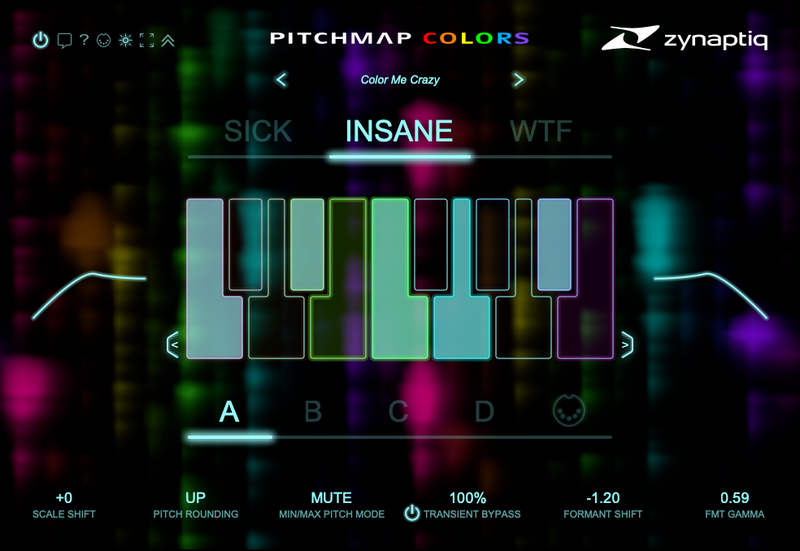
Like its popular sibling PITCHMAP, PITCHMAP::COLORS conforms any audio to whatever tonality you want, quickly and easily. However, it does so with a distinctly electronic flavor, geared for sound design. Switch between the somewhat natural sounding SICK, the gloriously resonant INSANE, and the mesmerisingly electric WTF (Warp Those Frequencies) modes with a single click!
Map Those Pitches
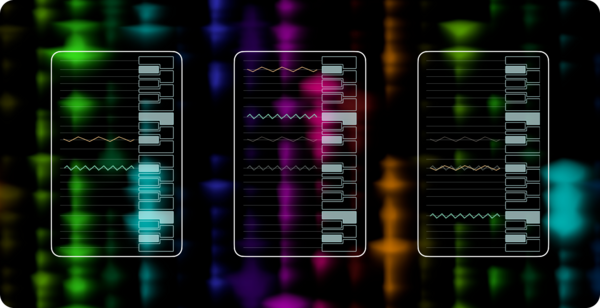
PITCHMAP::COLORS works by separating the input audio into separate sounds based on their pitch, then shifting each up or down to fit a pitch grid individually. This grid is set up easily using the UI keyboard or a MIDI keyboard - just play the chords you want to shape the tonality of your audio. Turn major into minor, A minor 7 to F# Major, or wobble bass and noise into harmonic content...it's like magic!
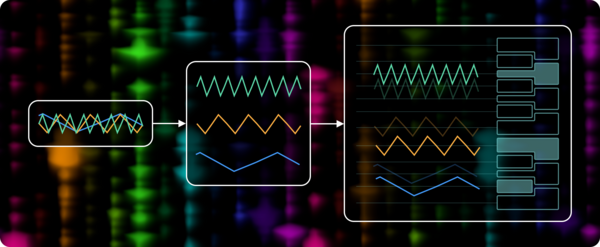
Mixed input audio is separated into individual notes and mapped to grid slots.
Tweak That Sound
PITCHMAP::COLORS goes way beyond just pitch-mapping your audio. On top of switching the pitch-mapping algorithm itself between three types of awesome, the plug-in also throws in scale shifting, advanced formant processing and transient bypass functionality, as well as high-pass and low-pass filters. Create unheard harmonic processing in seconds!
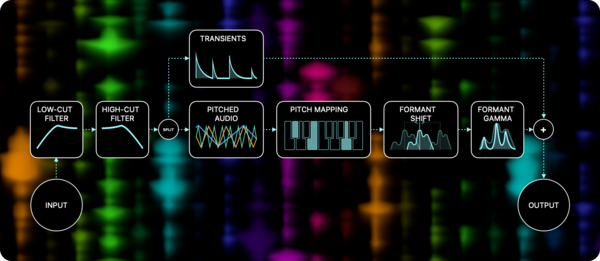
The PITCHMAP::COLORS signal flow graph.
Scale Shift
The new SCALE SHIFT parameter makes it easier than ever to sweep through the pitch grid. Find the sweet spot within the scale, or automate SCALE SHIFT as new arrangement technique, with a single, MIDI-controllable parameter.
Formant Shift & Gamma
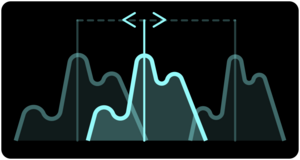
PITCHMAP::COLORS features a powerful formant shifter, for changing the perceived size of the sound and making large pitch shifts more natural(-ish) sounding. Its two octave range has you covered from huge demon voices to hyperactive chipmunks, and a 0.01 semitone resolution provides butter-smooth automations.
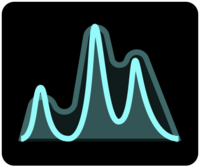
The formant shifter sports a unique function called FORMANT GAMMA, that exaggerates the formant peaks and troughs. The effect is really cool and hard to describe with words...think of it as a complex, self-modulating filter-oid that creates far-out, organic sounding mutations that add movement and alien-ness to your mix.
Transient Bypass
The more extreme sound modes can smoothe out transients in a cool way, but sometimes, you may want that sound while retaining transient detail - enter PITCHMAP::COLOR's super-easy to use and great sounding TRANSIENT BYPASS. Just dial in the amount of transients to take care of the pitch mapping and mix back in afterwards, and optionally boost them beyond their original level with just one control!

System Requirements
Mac
- macOS 10.15.x or newer, 64 bit
- Apple Silicon CPU, or Intel CPU with at least 2 Cores (i7 or better recommended)
- Apple AU (AudioUnits), Steinberg VST 2.4, VST 3 or Avid AAX Native compatible host software, processing audio as 32 bit float
Windows
- Windows 10 or newer
- Intel CPU with at least 2 Cores; i7 or better recommended
- Steinberg VST 2.4, VST 3 or Avid AAX compatible 64-bit host software, processing audio as 32 bit float
Important Notes:
- An iLok account or iLok 2/3-based activation is required in order to register this product
- An internet connection is required for software activation
Copy Protection
Zynaptiq products use the latest PACE copy protection, which allows you to place your activation on your machine or on an iLok 2* (not included). You will need a free iLok.com account to use our software, even for the demos - but you do not necessarily need the iLok 2 dongle if your machine has internet access (activation of a system without internet connectivity requires an iLok 2 device). All required software is installed along with our plugins, but we generally recommend downloading the latest versions directly from iLok.com.
Please Note: The older, first-generation iLok is not supported!
CPU Load
While they are highly optimized, Zynaptiq plugins use a LOT of CPU due to the complex nature of the magic they perform. Please use the free trial to evaluate whether your system has sufficient resources to utilize the software effectively!
Zynaptiq recommends setting your playback buffer size to at least 512 or ideally 1024 samples for optimum performance.
As Zynaptiq plugins sport unique features not found in any other software, Zynaptiq highly recommends reading the User Manuals to ensure that you get the most out of them!