Buy PSP Saturator, get a free gift with purchase:
Pristine Analog Saturation
A new addition to the PSP Audioware lineup, PSP Saturator brings its refined algorithms and pushes the quality of saturation to a new level and can virtually heat up your production.
PSP Saturator emulates the way that analog devices such as tape recorders and valve circuits warm up and “saturate” your audio material. This is achieved by adding harmonics, dedicated filtering, and dynamic processing. PSP Saturator uses three algorithms to emulate these devices, and offers eight different shape modes for loads of flexibility from subtle 'mix mojo' to outright audio destruction.
Features
- 8 different saturation shapes for a variety of tonal flavors.
- Three signal sculpting engines (low, high, overall saturation).
- Adjustable Low and High band processing engines for adequate, band related warming effects.
- Parallel mix option, with internal intelligent phase alignment.
- Multiple metering modes for signal analysis.
- Additional control panel for fine-tuning of various saturation parameters and smoothing.
- Three output modes (off, sat, lim) for shaping the final output stage.
- Input and Output gain controls, with optional relative link.
- Optional "FAT" quad-sampling for pristine saturation quality.
- Very low internal latency of 6 samples.
- 200 presets designed by top engineers and producers
System Requirements
PC
- Windows 7 – Windows 11
- VST, VST 3 and AAX
- The latest iLok License Manager application installed
Mac
- macOS 10.12 – macOS 13 Ventura (Apple Silicon Supported)
- VST, VST 3, AAX and AU
- The latest iLok License Manager application installed
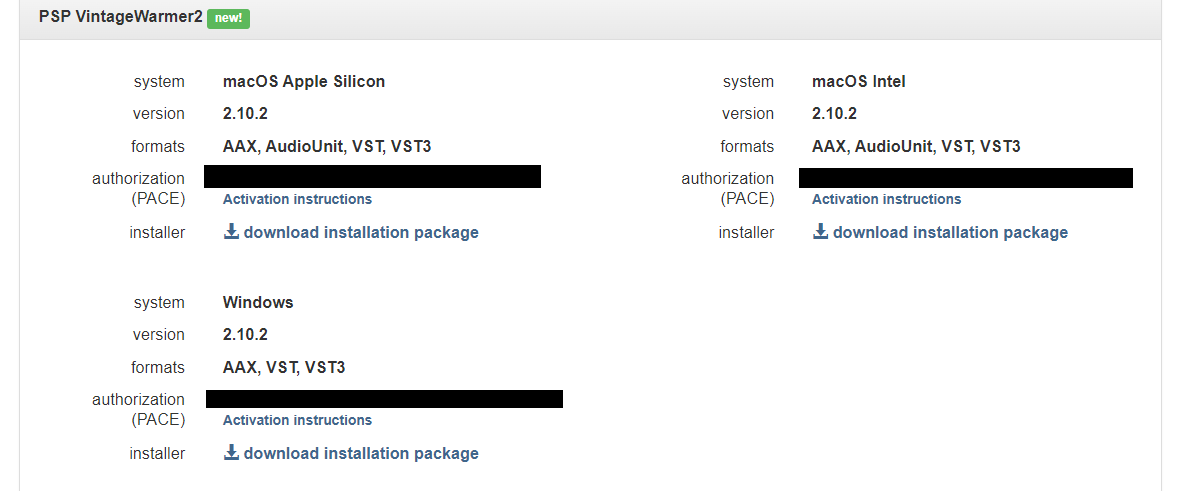
Please Note: PSP VintageWarmer2 is used as an example.
Activation
1. Visit the PSP Registration Centre and create/log into your PSPaudioware account.

2. Select the Manual Product Activation link and copy and paste/manually enter the serial number that is provided with your User Account. > click 'Activate!.'

3. Your PSP product will now show up in your PSP customer account. Your 30-digit iLok activation code will also be listed under authorization (PACE). Download the relevant installer.

iLok Registration
1. Go to the iLok website and create a new account if you are not currently registered and do not have the iLok Licence Manager installed on your computer.

2. Download and install the iLok License Manager.
3. Open your iLok license manager application > click 'Sign In'.

4. Enter your iLok registered User ID and password > click ‘Sign In'.

5. Once you are signed in, click the ‘Redeem’ icon which is located at the top-right corner of the iLok Licence Manager’s interface.

6. Copy and paste/manually enter the 30-digit code from your PSP Audioware account into the available Activation Code boxes, and then click ‘Next'.

7. Select your activation destination > Click 'Activate'.

8. Click 'Ok'.

Installation
Mac
1. Open the recently downloaded .dmg file to begin the installation.
2. Click 'Continue'.

3. Click 'Continue'.

4. Click 'Continue'.

5. Click 'Agree'.

6. Click 'Continue'.

7. Click 'Install'.

8. Click 'Close'.

9. Open your DAW > Open your newly installed software.
Your software is now activated and ready to use.

PC
1. Open the recently downloaded .exe file to begin the installation.
2. Click 'Next >'.

3. Select 'I Accept the Agreement' > Click 'Next'.

4. Click 'Next >'.

5. Click 'Next'.

6. Click 'Next'.

7. Click 'Next' to begin the installation.

8. Click 'Finish'.

9. Open your DAW > Open your newly installed software.
Your software is now activated and ready to use.