


 Log In

Free gifts available with your purchase
Product information
Abbey Road Vinyl
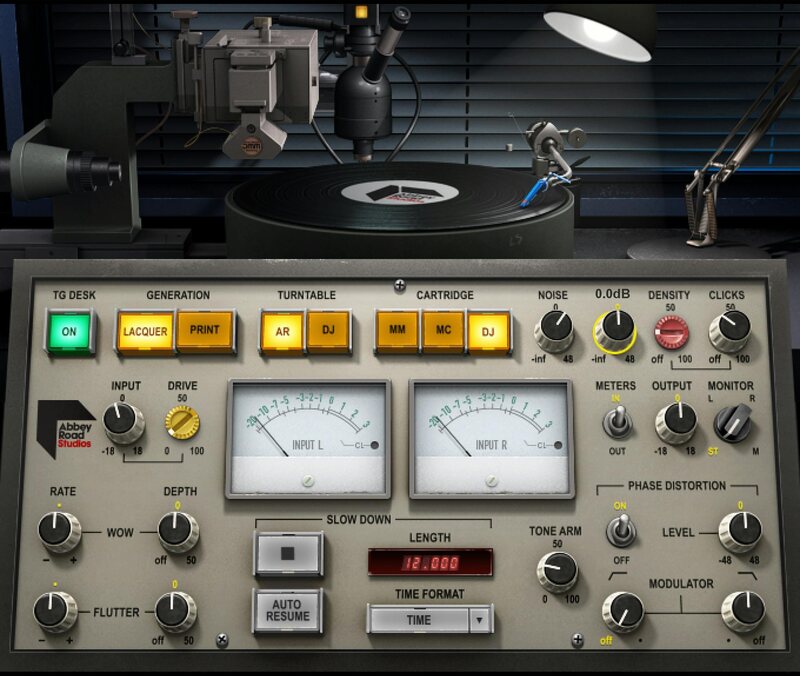
Add Vintage Vinyl Magic to Your Sound
The warm tonal character of music pressed onto vinyl remains coveted to this day. Now, for the first time, Waves’ close collaboration with Abbey Road Studios has created a plugin with the most detailed control over all aspects of vinyl: from creating the lacquer, to the pressing plant, to the warm crackles, wow and flutter of record wear.
Whether you’re producing, mixing or mastering your tracks, it’s time to experience the full range of creative vinyl ear-candy—from the magical way that vinyl glues tracks together, to the freedom to manipulate every stage of the vinyl process in ways never before possible.
Features
- Created with Abbey Road Studios with close attention to detail
- Models every aspect of the vinyl process, from cutting to playback
- 2 turntables—pro mastering model, or consumer DJ type—for diverse vinyl tones
- Choose between the original acetate (lacquer) master vs. the printed vinyl pressing
- 3 different cartridge technologies offer subtle tonal variations
- Retro production effects: crackles, pops, subtle hiss & more
- Wow and flutter to model manufacturing imperfections
- Run your sound thru Abbey Road’s EMI TG12410 mastering desk
- Slowdown/stop turntable effect, controlled in beats or seconds
- Control tone arm for variable distortion/frequency response
- Purity for audiophiles—or down and dirty for club DJs
- “Lite” components omit some functions to save CPU power
System Requirements
Mac
- macOS Monterey 12, Ventura 13, Sonoma 14, Sequoia 15
- VST / AU / AAX
PC
- Windows 10+
- VST / AAX
Installation Instructions














