


 Log In

Free gifts available with your purchase
BB Tubes
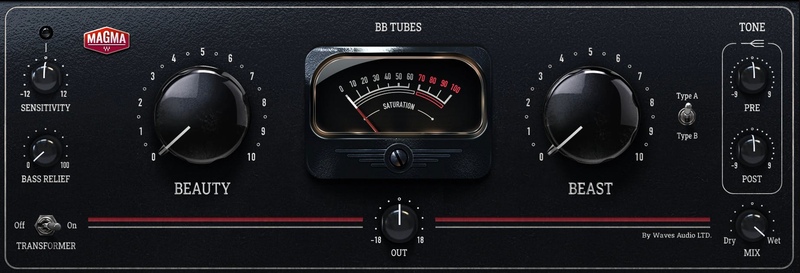
Make Your Vocals and Instruments Jump Out of the Speakers
There’s nothing quite like the magic of huge-sounding analog tube saturation—and this one must be heard to be believed. An original-design plugin from our Magma series, the unique blend of the BEAUTY and BEAST knobs offers a versatile sonic pallet from delicate to beyond aggressive, to help you create expensive-sounding productions.
You’ll find BB Tubes is incredibly addictive. Once you start using it on your drums, vocals, guitars, bass, synths, mix bus and absolutely everything, it’s hard to go back. Incredible tones are simple to dial in without overthinking, and parts will simply feel “finished” in the mix far quicker than before.
Features
- Huge-sounding analog tube saturation, subtle to aggressive
- Original Waves Maqma design and modeling of cascading tube stages
- BEAUTY knob perfect for delicate harmonic saturation
- BEAST knob for aggressive in-your-face distortion
- Blend BEAUTY and BEAST for an exception range of tones
- Transformer adds a pleasing colored low-end bump
- Tube soft-clipping creates extremely loud mixes, quickly
- Tone section—pre- and post-saturation hi-shelf EQ
- Bass Relief keeps just the low end clean from the tube saturation
- Sensitivity lets you control how the signal hits the tubes
System Requirements
Mac
- macOS Monterey 12, Ventura 13, Sonoma 14, Sequoia 15
- VST / AU / AAX
PC
- Windows 10+
- VST / AAX














