/ Saturation / RC-20 Retro Color
XLN Audio

RC-20 Retro Color

4.8 (10404 Reviews)
$49.50 $99.00

50% off until Dec 08

Main Image
Main Image
RC-20 Retro Color by XLN Audio | Plugin Boutique Top 100 gallery thumbnail
RC-20 Retro Color Saturation Plugin By XLN Audio - Show & Reveal With Joshua Casper  gallery thumbnail
RC-20 Retro Color — Your Sound. In Color. gallery thumbnail
RC-20 Retro Color — Preset Preview gallery thumbnail
T-Pain & Kenny Beats add the SAUCE with RC-20 gallery thumbnail
Get that lo-fi sound with RC-20 Retro Color gallery thumbnail
My Workflow featuring Jason Gill & RC-20: Processing Tove Lo's vocal track gallery thumbnail
My Workflow featuring Jason Gill & RC-20: Processing synths gallery thumbnail
XLN Audio RC-20 Retro Color - TEST gallery thumbnail
RC-20 Retro Color
Buy Now
Product information

Quickly Add Character and Analog Warmth to any Track or Mix

RC-20 Retro Color is a creative effect plugin that easily recreates the warm feeling of vintage recording equipment. It adds life and texture to any recording and also works perfectly in any modern production setting.


RC-20 Retro Color's 6 Effect Modules work great on their own or together:

Noise Generator
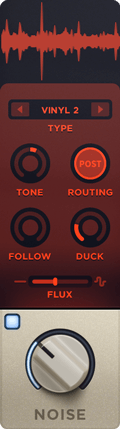
Add life and texture with one of RC-20's many noise types, from subtle vinyl crackle and tape hiss to ambient studio noise, electric circuit hum and stompbox static noise.

Wobble & Flutter

Wobble adds pitch inconsistencies associated with unstable playback on analog gear, like vinyl record players and tape machines.

Saturation & Distortion

Add everything from mild saturation to raging fuzz with one of RC-20's many distortion types.

Degrader & Bitcrusher

Recreate the sound of vintage digital gear like old-school samplers, and the unmistakable way limited sample rates and bit rate reduction color sound.

Reverb

Add depth and width to your tracks with RC-20's tailored reverb module.

Volume Drops
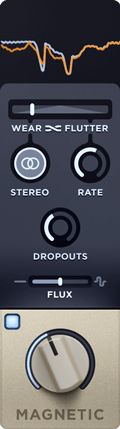
Reproduce the wear, tear and volume loss associated with recording and playback on tape and tape recorders.

Easily Scale All of RC-20's Effect Modules and Controls with a Single Slider
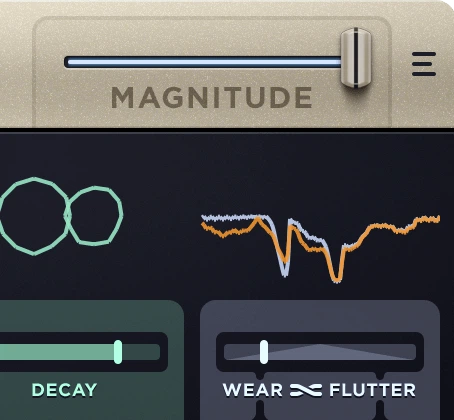
Dial in the perfect amount of your effects, or quickly create intros, outros, drops and transitions to take your mix to the next level.

Presets for any Track or Mix
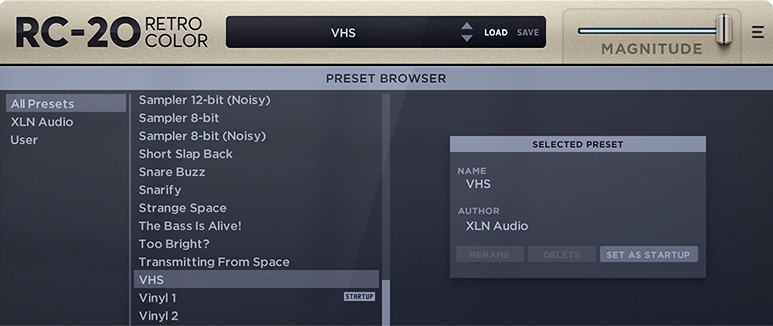
RC-20's tailor-made presets for drums, keys, guitars, bass, full mixes and post-production let you get to work right away.

Awards

Testimonials

Michael Tuller

"This is amazing. It's what I've been looking for to add character to tracks."

Diplo

"RC-20 Retro Color is perfect for me to bring all my new sounds into a vintage feel"

David Das

"It's so musical. An indispensable part of my plug-in arsenal".

Product Reviews
XLN Audio RC-20 Retro Color Review at Music Radar

Our Verdict Not only one of the best retro-ising plugins around, but also a powerful sound-design tool in a general sense, RC-20 is a wobbly, wonky, fizzy, soul-warming slice of awesome. Pros Makes anything sound old. Simple, stunningly effective processors. Cons Space mo...

Read More
XLN Audio RC-20 review by Whipped Cream Sounds

We’ve all heard of it… XLN Audio RC-20. It’s the retro colour plugin that everyone, including your gran, has – and you’re late to the party yet again. But is it really that good? In this article, we’re gonna get our snorkels on together, and go for a beautifully deep dive on XLN Audio’s RC-...

Read More
XLN Audio RC-20 review by Produce Like A Pro

RC-20 Retro Color by XLN Audio is a popular creative effects plugin. With its multiple parameters, you can quickly add character and a vintage vibe to any sound source in your mix. RC-20 Retro Color Overview The idea behind Retro Color was to create a plugin capable of modelling the various...

Read More
XLN Audio RC-20 review by Tape Op

If you want to time warp your sounds or samples, XLN Audio’s RC-20 Retro Color plugin is most likely the tool for you. I should clarify that it is not a clinical, surgical, X-Acto knife of a plugin, but rather a paint can of vintage vibe. What I’m trying to say is that the RC-20 is a heavy-handed...

Read More
XLN Audio RC-20 review by Everything Recording

If your tracks are repetitive, verging on boring, you need RC-20. Pros - Versatile effects, can be as subtle or vicious as you want. - Intuitive Interface - Great presets, with most needing very little tweaking Cons No real cons. Only suggestions Could use a Tape Delay ...

Read More
System Requirements

Mac

  • macOS 10.13 or later (Apple Silicon Native supported) (64-bit only)
  • 2 GB RAM (4 GB recommended)
  • Internet connection (during installation only)
  • VST, AU, AAX

Windows

  • Windows 7 - 11 (64-bit only)
  • 2 GB RAM (4 GB recommended)
  • Internet connection (during installation only)
  • VST, AAX

Please Note: This software is 64-bit only and will not function on 32-bit systems.

Hosts:

This product should run on any host supporting 64-bit VST, AU, or AAX plugins. XLN Audio actively tests on the host applications listed below:

  • Ableton Live 9 or later
  • Apple Logic Pro 9 & 10
  • Avid Pro Tools 11 or later (Pro Tools First is not supported)
  • Cakewalk by Bandlab
  • FL Studio 20
  • Propellerhead Reason 9.5 or later
  • Reaper 5 or later
  • Steinberg Cubase 8 or later
Installation Instructions

Account Registration

(If you have already created an XLN Audio account previously, please skip this part).

1. Go to the XLN Audio registration page (where you can now register for an account, and register your product key at the same time).

2. Enter your details, click 'I have a product key to register' and enter the code found in your Plugin Boutique account (displayed as Serial Number).

3. Click 'I agree to the Terms & Conditions' and then click REGISTER.

XLN Audio RC-20 Account Registration

You have now created an XLN Audio account and registered your product key.

Product Registration

(If you registered your product earlier when creating an account, skip this part).

1. Log in to your XLN Audio account.

2. Hover over My Account and select Register Product Key.

3. Enter the product key found in your Plugin Boutique account and click REGISTER PRODUCT KEY.

Your product has now been added to your XLN Audio account.

Mac

XLN Online Installer Installation

1. Download the Mac XLN Online Installer from your Plugin Boutique account and open it.

2. Double-click to install the XLN Online Installer.

3. Click Open (depending on your version of macOS, you may not encounter this security message).

4. Enter your password and click OK.

5. Click Open to finalise the security prompt.

6. Log in to your XLN Audio account. 

7. Enter a name for your Mac and click Register Computer.

The XLN Online Installer is now installed.

Product Installation

1. Make sure your new product is selected and click 'Click to start - Install: 1'.

2. Your software will now install.

Your software is now activated and ready for use within your DAW.

Windows

Online Installer Installation

1. Download the Windows XLN Audio Online Installer from your Plugin Boutique account and open it.

2. Click Yes to allow the application to run.

3. Log into your XLN Audio account. 

4. Enter a name for your computer and click Register Computer.

The XLN Online Installer is now installed.

Product Installation

1. Make sure your new product is selected and click 'Click to start - Install: 1'.

2. Your software will now install.

Your software is now activated and ready for use within your DAW.

Bundle & Save

RC-20 & XO Bundle
$109.00
$248.00 (56% off)

Plugin Boutique Rewards

Discover the most rewarding loyalty programme among all plugin retailers.

  • Free Loopmasters Samplepacks
  • Discounts on products and courses
  • Extra Virtual Cash claimed immediately at checkout
Find out more

Follow us:

X (Twitter) Facebook YouTube Instagram
Logo Logo

Plugin Boutique Limited, Part of the Beatport Group LLC.

Copyright © 2011-2025 Plugin Boutique. All rights reserved