


 Log In

Free gifts available with your purchase
Legendary Analog Saturation
Made for Your Tracks
Analog saturation is the favourite tool of many producers. When applied with elegance, it adds so much character, presence and definition to your tracks. Audified decided to create an advanced saturator, aimed especially at producers looking for adding extra flavour to their tracks. U78 takes the masterfully simulated analog saturation from u78b Compressor and takes it to the next level. With advanced controls, this plugin ensures you find the perfect analog character for your tracks.
Features
- Advanced saturation circuit based on u73b Compressor
- Modeled tube circuit for analog character and sound
- Optional automatic output level control
- Adjustable effect proportion and output level
- Hi and low pass filters for a frequency-dependent effect
Controls
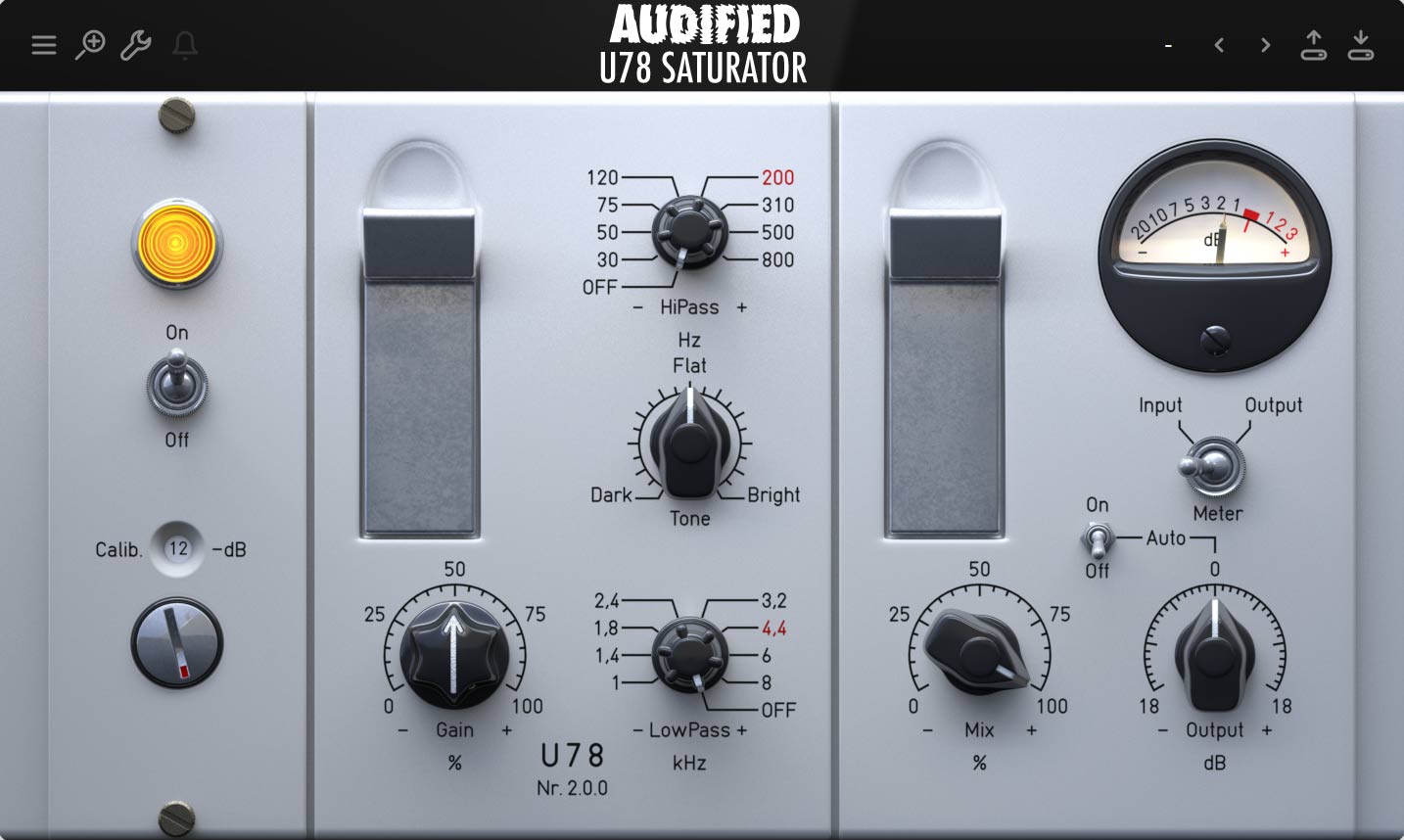
- Gain - Adjusts the input gain of the saturation circuit. The higher the settings, the richer the sound that can be achieved.
- Hi-Pass - Sets the cut-off frequency of the high-pass filter, which comes before the saturation circuit in the signal path. The range is from 30 Hz to 800 Hz.
- Low Pass - Sets the cut-off frequency of the lowpass filter, which comes before the saturation circuit in the signal path. The range is from 1 kHz to 8 kHz.
- Tone - Controls the U78 Saturator's unique tone filter. Lower settings produce darker sounds with more low-frequency content; higher settings result in brighter, sparkling sounds.
- Mix - Controls the dry and wet signal ratio. The dry signal is delayed to match the wet signal path latency to prevent phasing issues.
System Requirements
Mac
- macOS 10.11 - macOS 12 Monterey (Intel / M1 Apple Silicon supported) (64-bit only)
- AAX, AU, VST3
Windows
- Windows 7 - Windows 11 (32 / 64-bit)
- AAX, VST3
Awards

Boris Carloff
Czech musician, composer and record producer. In 2012 he released the Apollo Award winning album The Escapist, followed by Morphosis in 2014.
"The plug-in is mainly intended to be used on bass, drums and vocals, but creativity knows no boundaries."


Reviews Summary
While it aims to provide a helpful overview, it may not capture every perspective or detail. We encourage you to read individual reviews to make an informed decision.
The U78 Saturator is highly praised by users for delivering a warm, thick, and characterful analog tone that is excellent for adding richness and depth to bass, drums, and vocals. Reviewers appreciate its user-friendly interface, simple controls, and low CPU usage under normal conditions. While a few users find it to be just another standard saturation option with a high CPU hit in oversampling mode, the majority of customers love its sound quality, versatility, and affordable price.


