


 Log In

Free gifts available with your purchase
Instant lo-fi Modulation & Distortion
From the Swedish distortion masters and makers of the acclaimed Tape, Tape Echoes, Harmonics, and Saturation Knob plug-ins comes Dirty Tape. The tape effect you need when you want to get down and dirty and keep the sound quality savage.
Dirty Tape gives you warm, analogue vibes from the moment you load it on a track. Capable of fiercely gritty distortion and saturation, Dirty Tape can also add subtle texture and movement to a sound. Like a photo filter for your tracks, Dirty Tape will take you from static and dull to lively and colourful in a snap.
- A tape dirt machine effect with Softube-quality sound
- Add warm, low fidelity vibes to any sample, instrument, or beat
- From the makers of Tape, Tape Echoes, Harmonics, and Saturation Knob
The Art of Rock & Roll Science
When it comes to creating equipment that improves workflow and offers the highest quality sound, Softube's reputation is rock solid—and long. Their partnerships with premium brands like Marshall, Tube- Tech, Chandler Limited®, and Empirical Labs go back nearly twenty years.
Dirty Tape is built on this legacy of creativity, passion, and attention to detail. Because to create tools that innovate, you have to have heart, soul, and Rock & Roll Science.
Two Knobs Do The Job
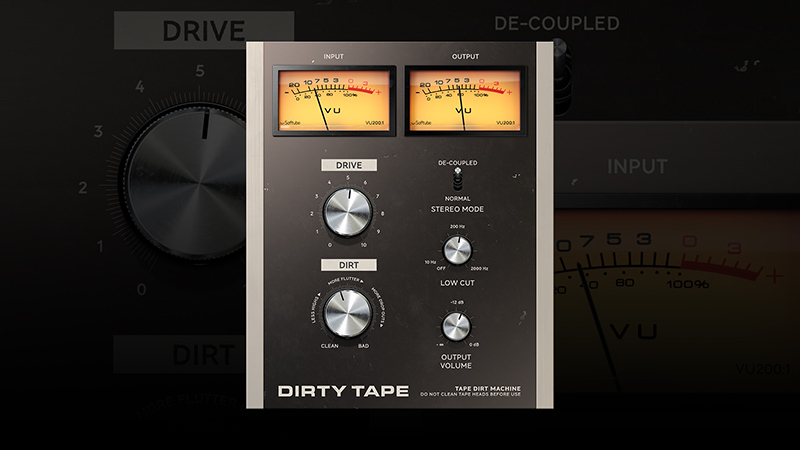
With two knobs to regulate all the effects it produces, Dirty Tape makes it simple to add lo-fi, vintage vibes to your mix. The Dirt and Drive controls—based on the Dirt and Drive sections of Softube Tape Echoes—are precision-tuned to dial in the ideal amount of the intended effect. From retro distortion, saturation, and degradation to tape speed variations like pitch modulation, crosstalk, and stereo imbalance to flutter, dropouts, and wow. Dirty Tape delivers it all—with ease.
Calibrate a Custom Vibe
Set the Stereo Mode to Normal or use it De-coupled (dual mono) to have a greater effect on the balance of your stereo image. Adjust the Low Cut Filter to reduce low-end rumble and increase the lo-fi vibes. Dirty Tape’s parameters let you transform the character of a sound to your taste, from nuanced to in-your-face and every rendition in between.
Make Your Beat Pop
Programmed drum loop sounding too clean? Piano loop too hi-fi for your hip-hop vibe? All the components of your beat will sit right in your mix with the perfect amount of warm saturation from Dirty Tape. It lets you add movement, musicality, and a hip lo-fi mood to your beat-making process.
This product supports Extended Features
Softube loves VU meters, Bakelite knobs, and analogue quirks. But they want modern precision and workflow. The answer? Softube Extended Features. Easy-access panels with the innovations you need close at hand.
Features
- Realistic tape FX perfect for samples, instruments, and beat making
- From the makers of Tape, Tape Echoes, Harmonics, and Saturation Knob
- Instantly apply warm, vintage lo-fi mojo to your tracks
- Easy-to-use with just two knobs to control all the effects
- Derived from Softube Tape Echoes’ Dirt and Drive sections
- Go super-distorted and saturated or add subtle texture
- Featuring effects that range from random pitch modulation to flutter, wow, and dropouts
- Work in Normal Stereo or use De-coupled mode (dual mono) to further affect the balance of your stereo image
- Use the Low Cut Filter to reduce low-end rumble and increases lo-fi vibes
- Get even more control over the dynamics with Softube Extended Features
System Requirements
- macOS Big Sur 11, Monterey 12, Ventura 13
- Windows 10 (64-bit), Windows 11
- Softube account
- iLok account
- Computer with AU, VST, VST3, and/or AAX-compatible DAW host software
- Internet access (for downloading installers and managing licenses)
Supported CPU Families
- Apple macOS computers with Intel Core i3/i5/i7 or Apple silicon (M1 or newer) CPU. Apple silicon is supported natively.
- Windows computers with quad-core Intel Core i3/i5/i7 or AMD quad-core processors with SSE 4.2 support.
- Other Intel processors (Celeron, Pentium, and Xeon) are compatible if they support SSE 4.2 instructions.
Supported Host Software (DAW)
Any 64-bit VST, VST3, AU, or AAX (Pro Tools 11.0.2 or higher) compatible host application should work. However, due to plug-in host differences between DAWs—and our rigorous standards—Softube only officially test their plug-ins and instruments in the most recent versions of Pro Tools, Logic Pro, Cubase, Ableton Live, Studio One, and Reaper. Softube plug-ins are not tested regularly in non-listed systems. They will likely work if the system requirements are met. However, the manufacturer cannot guarantee a solution for issues in unsupported systems.
Softube strongly recommend using VST3, as some of their plug-ins have features that are not present in the older VST format. Supported sample rates: 44.1, 48, 88.2, 96, 176.4, and 192 kHz, in both mono and stereo. The most recent maintenance release of your DAW application is recommended. AAX DSP is not currently in active development. TDM/VENUE/RTAS are no longer supported. See Legacy Installers.
Important Note: Make sure that you always use the latest iLok License Manager. It is not included in the Softube installer but can be downloaded from www.ilok.com
Awards


