


 Log In

Free gifts available with your purchase

Out of one, many
Precise and perfect are not always desired. Sometimes, you need to apply little imperfections to your samples to make your creation sound real and alive. Whether those are steps, gunshots, or hi-hat hits, it doesn’t matter. Do you want subtle differences or massive changes? Randomachine can cover any needs you may have. Copy-pasted and repeated samples can sound unique.
Fight the monotony
Randomachine finds its place wherever you need to make many variants of one sample in no time. No matter if you make film or game sound design or electronic music. Randomachine destroys uniformity and mechanical sterility.
6 unique changers
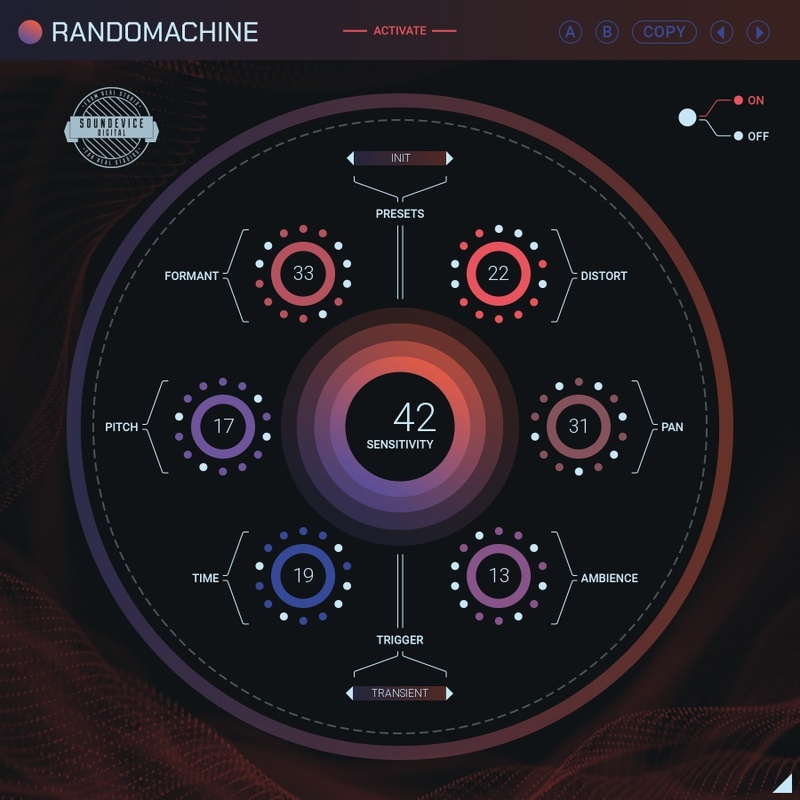
Each time Randomachine is triggered, it randomly changes multiple parameters of each of the six effects that run behind the scenes. This means every hit differs from another. The effects are: Pitch and Formant Shifter, Ambience, Saturation, Panorama, and Time offset.
3 ways to trigger
Not every audio material is the same, not every audio material is consistent. Therefore, United Plugins decided that Randomachine could be triggered by three different sources: Audio input, project tempo, and MIDI information.
Transient
In Transient mode, Randomachine's engines are ignited by the incoming signal. Every sonic hit instantly changes the settings of the selected effects.
Sync with tempo
When composing grid-based music, the Sync mode may come in handy. Randomachine changes the settings of the effects regularly upon the interval you set. It can be every beat as well as every hi-hat hit.
Trigger by MIDI
If you want the triggering of the randomization process under total control, you may activate the MIDI mode. Any MIDI note coming from the dedicated source (track, controller) may reset Randomachine at any time.
Hassle-free software protection
No iLok, no dongle, or internet access is required for activation. United Plugins software uses license files to activate your software. You can freely use the purchased software on all your computers as long as you are the user.
FREE 15-Day unlimited trial
All the descriptions are nothing compared to putting your hands on the plugin. No saving limits. No noises. No boundaries. Engage the plugin in your project for real and fully exploit its powers for two weeks.
64-bit audio quality at ANY sampling rate
The plugin provides the maximum audio quality you can get. It uses internal 64-bit audio processing and can handle any sampling rate. 192 kHz or even higher.
Smart bypass
The intelligent way United Plugins plugins manage bypassing ensures that you don't get any clicks or harmful noises when automating the parameter. It also compensates for latency, ensuring that the bypass states are perfectly in sync with each other.
Intelligent sleep on silence
This plugin intelligently detects whether it makes sense to perform processing at all. If not, it temporarily turns on sleep mode. In such a state, it requires virtually no CPU at all to save the computing sources for other processes.
Free-for-life updates
United Plugins' plugins never become obsolete. They keep track of the current operating systems and DAWs. You may always update to the most recent version for free, without paying a cent, a penny, or whatever currency you prefer.
System Requirements
Windows
- Windows 8/10/11 (64-bit)
- Intel/AMD processor with SSE2 support
- VST/VST3/AAX compatible host
Mac
- macOS (from 10.10 Yosemite to Ventura, 64-bit)
- Intel/AMD/Apple Silicon CPU
- VST/VST3/AAX/AU compatible host
Reviews Summary
While it aims to provide a helpful overview, it may not capture every perspective or detail. We encourage you to read individual reviews to make an informed decision.
Users praise this plugin as a fast, creative, and intuitive tool that excels at injecting movement, groove, and analog-style randomness into drums, percussion, and quantized melodies. It is widely celebrated for adding depth, width, and unexpected textures with just a few knob tweaks. Although some reviewers noted a desire for finer parameter control to precisely repeat favored randomized effects, the overall consensus is overwhelmingly positive, with many calling it a unique must-have.


