


 Log In

Free gifts available with your purchase

Nitro Power For Your Mixes
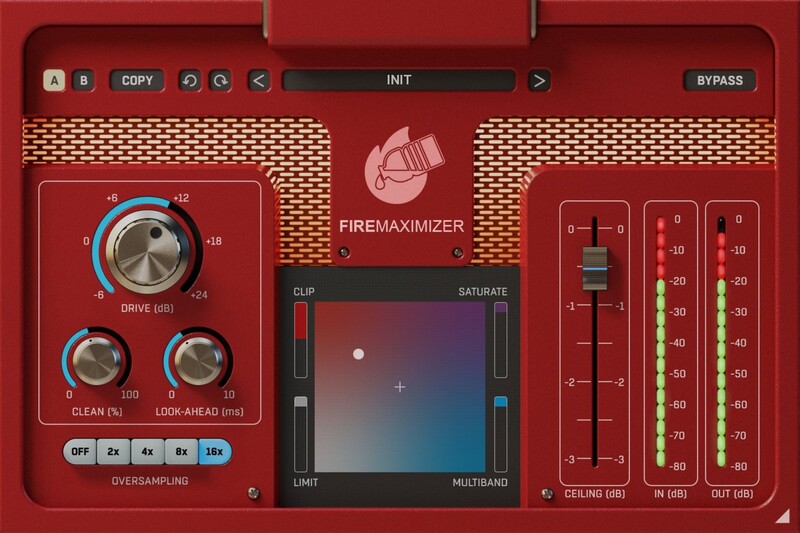
Loudness war may be over, but sound still matters. Some tracks require punchy, aggressive sound; others need a clean and transparent finish. Limiters are often too smooth, and clippers too aggressive... How about combining them? FireMaximizer provides pristine clipper, saturator, limiter and multiband limiter algorithms and allows you to blend between them to get the exact ratio of digital and analogue grit and transparency your master (or individual instruments) needs!
Features
- Truly Universal -Disregard the music style. Thanks to the selection of unique algorithms, FireMaximizer can be anything from transparent to brutal. Clippers & saturators will make your modern metal and EDM tracks punchy and aggressive. Limiters will produce nicely transparent sound for any genre, from ambient and classic music to pop. And, well, anything in between.
- Pump Up Your Instruments - Although FireMaximizer is primarily intended to be used on the master track, you can use it to power up almost any instrument track too. It's fantastic on drums, amazing on acoustic or electric guitars, but also outstanding on vocals.
- 16x Oversampling - For maximum precision and smoothness, FireMaximizer offers up to 16x oversampling, alowing its algorithms to operate in way better resolution than an ear can possibly hear (but with a significant impact on the final sound)
- Hassle-free software protection - No iLok, no dongle nor internet access is required for activation. FireMaximizer uses licence files to activate your software. You can freely use the purchased software on all your computers as long as you are the user.
- Realistic 3D yet flexible GUI - The photorealistic graphic user interface of the plugin gives you the feeling you are touching the real hardware. But it easily adapts to your needs. You can always drag the arrow in the bottom right corner to change its size - make it smaller to save valuable screen space, or enlarge it to make it easier to use.
- 15-Days unlimited trial version for FREE - All the descriptions are nothing compared to putting your hands on the plugin. No saving limits. No noises. No boundaries. Engage the plugin in your project for real and fully exploit its powers for two weeks.
- 64-bit audio quality at ANY sampling rate - The plugin provides the maximum audio quality you can get. It uses internal 64-bit audio processing and can handle any sampling rate. 192 kHz or even higher.
- Smart bypass - The intelligent way United Plugins' plugins manage bypassing ensures that you don't get any clicks or harmful noises when automating the parameter. It also compensates for latency ensuring that the bypass states are perfectly in sync with each other.
- Intelligent sleep on silence - This plugin intelligently detects whether it makes sense to perform processing at all. And if not, it temporarily turns on sleep mode. In such a state, it requires virtually no CPU at all to save the computing sources for other processes.
- Free-for-life updates - These plugins never become obsolete. United Plugins keep track of the current operating systems and DAWs. And you may always update to the most recent version for free. Without paying a cent, a penny, or whatever currency you prefer.
System Requirements
Mac
- macOS 10.10 and later (Apple Silicon and macOS 11 Big Sur supported) (64-bit only)
- Intel / AMD processor with SSE2 support
- VST2, VST3, AAX or AU compatible host
Windows
- Windows 8 - Windows 11 (32 / 64-bit)
- Intel / AMD processor with SSE2 support
- VST2, VST3 or AAX compatible host
Scott Yahney
Producer, Writer, and Keyboard Player
"Instant gratification is what you get & this little plugin sounds KILLER!!! Don't be fooled... there's a lot going on under its hood..."
PLEEG
Electronic music producer
"The results are so impressive! FireMaximizer is the kind of plugin that once you use it for the first time, you know it will become essential for all of your future productions. A must-have."
Jimmy Deer
Producer/Artist/Composer and DJ
"FireMaximizer brings excellent instant results on par with all my favourite finalizers."
Reviews Summary
While it aims to provide a helpful overview, it may not capture every perspective or detail. We encourage you to read individual reviews to make an informed decision.
Users highly praise the plugin for its simple, user-friendly interface and its ability to quickly deliver punchy, loud, and polished results without compromising mix dynamics. It is widely considered an effective tool for mastering and sound processing that adds energy, clarity, and fullness to both full tracks and individual elements like basses and synths.


