/ Mastering / Grand Finale
Klevgrand

Grand Finale

4.8 (59 Reviews)
$27.99 $69.99

60% off until Dec 11

Klevgrand Grand Finale Artwork
Grand Finale 2.0 – Audio Finalizer gallery thumbnail
Klevgrand Grand Finale - GUI
Buy Now
Product information

Audio Finalizer

Everything needed to finalize your project

Grand Finale is a multi-effect plug-in designed for finalizing complete mixes, stems, buses and/or individual audio tracks. The plug-in offers several modules in a pre-routed configuration. Each module has parameters to alter, and most modules offer a set of different algorithms to select. These features come together to make Grand Finale a powerful tool for quickly finalizing a track, bus or mix.

Trim the input signal, add your desired amount of compression, multi-band compression, stereo width, EQ, blend in some add compression and/or distortion, and glue it all together by balancing the input and output trim. Use the meters to monitor and adjust your output level to whatever destination.

New in version 2​​​​​​: Grand Finale has been given some much-needed love and attention resulting in a major facelift and some extra horsepower under the hood.

Anatomy
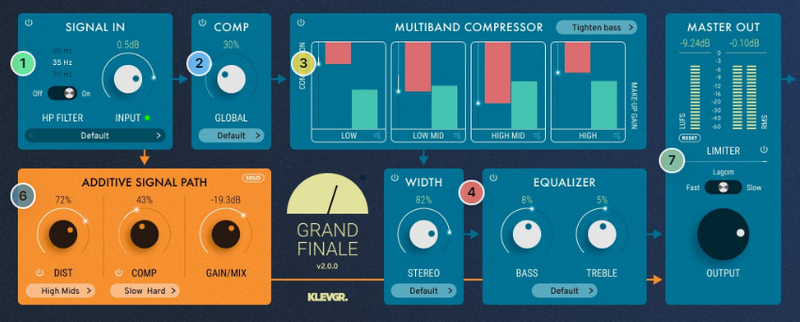
1. Input section - Make sure your audio enters the processor in a proper way. Input level & HP filter.

2. Compress - Give your favourite song a squeeze. 

3. Multiband compress - Sometimes, each band needs a specific squeeze.

4. Width & EQ - Got two ears? Great! Make them feel wider. Fool-proof, yet powerful.

6. More is more - For more flavour, an additional signal path with some nasty distortion and/or squashed compression can be mixed in.

7. Master - Check your levels, both LUFS and RMS. And, if you want, add a limiter.

Features

  • High-quality effects, trimmed for high-precision audio finalizing
  • LUFS and RMS output metering
  • Parallel signal in aligned phase
  • Additive signal path with distortion and/or compression
  • Revamped UI optimized for a quick and creative workflow
  • Stereo width enhancer
  • Multi-band compressor
  • Fine-tuned limiter
  • Collection of pre-made presets

System Requirements

  • macOS 10.10 or later (optimized for the M1 processor)
  • Windows 7 SP1 or later
  • 64-bit AU, VST2, VST3, AAX

Installation Instructions

Please Note: Pana is used as an example:

Mac

License Redemption

1. Navigate to https://klevgrand.com/redeem > Paste your 16-digit redemption code found in your Plugin Boutique User Account > Click 'Submit!'.

2. Your redemption code has been accepted > Scroll down to Step 2.

3. Click either 'Sign in' if you already have a Klevgrand account, or 'Create new account' if you do not > Fill in your personal details > Click 'I'm ready'.

4. Your account has now been created.

5. Navigate to your email inbox and locate the activation email that you should have received from Klevgrand > Click 'Let me in!' to activate your account.

6. Create a password for your account > Click 'Enter Klevgrand'.

7. Your software and serial number is now available within your Klevgrand account > Click the Apple logo to download the installer file.

Installation

1. Launch the pana_x_x_x_macOS.dmg installer file.

2. Double click the KLEVGR. logo to launch the installer.

3. Click 'Continue'.

4. Click 'Continue'.

5. Click 'Agree'.

6. Click 'Install'.

7. Enter your system password > Click 'Install Software'.

8. Click 'Close'.

9. Navigate back to your Klevgrand My Account page > Click on the serial number to copy it to your clipboard.

10. Launch your DAW > Create a new audio track > Insert Pana onto the channel > Paste your serial number into the box.

Your software is now activated and ready to use within your DAW

Windows

License Redemption

1. Navigate to https://klevgrand.com/redeem > Paste your 16 digit redemption code found in your Plugin Boutique User Account > Click 'Submit!'.

2. Your redemption code has been accepted > Scroll down to Step 2.

3. Click either 'Sign in' if you already have a Klevgrand account, or 'Create new account' if you do not > Fill in your personal details > Click 'I'm ready'.

4. Your account has now been created.

5. Navigate to your email inbox and locate the activation email that you should have received from Klevgrand > Click 'Let me in!' to activate your account.

6. Create a password for your account > Click 'Enter Klevgrand'.

7. Your software and serial number is now available within your Klevgrand account > Click the Windows logo to download the installer file.

Installation

1. Unpack the pana_x_x_x_win.zip installer file > Launch the pana_x_x_x_win.exe file.

2. Click 'I accept the agreement' > Click 'Next'.

3. Click 'Next'.

4. Click 'Next'.

5. Click 'Next'.

6. Click 'Install'.

7. Click 'Finish'.

8. Navigate back to your Klevgrand My Account page > Click on the serial number to copy it to your clipboard.

9. Launch your DAW > Create a new audio track > Insert Pana onto the channel > Paste your serial number into the box.

Your software is now activated and ready to use within your DAW

Plugin Boutique Rewards

Discover the most rewarding loyalty programme among all plugin retailers.

  • Free Loopmasters Samplepacks
  • Discounts on products and courses
  • Extra Virtual Cash claimed immediately at checkout
Find out more

Follow us:

X (Twitter) Facebook YouTube Instagram
Logo Logo

Plugin Boutique Limited, Part of the Beatport Group LLC.

Copyright © 2011-2025 Plugin Boutique. All rights reserved























