/ Multi-Effect / MDE-X
KORG

MDE-X

4.6 (31 Reviews)
$24.99 $49.99

50% off until Dec 08

KORG MDE-X
KORG MDE-X
KORG MDE-X
KORG MDE-X
Main Image
Buy Now
Product information

Carefully Selected High-Quality Multi Digital Effects

MDE-X comes with 21 types of effects, such as compressor, limiter, overdrive, EQ, talking modulator, flanger, phaser, chorus, delay, and reverb.

MDE-X uses the high-quality TRITON instant effect algorithm. Use the effects that have been used in many famous sounds and have defined the sound in plug-ins. Featuring 128 types of effect programs, it can be used in a wide range of applications, such as sound design, live performances, and mixing. MDE-X V2 has had its design further refined, adding Distortion and Feedback Reverb, two new types of high-end effects that allow multiple types to be switched.

Carefully Selected Effects and Superb Ease of Use

A carefully made selection of effects and parameters that are needed for music production are provided so that you can quickly shape the sound you imagine. Furthermore, the CPU-efficient, high-quality effects attained through fine-tuning assist you in all stages of music production, from mixing to mastering.
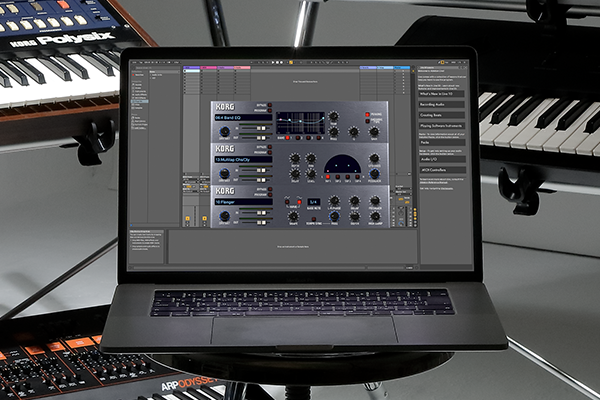
High-Resolution Interface for Retina and 4K

KORG have made major GUI refinements to the KORG Legacy Collection MDE-X software released in 2004. It features high-resolution graphics that will make it fit into modern Retina & 4K environments. By supporting six levels of scalability, usability has been drastically improved. Enjoy features that are easy to use, get the satisfaction provided by the MDE-X, and control many parameters such as patching, all at a high resolution.

Two Types of New Effects Included

KORG Collection MDE-X V2 comes with two powerful effects added to the regular 19 effects. You can use a total of 21 types of high-quality multi effects, including Distortion with three types of switchable effects such as Valve Reactor, and also Feedback which has four types of switchable effects such as Reverb, Space, and Riser.

Features

  • High-resolution interface for Retina and 4K.
  • Two (2) types of new effects included.

System Requirements

Mac

  • Mac OS X 11 or higher (latest update)
  • Intel Core i5 or better (Core i7 or better recommended) (Apple Silicon Native supported)
  • 8 GB RAM (16 GB or more recommended)
  • 8 GB free disk space (SSD recommended)
  • AU, VST, VST3, AAX (Supported 64bit plug-ins only)
  • An internet connection is required

PC

  • Windows 10 64bit or higher (latest update)
  • Intel Core i5 or better (Core i7 or better recommended)
  • 8 GB RAM (16 GB or more recommended)
  • 8 GB free disk space (SSD recommended)
  • VST, VST3, AAX (Supported 64bit plug-ins only)
  • An internet connection is required
Installation Instructions

Please note: opsix native is used as an example.

PC

Activation

1. Download the installer file from your Plugin Boutique account. Run the KORG Software Pass .exe file 

2.  Click 'I accept the agreement' > Click 'Next >'.

3. Click 'Next >'.

4. Click 'Next >'.

5. Click 'Next >'.

6. Click 'Install'.

7. Click 'Finish'.

8. Open KORG Software Pass.

9. If you already have a KORG account, skip to step 12 > Click 'Don't have a KORG ID? Signup'.

10. Sign up for a KORG account by filling in your details.

11. Go to your email inbox and locate the email from KORG > Click 'Confirm my account'.

12. Go back to the KORG Software Pass > Click 'Login at KORG ID'.

13. Click 'Register new product'

14. Copy & paste/manually enter the licence key/serial code that is available in your Plugin Boutique account > Click 'Start'.

15. Locate opsix native in the list of products > Click 'Download'.

16. The software will automatically open the downloaded .zip file > Double click the opsix native .exe file.

Installation 

1.  Click 'I accept the agreement' > Click 'Next >'.

2. Click 'Next >'.

3. Click 'Next >'.

4. Click 'Next >'.

5. Click 'Install'.

6. Click 'Finish.

7. Open opsix native in your DAW or as a standalone program. 

Your software is now activated and ready to use!

Mac

Activation

1. Download the installer file from your Plugin Boutique account. Run the KORG Software Pass .pkg file 

2. Click 'Continue'.

3. Click 'Continue'.

4. Click 'Continue'.

5. Click 'Agree'.

6. Click 'Install'.

7. Click 'Close'.

8. Open KORG Software Pass.

9. If you already have a KORG account, skip to step x > Click 'Don't have a KORG ID? Signup'.

10. Sign up for a KORG account by filling in your details.

11. Go to your email inbox and locate the email from KORG > Click 'Confirm my account'.

12. Go back to the KORG Software Pass > Click 'Login at KORG ID'.

13. Click 'Register new product'

14. Copy & paste/manually enter the licence key/serial code that is available in your Plugin Boutique account > Click 'Start'.

15. Locate opsix native in the list of products > Click 'Download'.

16. The software will automatically open the downloaded .zip file > Double click the opsix native .pkg file.

Installation 

1. Click 'Continue'.

2. Click 'Continue'.

3. Click 'Continue'.

4. Click 'Agree'.

5. Click 'Install'.

6. Click 'Close'.

7. Open opsix native in your DAW or as a standalone program. 

Your software is now activated and ready to use!

Plugin Boutique Rewards

Discover the most rewarding loyalty programme among all plugin retailers.

  • Free Loopmasters Samplepacks
  • Discounts on products and courses
  • Extra Virtual Cash claimed immediately at checkout
Find out more

Follow us:

X (Twitter) Facebook YouTube Instagram
Logo Logo

Plugin Boutique Limited, Part of the Beatport Group LLC.

Copyright © 2011-2025 Plugin Boutique. All rights reserved