/ Multi-Effect / Lifeline Wear
Excite Audio

Lifeline Wear

4.6 (100 Reviews)
$5.00 $19.00

73% off until Dec 07

Lifeline Wear - Main View
Lifeline Wear - Creative Textural Layers gallery thumbnail
Buy Now
Product information

Creative Textural Layers

Lifeline Wear allows you to use noise, hum, artefacts and dropouts to shape a sound’s tone and feel. Add life, realism or even a lo-fi texture to a mix, and use these factors creatively as part of your sound design and production workflow.

Three Wear modes – Tape, Vinyl and Cassette bring three types of recogniseable degradation to your audio, and the Age control introduces the saturation and deterioration that occurs over time in these formats.
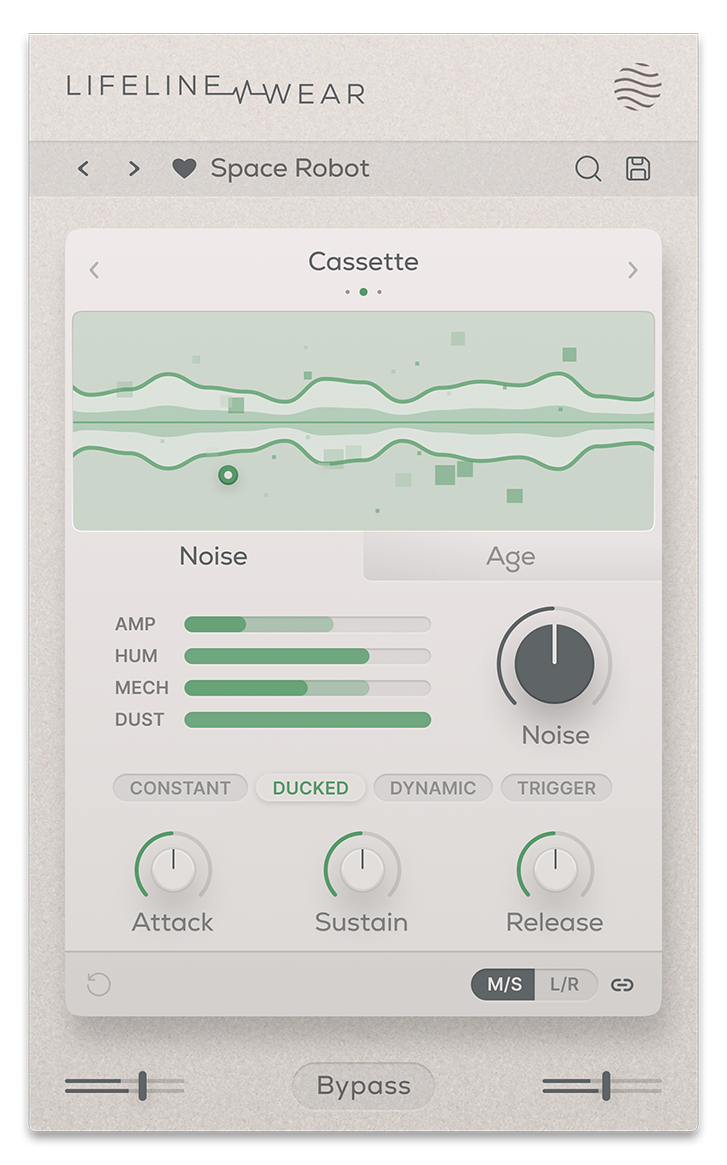
Noise properties in the Lifeline Wear include Amp (hiss), Hum (electrical noise), Mechanical (physical movement and whir), and Dust (light artefacts). These signals can be ducked or triggered by input audio, letting you harness noise as a creative effect. The interactive display also reacts to your audio, noise, age, artefacts and dropouts.

Create musical elements out of your Artefacts and Dropouts such as light rhythms and subtle gating by syncing them to your project tempo.

Features

  • 3 Wear Modes
  • 4 Noise layers per mode (Amp/Hum/Mechanical/Dust)
  • Internal Sidechain for Input reactive Noise
  • Free & Tempo synced Artefacts/Dropouts
  • Mode-specific Age control
  • Input/Output Gain Controls
  • Global Bypass
  • Resizeable UI
  • Zero Latency
  • 50 Presets

System Requirements

macOS

  • macOS 10.15 or higher (Intel / Native Apple Silicon supported).
  • Plugin Formats: VST, VST3, AU, AAX, Standalone
  • DAW's Supported: Ableton Live, Pro Tools, Logic Pro, FL Studio, Cubase, Nuendo, Reaper, Reason + more.
  • Compatibility: 64-bit compatible only.

Windows

  • Windows 7 or higher
  • Plugin formats: VST, VST3, AAX, Standalone
  • DAWs supported: Ableton Live, Pro Tools, FL Studio, Cubase, Nuendo, Reaper, Reason + more.
  • Compatibility: 64-bit compatible only.
Installation Instructions

Please Note: Lifeline EQ is used as an example. You will recieve either Lifeline Console or Lifeline Expanse in your download depending on the plugin. The process is the same for both.

Mac 

Installation

1. Download the .pkg file from your Plugin Boutique account > Open it to start the installation process (Note: This will install all available modules of Lifeline Console) > Click 'Continue'.

2. Read the Software License Agreement > Click 'Continue'.

3. Click 'Agree'.

4. Click 'Continue'.

5. If you wish to customise the installation to only install specific Lifeline modules or components, click 'Customise'. Otherwise, click 'Install'.

6. Lifeline Console is now installed on your Mac > Click 'Close'.

Activation

1. Copy the serial number found in your Plugin Boutique account.

2. Open Lifeline EQ in your DAW > Paste your serial number > Click 'Activate Plugin'.

3. Lifeline EQ is now activated > Please restart your project or DAW.

Lifeline EQ is now ready to use in your DAW!

Windows

Installation

1. Download the .zip folder from your Plugin Boutique account > Double-click it to extract the .exe installer file.

2. Double-click the installer file to start the installation process (Note: This will install all available modules of Lifeline Console) > Read the License Agreement > Select 'I accept the agreement' > Click 'Next'.

3. Select which plugin formats you would like to install > Click 'Next'. If you're unsure, please leave all boxes ticked, or check out our Help Centre article for more information - Plugin Formats Explained (VST, AU, AAX, etc)

4. Click 'Install'. 

5. Click 'Finish'.

Activation

1. Copy the serial number found in your Plugin Boutique account.

2. Open Lifeline EQ in your DAW > Paste your serial number > Click 'Activate Plugin'.

3. Lifeline EQ is now activated > Please restart your project or DAW.

Lifeline EQ is now ready to use in your DAW!

Plugin Boutique Rewards

Discover the most rewarding loyalty programme among all plugin retailers.

  • Free Loopmasters Samplepacks
  • Discounts on products and courses
  • Extra Virtual Cash claimed immediately at checkout
Find out more

Follow us:

X (Twitter) Facebook YouTube Instagram
Logo Logo

Plugin Boutique Limited, Part of the Beatport Group LLC.

Copyright © 2011-2025 Plugin Boutique. All rights reserved
