


 Log In

Free gifts available with your purchase
Maserati GTi
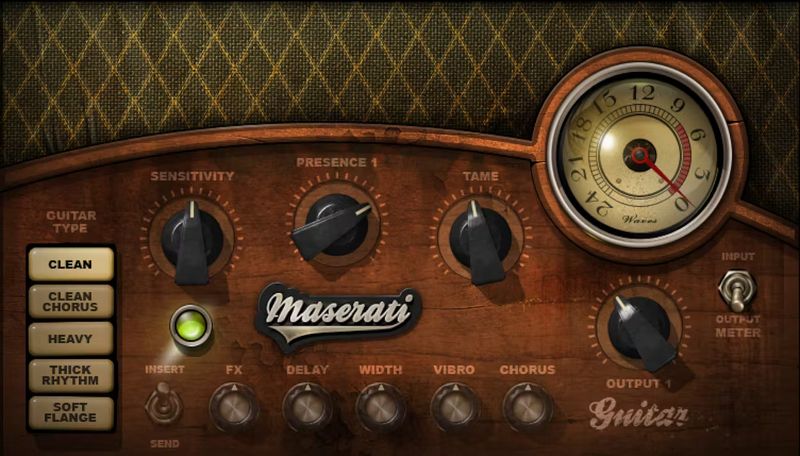
The Extra Controls You Wish Were on Your Guitar
If your guitar had more controls than just tone and volume, they’d probably be the ones in GTi—a different type of guitar processor from Grammy winner Tony Maserati. It’s not an amp sim or a pedalboard, but a toolkit for solid guitar sounds that can slide right into a mix, or drive an amp.
GTi is faithful to your guitar’s essence, but also dials up versatile, inspiring tones. From clean, commanding timbres, to chorusing that ranges from subtle to deep, GTi takes your guitar further.
“We created GTi with all the guitar players I admire in mind. CLEAN CHORUS creates the wide chorus-y spread of The Police’s Andy Summers. HEAVY will help crunched guitars scream through thick instrumentation. THICK RHYTHM helps rhythm guitar sound livelier. All these five chains are meant to help your guitars find their right place in the mix.”—Tony Maserati
Features
- Created with Grammy®-winning mixer Tony Maserati
- 5 characters: Clean, Clean Chorus, Heavy, Thick Rhythm, Soft Flange
- Clean and Heavy modes deliver definitive rhythm guitar tones
- If you don’t like choruses—this one will change your mind
- As a “front end” for amps and sims, GTi adds realism and feel
- Classic rotating speaker and vibrato effects
- “Tame” parameter controls peaks, and thickens the sound’s body
- Handles being pushed into the red, for more crunch
- Effects options are tailored for each of the 5 characters
- 34 ready-to-rock presets show off GTi’s versatility
System Requirements
Mac
- macOS Monterey 12, Ventura 13, Sonoma 14, Sequoia 15
- VST / AU / AAX
PC
- Windows 10+
- VST / AAX














