/ Multi-Effect / CLA Bass
Waves

CLA Bass

5.0 (2 Reviews)
$29.99 $99.00

69% off until Dec 07

Waves CLA Bass
Waves CLA Bass
Waves CLA Bass
Waves CLA Bass gallery thumbnail
Buy Now
Product information

CLA Bass

Home Base for Your Bass

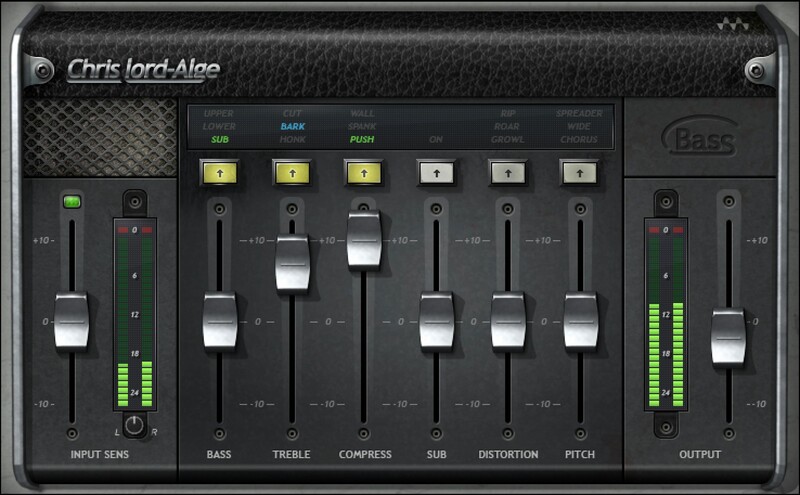
Grammy winner Chris Lord-Alge (Foo Fighters, Green Day, Muse) has laid down some of the punchiest sounds ever for modern rock music. CLA Bass translates his experience, forged in world-class studios around the world, to a monster tone machine for bass.

Whether you record electric or synth bass, CLA Bass delivers the full tonal spectrum from shaking sub-bass to a deep chainsaw growl—and makes it easy to dial up the right bass sound for your mix.

Features

  • 6 effects optimized specifically for electric and synth bass
  • For super sustain, level the lows with effective bass compression
  • Each effect has 3 modes for extra versatility
  • EQ controls can boost the bass, top up the treble, or trim either one
  • Shake dance floors, and punch to the gut, with sub-bass boost
  • Cut through mixes with distortion that growls, roars, or rips
  • Stereo chorus, widening, and spreading for a rich bass image
  • 6 faders make it easy to dial up the sound you want—in seconds

System Requirements

Mac

  • macOS Monterey 12, Ventura 13, Sonoma 14, Sequoia 15
  • VST / AU / AAX

PC

  • Windows 10+
  • VST / AAX
Installation Instructions

1. Head to https://www.waves.com/create-account

2. Enter your email and choose a password to create an account (if you already have a Waves account, choose Log in, enter your details and head to Step 5) > click 'Submit'

3. Open your email inbox > click the activation link in the email from Waves

4. Click 'Log in here' > Log in to your Waves account

5. Click 'Register New Products'

6. Enter the Serial Number found in your Plugin Boutique user account > click 'Submit'

7. Click download in your Plugin Boutique user account or head to https://www.waves.com/downloads/central > download the Waves Central app for your operating system

8. Install Waves Central > Open Waves Central

9. Click 'Log in' > enter your log in details

10. Click the 'Install Products' tab

11. Tick the blue dot on all products you wish to install or click the top dot to install all products > click 'Install & Activate'

12. Click 'OK'

13. Open your DAW > open the Waves plugin

Your Waves plugins are installed and ready to use, enjoy!

Plugin Boutique Rewards

Discover the most rewarding loyalty programme among all plugin retailers.

  • Free Loopmasters Samplepacks
  • Discounts on products and courses
  • Extra Virtual Cash claimed immediately at checkout
Find out more

Follow us:

X (Twitter) Facebook YouTube Instagram
Logo Logo

Plugin Boutique Limited, Part of the Beatport Group LLC.

Copyright © 2011-2025 Plugin Boutique. All rights reserved