


 Log In

Free gifts available with your purchase

Tired of your beats falling flat and feeling lifeless? W.A. Production’s BeatQuake is the characterful sonic toolkit you've been waiting for, ready to shake your music to the core. Crafted by award-winning sound engineer Emrah Celik, this expertly designed plugin delivers earth-shattering sound that will crunch your kicks and make your snares slam.
Emrah's expansive background in drum mixing (with over 300 productions per year), has been poured into BeatQuake's cutting-edge algorithms. Psychoacoustic filtering and meticulously tuned tonal controls unlock a suite of powerful tools, perfect for dancefloor destruction.
While its interface is simple, BeatQuake's potential is limitless. With 100 discrete points on every knob, you can explore over a hundred million potential sound color combinations. Not just limited to drums, BeatQuake's magic works wonders on all types of audio. Use it to beef up bass lines, polish pads and elevate vocals.
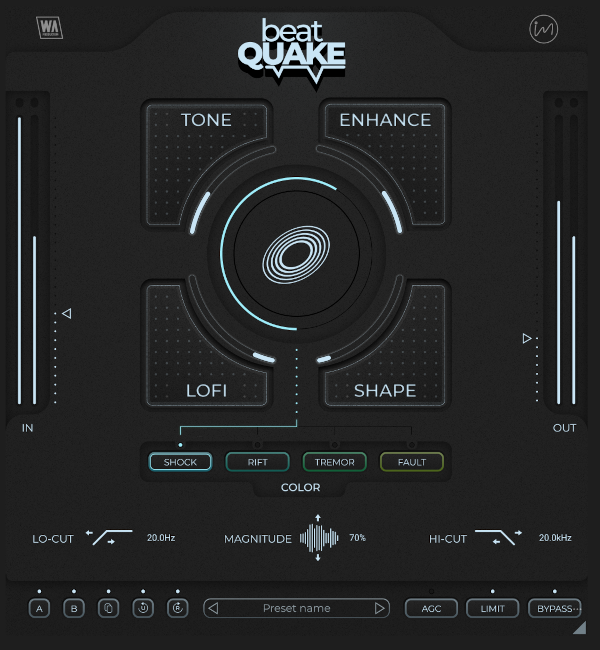
Tone, Enhance, Lofi & Shape
Each BeatQuake control knob offers a unique tonal character. Experiment with individual dials or combine them to create distinctive tonal blends…
- TONE : Inspired by the legendary Pultec EQs and a renowned modern multiband exciter, this control adds a unique blend of classic warmth and harmonic enhancement. Achieve the smoothest V-shape sound with a single twist, serving as the perfect final touch to your beats.
- ENHANCE : Boosts the attack power and aggression of your beats, increasing their dynamics and delivering musically rich sub-harmonic low-end power.
- LOFI : Add tonal variation and replicate the unique texture of 12-bit samplers with a single knob, producing a wide modern LoFi effect.
- SHAPE : Introduces inflation, combined with a high-quality compressor algorithm. This provides precise dynamic control over fluctuating sounds, which is especially useful for 808s or highly dynamic tracks.
Color Your Beats
BeatQuake features 4 unique psychoacoustic pre-filtering color modes that can be dialled in via the central control: SHOCK, RIFT, TREMOR, and FAULT. Designed and developed over two years, these color modes go beyond traditional saturation effects by preserving transients, enhancing sustain, and maintaining low-end vibrancy - all with one-knob functionality
- SHOCK : Punches up attack and strength while keeping the low-end clean and powerful.
- RIFT : Introduces a gritty, textured sound by stretching sustain and enhancing rumble.
- TREMOR : Delivers immense low-end power for earth-shaking beats.
- FAULT : Enhances above 60Hz, offering a clean gain boost for clarity and polish.
Visual Feedback, Comparison & Control
BeatQuake is built on vector graphics with a resizable interface. Accurately monitor your audio with the Input / Output faders. For those who like to experiment, contrast different processing chains with AB comparison and copy / paste. Use the undo / redo buttons to revert any changes. Compensate for gain increases with the AGC button and use the onboard Limiter to prevent clipping.
Powerful Presets
BeatQuake offers an extensive suite of presets and a powerful snapshot manager. One-click to load presets for all kinds of drums, percussion, breakbeats, and other types of audio. These jumping-off points are ripe for tweaking to create the perfect transformations. Save and categorize your own creations as presets for future recall.
W. A. Production are real-life producers making creative plugins to help you achieve studio quality processing quickly and easily. Enjoy!
Features
- Earth-shaking beat transformations… and beyond
- Intuitive interface
- 4-way sound shaping via Tone, Enhance, LoFi & Shape
- Color selector: Shock, Rift, Tremor & Fault
- Quake Magnitude control
- Frequency shaping filters
- AB Comparison and undo / redo
- Click & pop-free bypass
- Preset manager
- Resizable interface
- PDF Manual & Tutorial video
System Requirements
- Windows 8 or higher (64 bit)
- macOS 10.10 or higher (64 bit)
- AAX - ProTools 11 or higher
- VST, VST3, AU, AAX, both Intel and Apple Silicon-based CPUs as well as Native AAX format.


