


 Log In

Free gifts available with your purchase

A Game-Changing Mix Sweetener
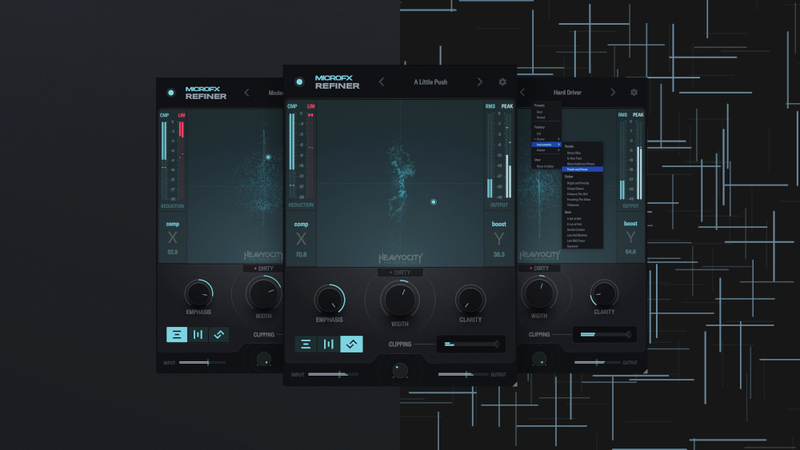
The Perfect Finish
MicroFX Refiner tightens, drives, and transforms your instrument busses into pristine, release-ready perfection. Whether you’re polishing a mix, creating a quick master, or need glue for stems, MicroFX Refiner delivers the final finesse and extra polish your mix deserves—making it easy to achieve that perfect sound.
You're In Control
Take full control of your sound. With intuitive settings, you decide how your mix feels—tight, bright, or polished—without overcomplicating the process.
At Its Core
At its core is a carefully crafted signal chain. From EQ and clipping to compression, saturation, stereo imaging, and limiting, it delivers all the tools you need to elevate your sound and achieve a release-ready finish.
Dynamic Control
Effortlessly balance loudness and character with the innovative X|Y pad. Intuitively shape your mix and find the perfect sweet spot with a simple drag of your mouse.
All-In-One Solution
MicroFX Refiner is your essential tool for bus processing, combining multiple must-have effects into one streamlined plugin. Whether fine-tuning a sub-mix, creating a quick master, or gluing stems, it simplifies the process while delivering pristine, polished sound.
Presets For Every Bus
With expertly crafted presets tailored for Master, Drum, Vocal, and Instrument buses, MicroFX Refiner makes it easy to enhance any mix. Each preset is designed to optimize the signal chain for its specific purpose, helping you achieve polished results faster. Perfect for quick inspiration or as a starting point for your creative vision.
Creative Engine
The MicroFX engine redefines how you interact with effects, offering focused tools that invite expansive creative exploration. With its deceptively deep functionality, each plugin offers a creative experience that challenges you to push your sonic boundaries.
Features
- 36 Expertly-Crafted Presets in Three Categories – Drums, Instruments, and Mastering
- Three Distinct Modes – Gentle, Wide, and Punchy
- Emphasis, Width, Clarity, Clipping, and an extra Dirty option provide additional control of your sound
- Intuitive XY Grid to easily sculpt your sound with a single click
System Requirements
- Mac: OS 12 or later (Intel and Silicon compatible) (64-bit only)
- Windows: Windows 10 or later (64-bit only)
- AAX, VST3, and Audio Units (AU)
- Internet connection and a Heavyocity.com account is required to activate
Supported Hosts
- Pro Tools 2020+, Live 10+, Cubase 12+, Logic Pro X, DP10+, Bitwig
















Reviews Summary
While it aims to provide a helpful overview, it may not capture every perspective or detail. We encourage you to read individual reviews to make an informed decision.
MicroFX Refiner is highly regarded as a flexible, lightweight, and easy-to-use plugin that is excellent for adding instant texture, character, and polish to mixes, particularly in electronic, dance, and cinematic music. While some users feel it can be a bit limited, redundant, or overly aggressive unless carefully tweaked, most agree it is a valuable tool for sound design, mixing, and mastering.


