


 Log In
.jpg)
Free gifts available with your purchase

Instant Old School Flavours
Rediscovering Glorious Tones
Do you ever play classic records and think “That. Sounds. GREAT! How do I get that 60s (or 70/80/90s) vibe in my track?” With Finisher RETRO, it’s easy. UJAM's experts have done the hard work and captured the classic reverbs, delays, flangers, tubes, tape hiss and magic for you. Just load RETRO and go!
A Complex Web of Effects
RETRO is so much more than just one effect. Each of its modes is a web of up to 20 interconnected sound modules. It’s like having a huge pedalboard AND rack of studio gear with everything set just right.
- Like Instagram filters for your audio.
- 50 modes presented in decades, from 60-90s.
- 100 individual presets created from the modes.
- FINISHER and VARI knobs for fast, easy tweaking.
60s, 70s, 80s or 90s. You Pick!
Finisher RETRO’s models are presented in decades, from 60s, 70s, 80s or 90s. Each mode is carefully crafted by UJAM's sound designers to give you an authentic snapshot of a great sound from that decade.
Tweak-o-Rama
Don’t worry, you’re never stuck with RETRO’s presets. The FINISHER and VARI knobs let you easily push each preset in different directions from “light and subtle hint” to “laying it on real thick!”
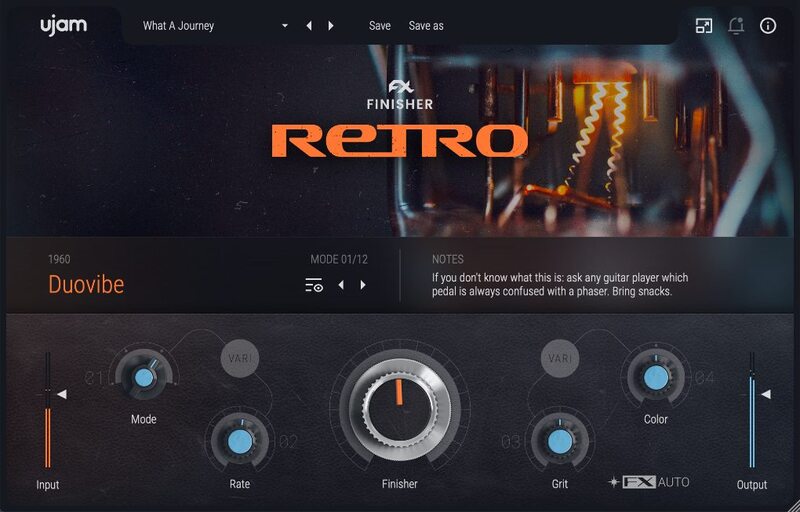
Features
- Super-Simple User Interface: Create your music without overthinking! Pick any inspiring preset and get to work instantly.
- UJAM's infamous FINISHER knob: Presets have dozens of processors under the hood, but it’s all controlled with one glorious knob.
- Tweak to perfection: In addition to the FINISHER knob, you have four VARI knobs to tweak your sounds to perfection.
System Requirements
Operating Systems
- Windows 7 or later (64-bit only)
- macOS 10.14 - macOS 14 (64-bit only)
- You may run them on earlier versions but UJAM doesn’t support them.
For up-to-date info on UJAM products support for VST3, AAX, and Apple Silicon, please refer to the UJAM website.
Minimum Requirements
- 4 GB of RAM
- 0.354 GB of Disk Space
- 1280 x 768 px Display
- Internet Connection required for download and authorisation.
Plugin Formats
- VST2, AU 2
- AU 2 version is only compatible with Logic Pro X and newer.
Supported Standards
- MIDI
Additional Information
- Comes as downloadable installer files.
- Authorize by email address and password for ujam.com within the plugin.
- If you want to move your .blob files to an external drive, UJAM recommends the use of an SSD to prevent dropouts.
Important note: When accessing this software via a Rent to Own plan or the Beatport Studio membership, it's installed and run through the Beatport Access portal. An internet connection is required every 30 days to validate your license.
Reviews Summary
While it aims to provide a helpful overview, it may not capture every perspective or detail. We encourage you to read individual reviews to make an informed decision.
Overall, users praise UJAM Finisher Retro as an easy-to-use, inspiring multi-effect plugin that quickly adds vintage warmth, nostalgic textures, and atmospheric character across multiple decades of styles. While celebrated for its streamlined workflow, polished sound, and creative presets ideal for lo-fi, synthwave, and cinematic music, some reviewers caution that it lacks deep parameter customization, can be CPU-heavy, and may occasionally feel too bold or generic for those seeking granular control.


