Log In

Free gifts available with your purchase

The Ultimate Full Spectrum Audio Sweetener
Designed by a team of award-winning engineers to offer their most useful and most essential harmonic enhancement techniques in one centralized plug-in.
The resulting colour palette is a fast lane to pro-sounding records.
This full-spectrum enhancer will add punch, thickness, depth, warmth, edge and grit to all your tracks.
A Complete Color Palette
Sugar is an audio colour palette based on classic tricks used by top engineers to achieve great tones. Professional mixing engineers spend years refining techniques and processes to create the magical sounds the public hears on finished records. Beyond straight EQ and compression, these top engineers use processes that can be complicated to set up and tweak and often require expensive gear to achieve.
Sugar is a shortcut to those punchy kick drums, thick basses, sharp snares, edgy guitars, airy and creamy vocals, warm mixes and wide masters, and much more.
Sugar saves time by centralizing these processes in one analogue-inspired plug-in without sacrificing the ability to fine-tune for a professional experience. Sugar's four effects are routed in parallel processing and work in mono, stereo and M/S (Mid-Side) mode.
Sugar's signal flow is straightforward: the chosen effects are blended with the dry signal and routed through a High-Pass/Low-Pass linear phase filter combination to reign in the extreme amount of energy Sugar can add to the raw signal (There can be such thing as too much Sugar). This blended signal is then run through the Saturation section of the plug-in, where three carefully chosen saturation algorithms can tame unruly transients, add more grit to your sound, or simply destroy it in devastatingly creative ways.
Sugar's interface is designed to streamline necessary but otherwise repetitive tasks and to allow engineers to dial in the perfect setting very fast and intuitively so they can focus on the music, not the tools.
4 Faders, 8 Colors
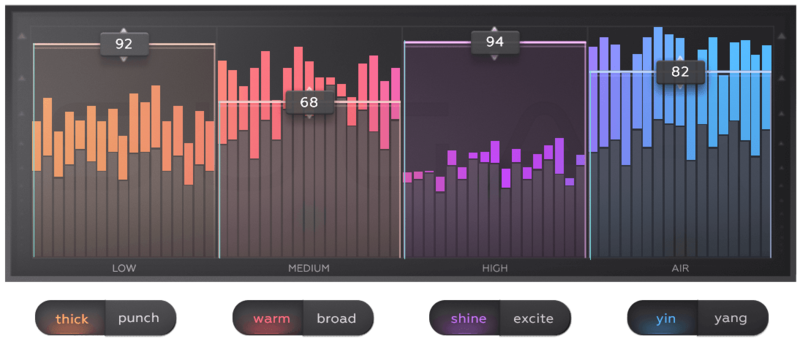
Professionals always add more punch, thickness, warmth, width, edge or air to their tracks. Sugar helps you achieve what you are looking for faster than ever. Select a colour. Push a fader.
3 Types of Saturation
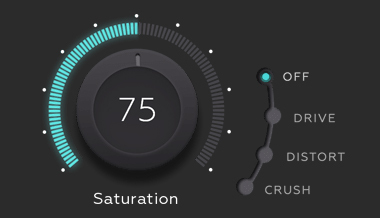
Give your sound that polished analogue feel, add more grit or simply tame unruly transients with one of the three carefully selected saturation algorithms.
A Unique Jog Wheel Control
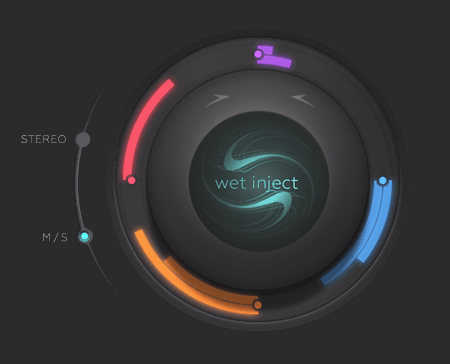
The 4 Sugar bands are processing your sound in parallel and work in mono, stereo or M/S mode. Once you have found the proper balance that suits your sound, use the jog wheel in order to intuitively add more or less Sugar.
Linear Phase Filters
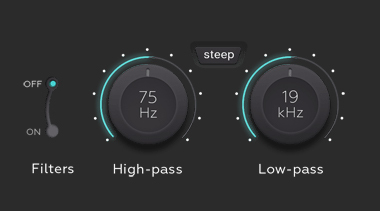
High-pass and low-pass filters are used in order to reign-in bursts of energy. Sugar's filters and the 4 band crossovers are all linear phase in order to allow for mastering-grade processing and avoid phase issues.
A Linear Phase Delight
Sugar's four crossover bands and LP & HP filters are built on high-grade linear-phase technology to avoid any of the common phase issues associated with parallel processing. This makes Sugar safe for 2-mix or mastering duties by guaranteeing the integrity of the source signal.
Sugar Learning Center
To cut the user's learning curve of this new tool, PROCESS.AUDIO created an expansive Learning Center featuring many video tutorials on how to best use Sugar on distinct audio sources, as well as a thorough run-through of all the features.
Sugar owners can also enjoy a full 20-minute mixing video tutorial by prominent engineer Fab Dupont, demonstrating how he exclusively used Sugar to mix the soundtrack of the plug-in's release video. Users can freely download the source session of the mix and look at the settings in their own DAW. The session is available in Pro Tools, Logic, Cubase, Studio One, and Ableton formats.
Features
- 4 bands of processing (Low, Mid, High, Air), with 2 different colours per band
- 8 Colors: Thick, Punch, Warm, Broad, Shine, Excite, Yin, Yang
- Jog wheel blending knob
- High-pass and Low-pass filters for fine-tuning
- 3 Saturation circuits: Drive, Distort and Destroy
- Linear Phase Mode for the 4 band crossovers and the 2 filters
- Level Management to prevent bursts of energy
- FX-only switch in order to hear what Sugar adds to your sound
- Input/Output gain
- Works in mono, stereo and M/S mode
System Requirements
- Windows (64-bit) version 7, 8, 10 or higher
- Mac OS X 10.9 up to OS 12.0.1 (Monterey)
- CPU - Apple Silicon M1, Intel Core 2 Duo, or AMD Athlon 64 X2 or newer
- RAM - 1GB or more
- Formats - VST 2.4, VST 3, AU, AAX (native)
- iLok account for authorisation - iLok Cloud or Physical (iLok 2+)
Compatible DAW's
- Pro Tools
- Logic Pro X
- Cubase
- Ableton
- Studio One
Darrell Thorp
Award-winning engineer.
"Sugar is my new go-to tool. Having fun enhancing sub low frequencies on the bass drum. High-frequency air for vocals. And of course, helping sonically stale recordings come to life in a mix."
Vance Powell
Award-winning engineer.
"Sugar is great, it's the perfect tone shaper."
Ryan West
Award-winning engineer.
"Sugar is a next-generation plugin that lives up to that analogue ideal. From rescuing a boring drum bus to making a vocal sing, this thing is useful as hell. Sugar will live on many of my future mixes."