The best sounds come from the best artists. And no one knows sound better than KSHMR and, your trusted source for EDM sounds W. A. Production.
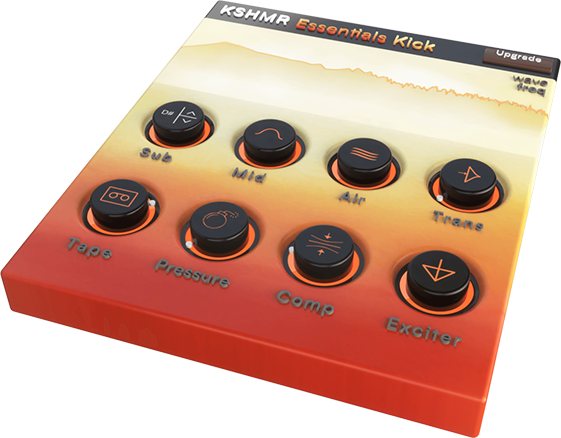
Based on the artist signature KSHMR Essentials multi-fx plugin, KSHMR Essentials Kick is a free plugin loaded with the exact same tools as the kick module of the full version.
If you want your kick to hit harder, feel tighter, and pack a clear, solid punch this will be the only kick shaping tool you will ever need.
KSHMR Kick Essentials from KSHMR and W. A. Production is a one-page plugin that gives you 8 ways to take your kick from lame to fame.
You are going to love, not only the professional quality of this plugin but also the sleek design of its easy-to-use interface. Not to mention it's one page, which makes it lightweight and CPU friendly.
Trust the pros and those who know and pick up this amazing freebie KSHMR Essentials Kick from KSHMR and W.A Production.
Features
- Sub - Bass Frequency Tuning
- Mid - Frequency Adjusting
- Air - High-Frequency Adjusting
- Transient - Shaping for a Harder Punch
- Tape - Saturation/Distortion
- Pressure - Multiband Compression
- Compressor - Single Band Compression
- Width - Because Wider is Better
System Requirements
Mac
- macOS 10.13 and later (32/64-bit)
- VST, AU, AAX
Windows
- Windows 8 or later (32 / 64-bit)
- VST, AAX
Please Note: The AAX format of this plugin requires Pro Tools 11 or higher.
Important Notes for Mac Apple Silicon users:
- Before purchasing, please review the current compatibility status of this plugin on your system here.
- KSHMR Essentials Kick is not yet natively compatible and must be launched using Rosetta 2.
Registration and Activation Video
Please Note: CHORDS is used as an example.
Registration
1. Click the Download button in your Plugin Boutique account or go to https://www.waproduction.com/users/login
2. Click 'Create New Account' (if you already have a W.A Production account, enter your details, log in and skip to step 5).

3. Enter your details > Choose your marketing preferences > Click 'Finish Registration'.

4. Your account has been registered > Click 'Register Plugin'.

5. On the license registration page, enter the license key from your Plugin Boutique account (which will be referred to as 'serial number' on our site) > Click 'Add'.

6. Your product will now be displayed in your W.A Production account > Scroll down to My Orders and click 'View Order'.

7. Click 'Download Files'.

8. Click 'Download'.

Mac Installation
1. Once the download is complete, extract and open the ZIP folder you just downloaded > Open the Mac folder > Double-click the CHORDS .pkg installer file.
2. Click 'Continue'.

3. Read the Software License Agreement > Click 'Continue'.

4. Click 'Agree'.

5. Click 'Install'.

6. Click 'Close'.

7. Open CHORDS in your DAW.
8. Click the information icon in the bottom left-hand corner > Enter the serial number you were given in your W.A Production account > Click 'Authorize'.
Your software is now ready to use in your DAW!

Windows Installation
1. Once the download is complete, extract and open the ZIP folder you just downloaded > Open the PC folder > Double-click the CHORDS PC installer file.
2. Click 'Next'.
3. Click 'Next'.
4. Select which plugin formats you would like to install > Click 'Next' > Click 'Install'.
5. Click 'Finish'.
6. Open CHORDS in your DAW.
7. Click the information icon in the bottom left-hand corner > Enter the serial number you were given in your W.A Production account > Click 'Authorize'.
Your software is now activated and ready to use in your DAW!


