/ Vocal Processing / Waves Tune
Waves

Waves Tune

4.6 (8 Reviews)
$29.99 $149.00

79% off until Dec 07

Waves Tune
Waves Tune
Waves Tune
Waves Tune gallery thumbnail
Buy Now
Product information

Waves Tune

If You Didn’t Have Perfect Pitch… You Do Now

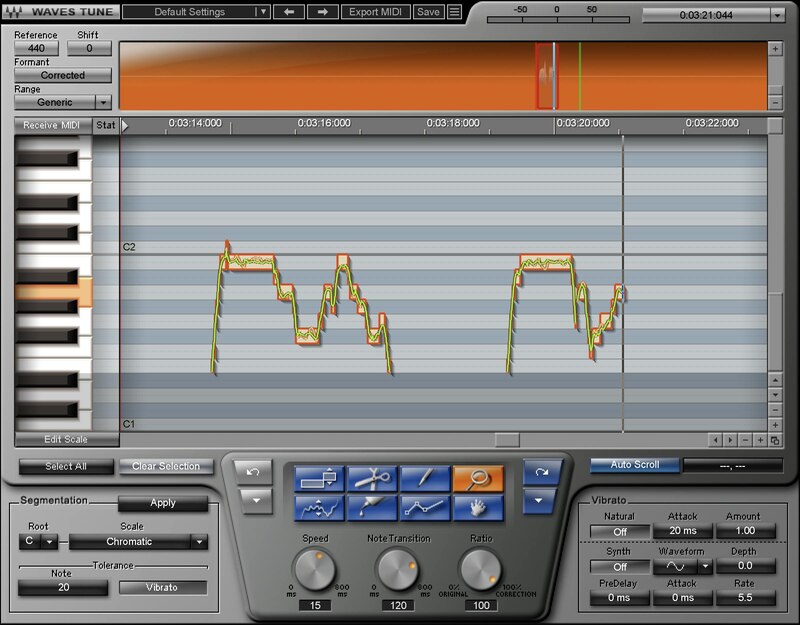
Pitch correction isn’t only about fixing mistakes, but giving you freedom. Go ahead: stretch your voice, try out different techniques, and push your performance. If you sing an unexpectedly great vocal but there are a couple of wrong notes, just fix them—and preserve that special magic.

Waves Tune is as precise or as broad as you want. Or, get creative: Waves Tune can add amazing pitch effects to any instrument whose single-note lines fall within a vocal’s pitch range.

Features

  • Precision control over all pitch parameters, including slides
  • Correct pitch with transparency and natural results
  • Conform notes to 43 scales, or a custom scale
  • Create hip hop and EDM “hard” correction effects easily
  • Choose correction speed, transition time, and amount
  • Retain natural vibrato and enhance it, or synthesize new vibrato
  • ReWire support for additional flexibility
  • Works for guitar and monophonic instruments in a vocal’s range

System Requirements

Mac

  • macOS Monterey 12, Ventura 13, Sonoma 14, Sequoia 15
  • VST / AU / AAX

PC

  • Windows 10+
  • VST / AAX
Installation Instructions

1. Head to https://www.waves.com/create-account

2. Enter your email and choose a password to create an account (if you already have a Waves account, choose Log in, enter your details and head to Step 5) > click 'Submit'

3. Open your email inbox > click the activation link in the email from Waves

4. Click 'Log in here' > Log in to your Waves account

5. Click 'Register New Products'

6. Enter the Serial Number found in your Plugin Boutique user account > click 'Submit'

7. Click download in your Plugin Boutique user account or head to https://www.waves.com/downloads/central > download the Waves Central app for your operating system

8. Install Waves Central > Open Waves Central

9. Click 'Log in' > enter your log in details

10. Click the 'Install Products' tab

11. Tick the blue dot on all products you wish to install or click the top dot to install all products > click 'Install & Activate'

12. Click 'OK'

13. Open your DAW > open the Waves plugin

Your Waves plugins are installed and ready to use, enjoy!

Plugin Boutique Rewards

Discover the most rewarding loyalty programme among all plugin retailers.

  • Free Loopmasters Samplepacks
  • Discounts on products and courses
  • Extra Virtual Cash claimed immediately at checkout
Find out more

Follow us:

X (Twitter) Facebook YouTube Instagram
Logo Logo

Plugin Boutique Limited, Part of the Beatport Group LLC.

Copyright © 2011-2025 Plugin Boutique. All rights reserved