


 Log In

Free gifts available with your purchase
Product information
OVox Vocal ReSynthesis
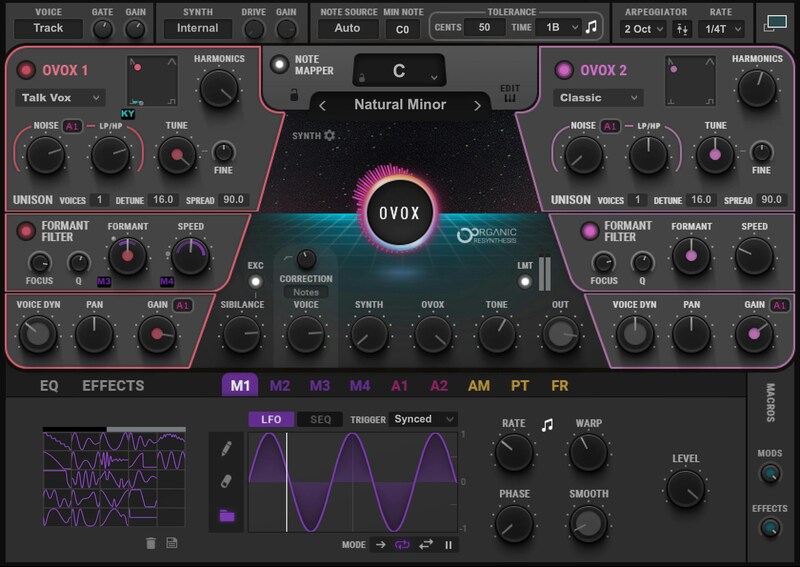
Total Voice Transformation
Your voice is an amazing instrument—now, OVox turns it into a production playground. Chord generation, vocoding, talkbox, tune/pitch effects, arpeggiation, and countless vocal synthesis effects can all be part of your vocal production palette. Send your vocal to MIDI, trigger instruments with your voice—or even go beyond voice to synthesize drums, bass and more.
Choose from 500 presets for an amazing array of cutting-edge, ready-to-go vocal effects. Or dive deep into the expanded view—and enter a vocal production paradise.
Features
- Voice-controlled synth: 8 voices, two high-resolution engines
- 500 presets by the producers for Bon Iver, Beyoncé, more
- Classic vocoder & talkbox effects plus pitch/tune and arpeggiation
- Automatic note mapper triggers chords, harmonies or scales
- Transform your voice to MIDI in real time, and send MIDI to any instrument
- Modulate your voice with 9 LFO/ sequencer, ADSR, and ORS envelopes
- 6 built-in FX: Autopan, Chorus, Comp, Delay, Distortion, Reverb
- Use as DAW plugin, or as a standalone app
- NKS-ready for NI Komplete Kontrol and Maschine
- SoundGrid-compatible for real-time live performance
System Requirements
Mac
- macOS Monterey 12, Ventura 13, Sonoma 14, Sequoia 15
- VST / AU / AAX
PC
- Windows 10+
- VST / AAX
Installation Instructions












Customer Reviews
(4)


