/ Vocal Processing / Manny Marroquin Triple D
Waves

Manny Marroquin Triple D

5.0 (1 Reviews)
$29.99 $99.00

69% off until Dec 07

Waves Manny Marroquin Triple D
Waves Manny Marroquin Triple D gallery thumbnail
Buy Now
Product information

Manny Marroquin Triple D
Fix Vocal Problems with Surgical Precision

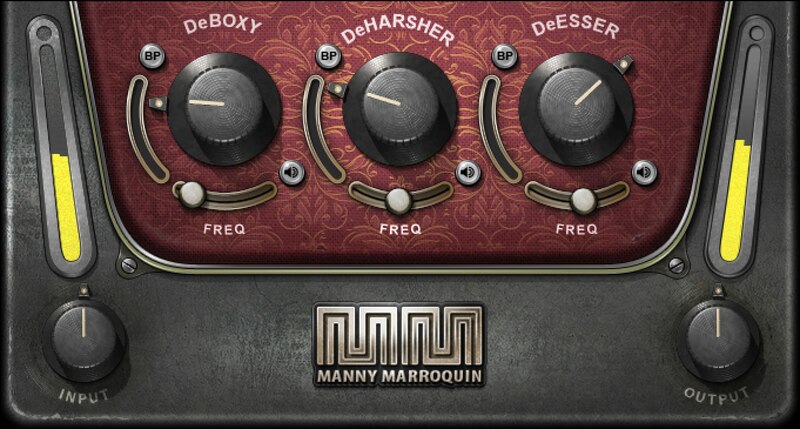
The usual technique of using EQ to fix boxy, sibilant, or harsh vocal sounds also gets rid of the EQed frequencies even when there’s not a problem. Developed by 10x Grammy® winning mix engineer Manny Marroquin (Kendrick Lamar, Kanye West, Lizzo, Future), Triple D fixes issues only when they’re present—and otherwise leaves the vocal alone.

For vocals, podcasts and voiceover, Triple D is the ingenious solution that saves time, delivers quality recordings, and retains the voice’s natural characteristics.

Features

  • Created with mix engineer Manny Marroquin (Kendrick Lamar, Lizzo)
  • Independent controls to tame boxy, harsh, or sibilant sounds
  • Based on dynamic EQ, but optimized for ease of use
  • Threshold setting triggers attenuation of problem sounds
  • Listen buttons isolate the three processes for easy tweaking
  • Frequency trims for each stage choose problematic frequencies
  • Attenuation meter shows reduction at the chosen frequency
  • Bypass buttons allow comparing each section’s effect

System Requirements

Mac

  • macOS Monterey 12, Ventura 13, Sonoma 14, Sequoia 15
  • VST / AU / AAX

PC

  • Windows 10+
  • VST / AAX
Installation Instructions

1. Head to https://www.waves.com/create-account

2. Enter your email and choose a password to create an account (if you already have a Waves account, choose Log in, enter your details and head to Step 5) > click 'Submit'

3. Open your email inbox > click the activation link in the email from Waves

4. Click 'Log in here' > Log in to your Waves account

5. Click 'Register New Products'

6. Enter the Serial Number found in your Plugin Boutique user account > click 'Submit'

7. Click download in your Plugin Boutique user account or head to https://www.waves.com/downloads/central > download the Waves Central app for your operating system

8. Install Waves Central > Open Waves Central

9. Click 'Log in' > enter your log in details

10. Click the 'Install Products' tab

11. Tick the blue dot on all products you wish to install or click the top dot to install all products > click 'Install & Activate'

12. Click 'OK'

13. Open your DAW > open the Waves plugin

Your Waves plugins are installed and ready to use, enjoy!

Plugin Boutique Rewards

Discover the most rewarding loyalty programme among all plugin retailers.

  • Free Loopmasters Samplepacks
  • Discounts on products and courses
  • Extra Virtual Cash claimed immediately at checkout
Find out more

Follow us:

X (Twitter) Facebook YouTube Instagram
Logo Logo

Plugin Boutique Limited, Part of the Beatport Group LLC.

Copyright © 2011-2025 Plugin Boutique. All rights reserved










